
Zigbee vs Thread Mesh Performance in Dense Apartment Buildings
Zigbee and Thread share the same low-power 2.4 GHz radio foundation, so dense-apartment reliability depends more on RF congestion, mesh topology, and infrastructure than protocol branding.
Quick answer
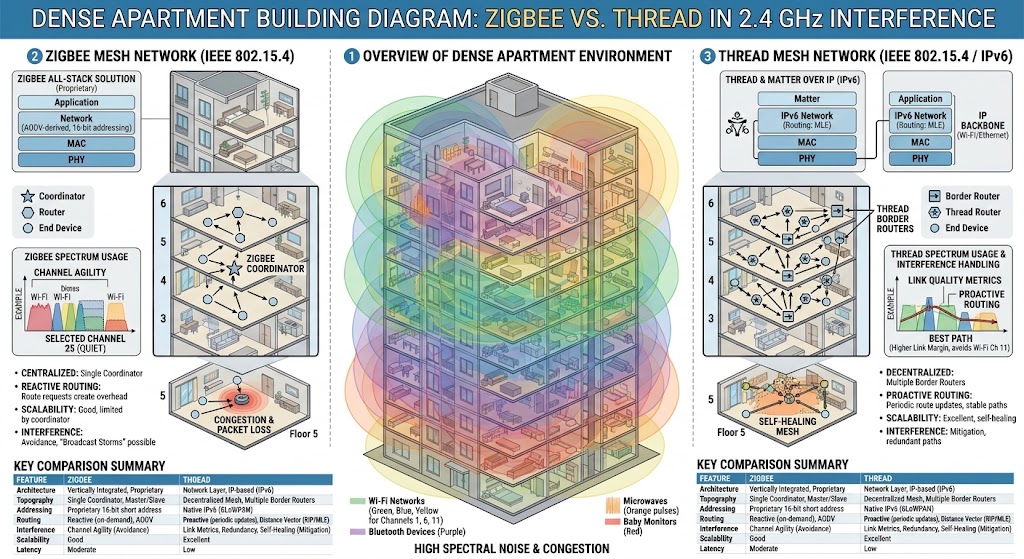
In a dense apartment building, neither Thread nor Zigbee has an inherent RF advantage because both commonly use IEEE 802.15.4 in the crowded 2.4 GHz band. Zigbee can be extremely reliable when a mature hub, carefully chosen channel, and enough mains-powered routers create a strong mesh. Thread adds native IPv6, dynamically managed routing roles, and support for multiple Border Routers, with Thread 1.4 improving multi-vendor mesh integration and robustness. In practice, channel congestion, router placement, wall construction, and the number of powered mesh nodes usually matter more than choosing Thread simply because it is newer.
Table of contents
- Zigbee and Thread start from a similar radio problem
- Why this matters in an apartment
- What dense-building interference actually looks like
- Interference does not always mean “offline”
- Channel planning matters for both
- Zigbee often gives power users more visible channel control
- Thread often hides the RF plumbing
- Zigbee topology: coordinator, routers, and end devices
- Coordinator
- Routers
- End devices
- Why Zigbee can be excellent in an apartment
- More routers are not infinitely better
- Thread topology: routing nodes, end devices, and Border Routers
- Thread routing nodes
- Thread sleepy end devices
- Thread Border Router
- Multiple Border Routers are one of Thread’s strongest advantages
- But multiple Border Routers do not automatically mean one perfect mesh
- Thread 1.4 can improve difficult layouts
- Concrete walls affect both protocols
- Improve geometry before replacing devices
- Hub placement matters enormously
- Neighboring Zigbee and Thread networks do not strengthen yours
- Which protocol has lower latency?
- Latency grows with hops and congestion
- Zigbee’s practical strength: mature local ecosystems
- Zigbee’s trade-off: hub architecture
- Thread’s structural strength: native IPv6
- Thread is not Matter
- Commissioning reliability can matter more than steady-state performance
- Battery sensors do not strengthen either mesh
- Small apartments also have an advantage
- Zigbee vs Thread in a dense apartment
- What to choose for a new apartment in 2026
- Choose Zigbee-first when:
- Choose Thread-first when:
- Use both when:
- Building a strong Zigbee apartment mesh
- 1. Place the coordinator centrally
- 2. Separate it from strong Wi-Fi radios
- 3. Choose the channel early
- 4. Add powered routers strategically
- 5. Keep battery sensors near reliable parents
- 6. Avoid unnecessary broadcast-heavy automation
- Building a strong Thread apartment mesh
- 1. Inventory existing Border Routers
- 2. Spread infrastructure around the apartment
- 3. Keep firmware current
- 4. Avoid accidental multiple meshes when diagnostics expose them
- 5. Keep IPv6 healthy
- 6. Do not hide every routing device in metal furniture
- How to tell RF problems from software problems
- Likely RF or topology problem
- Likely controller problem
- Likely Matter or ecosystem issue
- A simple apartment performance test
- Do not judge performance by signal bars alone
- When Thread is the better architectural choice
- When Zigbee remains the better practical choice
- Common mistakes in dense apartments
- Replacing Zigbee with Thread to escape 2.4 GHz
- Buying only battery devices
- Putting the radio beside the Wi-Fi access point
- Assuming every mains-powered device routes
- Assuming every Thread Border Router is contributing to one mesh
- Adding repeaters before checking congestion
- Changing an established Zigbee channel casually
- Calling every delay a mesh issue
- The recommendation
- Conclusion
Key takeaways
- Zigbee and Thread commonly share the same IEEE 802.15.4 2.4 GHz radio foundation, so Thread does not escape the Wi-Fi congestion that affects Zigbee.
- A healthy Zigbee mesh depends on enough mains-powered routers, while Thread dynamically manages routing-capable devices and can use multiple Border Routers for resilient IP connectivity.
- Dense apartment performance is shaped by channel congestion, reinforced concrete, neighboring access points, hub placement, hop count, and the quality of individual radios more than protocol marketing.
- For an existing reliable Zigbee installation, there is usually no performance reason to replace everything with Thread; use Thread where Matter interoperability or existing Border Router infrastructure provides a concrete benefit.
Editorial transparency
Who worked on this article and how it was handled.
- Written by
- Daniel Reed
- Creation method
- Editorial research
AI assistance: AI assisted with research organization and drafting. Sources, factual claims, and the final article should be reviewed by a human editor before publication.
A dense apartment building is a hostile place for almost any 2.4 GHz smart-home radio. Your own Wi-Fi access point may be only a few feet from the smart-home hub, while dozens of neighboring routers, Bluetooth devices, wireless speakers, cameras, and other low-power networks are transmitting through the same walls.
That environment makes the usual “Zigbee vs Thread” debate more complicated than a feature checklist. Both technologies commonly use IEEE 802.15.4 at 2.4 GHz, so moving from Zigbee to Thread does not magically move your sensors into a cleaner frequency band. The protocols build different networking systems on top of a similar radio foundation, but both still have to get packets through the same RF neighborhood.
For apartment reliability, the most important questions are therefore practical: How congested is the channel? How many powered mesh nodes can forward traffic? Where is the coordinator or Border Router? How much reinforced concrete sits between devices? And does your ecosystem actually place all of its Thread infrastructure on one healthy mesh? Those factors usually matter more than whether the protocol name is older or newer.
Zigbee and Thread start from a similar radio problem
Zigbee and Thread are different network protocols, but their common smart-home implementations share IEEE 802.15.4 in the 2.4 GHz ISM band.
That means both are designed for small packets, low power, mesh networking, and battery-powered sensors. They are not designed for video streaming or replacing Wi-Fi.
Silicon Labs’ network-performance documentation describes Zigbee and Thread as 802.15.4 mesh technologies even though their behavior differs above the physical layer.
Why this matters in an apartment
The RF energy from neighboring apartments does not care whether your packet contains Zigbee or Thread.
A strong 2.4 GHz Wi-Fi transmission can interfere with an 802.15.4 packet from either protocol when they occupy overlapping spectrum.
Silicon Labs’ coexistence guidance explicitly groups Zigbee and OpenThread together when discussing the impact of 2.4 GHz Wi-Fi on IEEE 802.15.4 radios.
So the first major conclusion is:
Thread is not an RF escape route from crowded apartment Wi-Fi.
What dense-building interference actually looks like
In a high-rise, your phone may detect dozens of neighboring Wi-Fi networks. The RF environment also changes during the day as residents start streaming, gaming, working, or using wireless speakers and TVs.
A mesh that feels perfect at 10 a.m. may show delayed commands at 8 p.m.
Interference does not always mean “offline”
IEEE 802.15.4 systems use retry mechanisms.
When a packet collides with other RF traffic, the system may retry and still deliver the command.
That can appear as a light responding later, a sensor update arriving late, or a battery device spending more time awake.
Silicon Labs notes that retries can increase latency and keep sleepy devices active longer.
That is why “everything eventually works” is not the same as a healthy RF environment.
Channel planning matters for both
Zigbee networks typically let the coordinator or network manager select the 802.15.4 channel.
Thread networks also operate over IEEE 802.15.4 channels and must coexist with local Wi-Fi.
The exact channel-management controls exposed to a consumer vary by platform.
Zigbee often gives power users more visible channel control
Dedicated Zigbee hubs and DIY coordinators commonly expose the Zigbee channel.
That lets an advanced user plan around the apartment’s Wi-Fi deployment.
The downside is operational: changing an established Zigbee channel can be disruptive, and not every device handles network changes equally well.
So channel selection is best done early.
Thread often hides the RF plumbing
The consumer promise of Thread is that the network should manage itself.
That is good UX when it works.
It can be frustrating when diagnosing a dense RF environment and the platform provides little information about the current Thread channel, link quality, parent relationships, or active routing nodes.
Thread 1.4 includes standardized diagnostic improvements intended to expose more topology and status information, but actual visibility still depends on device and platform implementation.
Zigbee topology: coordinator, routers, and end devices
A Zigbee network has three core node types.
Coordinator
The coordinator forms the network.
Silicon Labs describes it as the device that selects the initial channel, creates the network, manages certain network and security responsibilities, and then also behaves as a router.
There is one coordinator per Zigbee network.
Routers
Routers forward messages and generally remain powered.
Compatible mains-powered products such as plugs, switches, bulbs, or dedicated repeaters can perform this role depending on the product.
End devices
End devices do not forward other devices’ packets.
Battery sensors are commonly sleepy end devices.
They attach to a parent router and wake when they need to exchange data.
That is how a small contact sensor can conserve battery without keeping its radio awake continuously.
Why Zigbee can be excellent in an apartment
A well-built Zigbee mesh benefits from a huge mature catalog of mains-powered routing devices.
In a small apartment, you may only need a coordinator plus a few strategically placed powered routers so battery sensors have nearby parent options.
Silicon Labs’ current Zigbee guidance emphasizes balanced topology with redundant paths.
More routers are not infinitely better
The common rule “add more Zigbee routers” is too simple.
Silicon Labs specifically notes that in a very dense network it is not necessarily advantageous for every line-powered node to be a router.
For an apartment, the goal is coverage and redundant paths, not maximum router count.
Thread topology: routing nodes, end devices, and Border Routers
Thread solves a similar low-power mesh problem with a different architecture.
OpenThread describes Thread as an IPv6-based mesh built on IEEE 802.15.4.
Thread routing nodes
Routing-capable Thread devices forward packets through the mesh.
Thread can dynamically manage the active routing backbone. OpenThread documents promotion and demotion behavior for eligible devices rather than simply making every capable node a permanent router.
That is an architectural difference from Zigbee, where the coordinator/router/end-device type is generally chosen by the product design.
Thread sleepy end devices
Battery-powered Thread sensors can sleep and depend on a parent, much like sleepy Zigbee end devices.
They do not provide the routing backbone.
Thread Border Router
A Border Router connects the Thread mesh to non-Thread IP networks such as Wi-Fi or Ethernet.
Because Thread is already IP-based, the Border Router routes IPv6 rather than translating a proprietary application network into IP.
Multiple Border Routers are one of Thread’s strongest advantages
Thread supports multiple Border Routers on one mesh.
Thread Group explains that if one Border Router becomes unavailable, another can maintain connectivity between the Thread mesh and the rest of the IP network.
In an apartment, Border Router functionality may already be built into smart speakers, displays, routers, or home hubs.
Distributed placement can therefore improve infrastructure without adding a dedicated bridge in every room.
But multiple Border Routers do not automatically mean one perfect mesh
Historically, different ecosystems could create separate Thread networks if their credentials were not shared.
That meant a home might contain several private Thread meshes instead of one stronger network.
Thread 1.4 was designed to improve this.
The Thread Group says updated products and Border Routers can more consistently recognize and join an existing Thread network rather than creating another mesh.
That is especially useful in a dense building, where unnecessary extra meshes add more RF activity.
Actual results still depend on firmware and platform implementation.
Thread 1.4 can improve difficult layouts
Thread 1.4 introduced Thread over Infrastructure.
Compatible Border Routers can use existing IP links such as Ethernet or Wi-Fi to strengthen connectivity between parts of the Thread topology.
The Thread Group’s white paper explains that this can reduce network partitioning and improve routing where pure 802.15.4 links are weak.
For example:
Living room Border Router
        |
      Ethernet
        |
Bedroom Border Router
If a concrete wall weakens the direct low-power radio path, the IP infrastructure can help connect compatible Thread infrastructure.
That is a meaningful architectural benefit.
It does not remove interference on the final wireless hop between an endpoint and its nearby Thread routing node.
Concrete walls affect both protocols
Apartment RF performance is heavily shaped by construction.
Obstacles may include reinforced concrete, metal framing, foil-backed materials, large appliances, utility closets, mirrors, and elevator shafts.
A mesh compensates through intermediate hops.
But a mesh cannot route through a wall if there is no powered node on the other side.
Improve geometry before replacing devices
If a bedroom sensor is unreliable:
For Zigbee, add a compatible powered router between the sensor and coordinator.
For Thread, improve placement of a routing-capable Thread device or Border Router.
Do not begin by replacing every endpoint.
Hub placement matters enormously
Putting the smart-home radio directly next to the Wi-Fi access point is convenient.
It can also create a difficult coexistence environment.
Silicon Labs specifically discusses the challenge of co-located 2.4 GHz radios, especially when Wi-Fi is transmitting at high power or duty cycle.
For a USB Zigbee coordinator, physical separation from the Wi-Fi router and noisy computer hardware can be useful.
For Thread, the radio may already be integrated into a smart speaker or router, so adding another Border Router in a different room can provide another path.
Neighboring Zigbee and Thread networks do not strengthen yours
Your neighbor’s smart-home mesh does not become part of your own.
Security credentials and network identifiers keep private networks separate.
Neighboring networks can still interfere at the RF layer.
So more smart homes in the building can mean more shared-spectrum activity, not more routing capacity for your apartment.
Your mesh must remain healthy on its own.
Which protocol has lower latency?
For ordinary lighting and sensor commands, the answer is less dramatic than marketing often suggests.
Silicon Labs’ mesh comparison testing found that Zigbee and Thread both perform well with small payloads and relatively small networks.
That makes sense because a light command contains very little application data.
Latency grows with hops and congestion
Every extra hop adds transmission and routing work, and RF collisions can trigger retries.
Broadcast or multicast traffic also consumes airtime.
Silicon Labs’ Zigbee testing shows latency increasing as network size, packet size, hop count, and broadcast load increase.
For an apartment with a few dozen devices, one clean two-hop path can outperform a theoretically “newer” protocol using a congested or badly placed direct link.
Zigbee’s practical strength: mature local ecosystems
Zigbee remains especially mature for:
- bulbs;
- switches;
- buttons;
- motion sensors;
- contact sensors.
A stable Zigbee lighting installation with a strong routing backbone should not be replaced merely because Thread is newer.
Zigbee’s trade-off: hub architecture
Zigbee is not natively IP-based.
A hub or coordinator typically connects the Zigbee mesh to mobile apps, LAN services, cloud platforms, or Matter bridges.
The quality of that controller implementation can strongly influence perceived performance.
Two Zigbee networks using the same radio standard may feel very different because of hub firmware and device interoperability.
Thread’s structural strength: native IPv6
Thread’s major architectural difference is IPv6.
A Border Router forwards traffic between the Thread mesh and the rest of the home IP network.
That architecture is a natural fit for Matter.
Thread is not Matter
Thread is a network transport.
Matter is the smart-home application protocol.
Matter can run over Thread, Wi-Fi, or Ethernet.
A Matter-over-Thread device therefore combines Matter application behavior, Thread IP mesh networking, and an IEEE 802.15.4 radio.
This matters when troubleshooting because an apparently offline device can have a Thread problem, a Matter fabric/controller problem, or an ecosystem software problem.
Commissioning reliability can matter more than steady-state performance
A device can perform perfectly after setup and still be frustrating to commission.
Dense apartments add challenges such as crowded Bluetooth during setup, congested 2.4 GHz, multiple Thread networks, poor Border Router placement, and ecosystem credential differences.
Thread 1.4 targets several of these interoperability and credential-sharing issues.
But a product sold in 2026 does not necessarily mean every Thread 1.4 feature is active across the entire chain.
Check firmware for the accessory, Border Router, and smart-home platform.
Battery sensors do not strengthen either mesh
Adding ten battery sensors does not create ten routing points.
In Zigbee, sleepy end devices do not forward traffic.
In Thread, sleepy end devices also depend on a parent and do not form the routing backbone.
This network:
Coordinator
+
20 battery sensors
can be weaker than:
Coordinator
+
3 powered routing nodes
+
20 battery sensors
The number and placement of powered routing-capable devices is a more meaningful mesh metric.
Small apartments also have an advantage
Dense RF traffic is bad.
Short physical distances are good.
A compact apartment may require fewer hops than a large detached house.
That can reduce routing complexity and make central hub placement easier.
The difficult apartment is often the one with:
- concrete interior walls;
- a hub hidden in a metal utility cabinet;
- strong neighboring Wi-Fi;
- few powered routing nodes near weak rooms.
Zigbee vs Thread in a dense apartment
| Factor | Zigbee | Thread |
|---|---|---|
| Common smart-home radio | IEEE 802.15.4, 2.4 GHz | IEEE 802.15.4, 2.4 GHz |
| Immune to Wi-Fi interference | No | No |
| Mesh backbone | Dedicated router-capable product roles | Dynamically managed routing-capable nodes |
| Battery sleepy devices | Yes | Yes |
| Native IPv6 | No | Yes |
| Infrastructure device | Coordinator/hub | Thread Border Router |
| Multiple IP-border devices | Architecture dependent | Multiple Border Routers supported |
| Manual RF channel visibility | Often available on enthusiast hubs | Often abstracted by consumer platforms |
| Matter relationship | Can be bridged to Matter | Common Matter transport |
| Ecosystem maturity | Very mature | Rapidly growing |
| Strong reason to choose | Mature device catalog and local hub ecosystem | Matter/IP integration and Border Router infrastructure |
Neither column says “better RF.”
That is deliberate.
What to choose for a new apartment in 2026
Do not choose the protocol first.
Choose the use cases and ecosystem you actually want.
Choose Zigbee-first when:
- your preferred lighting and sensors are Zigbee;
- you already use a strong local coordinator;
- you want visible channel management;
- the mature device catalog matters more than Matter-native networking.
Choose Thread-first when:
- the devices you want are Matter-over-Thread;
- compatible Border Routers already exist in useful rooms;
- native IP architecture matters;
- multi-vendor Matter interoperability is a priority.
Use both when:
- your Zigbee network is already stable;
- new products you want are Thread;
- migration would add cost without solving a real problem.
A dual-protocol home is often more rational than forcing every device onto one mesh.
Building a strong Zigbee apartment mesh
1. Place the coordinator centrally
Avoid the far corner of the apartment if possible.
2. Separate it from strong Wi-Fi radios
Physical separation helps coexistence.
3. Choose the channel early
Plan around local 2.4 GHz conditions before pairing dozens of devices.
4. Add powered routers strategically
Place them near weak rooms and across major obstructions.
5. Keep battery sensors near reliable parents
Follow the ecosystem’s pairing and placement guidance.
6. Avoid unnecessary broadcast-heavy automation
Mesh airtime is finite.
Building a strong Thread apartment mesh
1. Inventory existing Border Routers
A device can support Matter without necessarily providing Thread Border Router functionality.
Verify the exact hardware.
2. Spread infrastructure around the apartment
Three Border Routers in one entertainment cabinet are less useful than coverage across the floor plan.
3. Keep firmware current
Thread 1.4 benefits depend on implementation.
4. Avoid accidental multiple meshes when diagnostics expose them
Updated cross-vendor credential sharing is intended to improve this, but older infrastructure may still behave differently.
5. Keep IPv6 healthy
Matter-over-Thread depends on IPv6 networking.
6. Do not hide every routing device in metal furniture
RF still has to reach the endpoint.
How to tell RF problems from software problems
Likely RF or topology problem
Symptoms include:
- failures concentrated in one room;
- worse response during evening congestion;
- improved reliability after moving the coordinator;
- improvement after adding a powered routing node;
- consistently weak link metrics.
Likely controller problem
Symptoms include:
- many devices fail simultaneously;
- local device behavior still works but app control fails;
- rebooting the controller temporarily fixes the entire network.
Likely Matter or ecosystem issue
Symptoms include:
- a Thread accessory works in one ecosystem but not another;
- commissioning fails after basic radio connectivity;
- multi-admin behavior differs between controllers.
Do not replace radios until you know which layer is failing.
A simple apartment performance test
You can create a useful diagnostic without pretending it is a lab benchmark.
Choose representative devices:
- closest to the hub;
- farthest from the hub;
- behind the thickest wall;
- one battery sensor;
- one powered routing-capable device.
Test them during:
- quiet morning;
- busy evening;
- active Wi-Fi streaming.
Record:
- response delays;
- failed commands;
- offline events;
- delayed battery-sensor updates.
If failures correlate with time of day, coexistence becomes a stronger suspect.
If failures correlate with one physical location, topology and construction become stronger suspects.
Do not judge performance by signal bars alone
Signal strength is only one variable.
A mesh device can have strong received signal while still experiencing interference or choosing a poor parent.
Real performance combines:
- signal;
- noise;
- retries;
- parent selection;
- hop count;
- routing state;
- controller responsiveness.
A single “excellent” icon cannot summarize all of that.
When Thread is the better architectural choice
Thread has a genuine advantage when you want a low-power mesh integrated directly into an IP-based Matter home.
Multiple Border Routers and Thread 1.4’s shared-mesh improvements are attractive when:
- smart speakers already exist in several rooms;
- Ethernet or reliable Wi-Fi infrastructure spans the apartment;
- multiple Matter ecosystems are used;
- devices are being purchased new.
That is a real architectural benefit.
It is not evidence that Thread radio signals penetrate apartment walls better than Zigbee.
When Zigbee remains the better practical choice
Zigbee remains excellent when:
- the network is already stable;
- powered lighting devices create a strong routing backbone;
- the hub exposes useful diagnostics;
- the required devices are mature and inexpensive;
- automation remains local.
Silicon Labs’ current Zigbee tests demonstrate strong reliability in networks up to 200 devices under their stated office test conditions while also showing that larger network size and increased traffic can increase latency.
A reliable 30-device apartment Zigbee mesh is not obsolete because Matter exists.
Common mistakes in dense apartments
Replacing Zigbee with Thread to escape 2.4 GHz
Both commonly use it.
Buying only battery devices
The network lacks a forwarding backbone.
Putting the radio beside the Wi-Fi access point
Co-located 2.4 GHz radios can create a difficult coexistence environment.
Assuming every mains-powered device routes
Verify the product behavior.
Assuming every Thread Border Router is contributing to one mesh
Firmware, credentials, and platform generation matter.
Adding repeaters before checking congestion
More routing options do not make a heavily interfered channel clean.
Changing an established Zigbee channel casually
Recovery behavior varies by device.
Calling every delay a mesh issue
Controller, cloud, app, and Matter layers can also add latency.
The recommendation
For dense apartment buildings, treat Zigbee and Thread as two strong mesh architectures sharing a difficult RF environment.
If you already have a stable Zigbee network, keep it and improve coordinator placement, channel planning, and powered-router coverage.
If you are adding new Matter devices and already have compatible Thread Border Routers, Thread is a strong choice. Improve it with distributed Border Router placement, updated infrastructure, healthy IPv6, and enough powered routing-capable devices.
The protocol matters.
The network design matters more.
Conclusion
Zigbee and Thread can both perform extremely well in a dense apartment, and both can perform badly when the RF environment and topology are ignored.
Their biggest similarity is also the most important fact for apartment dwellers: both commonly use IEEE 802.15.4 in the crowded 2.4 GHz band. Thread therefore does not automatically avoid the interference that affects Zigbee. Wi-Fi congestion, reinforced walls, radio placement, retries, and the availability of powered mesh nodes affect both.
Zigbee offers exceptional maturity, broad device selection, and often more visible channel control. Thread adds native IPv6, dynamic mesh management, multiple Border Routers, and increasingly strong multi-vendor integration through Thread 1.4. For most renters, the right answer is not a protocol migration. Keep the stable network you already have, add Thread where Matter gives you a real interoperability benefit, and spend more effort on RF placement and mesh design than on protocol labels.
Common questions
Questions this guide answers
Is Thread faster than Zigbee in an apartment?
Not automatically. Both commonly use the same 2.4 GHz IEEE 802.15.4 physical layer with a 250 kbps raw data rate, and both are designed for small smart-home messages rather than high bandwidth. Silicon Labs comparison testing found similar performance for small networks and small payloads, so real apartment latency is often dominated by interference, hop count, routing, implementation quality, and controller behavior.
Does Thread handle crowded 2.4 GHz Wi-Fi better than Zigbee?
Thread is not immune to Wi-Fi interference. Silicon Labs treats Zigbee and OpenThread together when discussing coexistence with 2.4 GHz Wi-Fi because both use IEEE 802.15.4 radios in the same spectrum. Good channel planning, physical separation from high-power Wi-Fi radios, and a healthy mesh help both protocols.
Why does Zigbee need mains-powered router devices?
Zigbee end devices, especially battery sensors, do not relay traffic. Mains-powered Zigbee routers form the forwarding backbone and can also act as parents for end devices. A network with many battery sensors but very few powered routers can have weak or overloaded paths even if every individual sensor is physically close to the coordinator.
Why are multiple Thread Border Routers useful?
A Thread Border Router connects the Thread mesh to Wi-Fi or Ethernet networks. Thread supports multiple Border Routers on the same mesh, so external connectivity can remain available if one goes offline. Thread 1.4 also standardizes improvements intended to make multi-vendor Border Routers join a common mesh more reliably and use infrastructure links to improve reach and robustness.
Which is better for a renter: Zigbee or Thread?
Choose based on the devices and ecosystem you already use. Zigbee remains a strong choice for mature lighting, sensors, and local hubs, especially when you can control the Zigbee channel. Thread is attractive for new Matter devices when your apartment already has well-placed compatible Thread Border Routers. Mixing both is often more practical than replacing a stable Zigbee network.
Evidence & further reading
Sources & references
Primary and authoritative references used to support or contextualize this article. Links open the original source.
- 1What is Thread?
OpenThread · Accessed Aug 31, 2026
Supports Thread as an IPv6-based low-power IEEE 802.15.4 mesh, its self-healing architecture, security model, and scalability.
- 2Node Roles and Types
OpenThread · Accessed Aug 31, 2026
Supports Thread router/end-device roles, dynamic router promotion, sleepy end devices, partitions, Border Routers, and multiple Border Routers.
- 3Thread 1.4.0 White Paper
Thread Group · Accessed Aug 31, 2026
Supports Thread 1.4 improvements for multi-vendor credentials, Thread over Infrastructure, routing robustness, Border Router scaling, and reduced network partitioning.
- 4Thread 1.4 Resources and FAQ
Thread Group · Accessed Aug 31, 2026
Supports Thread 1.4's goal of a shared mesh across updated vendors, multiple Border Routers, diagnostic improvements, and backward compatibility.
- 5What is a Thread Border Router and How is it Different from a Hub or a Bridge
Thread Group · Accessed Aug 31, 2026
Supports native IP routing, multiple Border Routers, and the role of mains-powered Thread devices in extending the mesh.
- 6Wi-Fi Coexistence Fundamentals
Silicon Labs · Accessed Aug 31, 2026
Supports the shared coexistence challenge between 2.4 GHz Wi-Fi and IEEE 802.15.4 radios such as Zigbee and OpenThread, including latency and reliability impacts under high Wi-Fi activity.
- 7Network Node Types
Silicon Labs · Accessed Aug 31, 2026
Supports Zigbee coordinator, router, and end-device roles; sleepy end devices; and the importance of a balanced router topology.
- 8Zigbee Mesh Network Performance
Silicon Labs · Accessed Aug 31, 2026
Supports current 2025 Zigbee performance testing in a commercial office with normal Wi-Fi interference, large-network behavior, and the effect of payload and network size on latency.
- 9Mesh Network Performance Comparison
Silicon Labs · Accessed Aug 31, 2026
Supports the principle that Zigbee and Thread share the same underlying IEEE 802.15.4 physical layer and can show similar performance for small payloads and smaller networks.

About the author
Daniel Reed
Daniel writes about connected-home standards, small-space technology, device interoperability, and privacy-conscious urban living.
More from Daniel →Make your home smarter without buying every gadget.
One useful idea, one product worth knowing, and one energy-saving action—delivered weekly.
No spam. Unsubscribe anytime.
Semantic recommendations
Related reading
Selected from topic cluster, entities, tags, search intent, and editorial relationships.
Matter Protocol in 2026: What It Is and Why Your Next Device Needs It
Matter 1.6 is the latest smart-home interoperability standard in 2026. Learn what Matter actually does, how Thread and Wi-Fi fit in, and when you should insist on Matter certification.

Zigbee vs. Z-Wave vs. Thread: Which Smart Home Protocol Wins in 2026?
Thread is the strongest choice for new Matter-first smart homes in 2026, while Zigbee remains the value and device-selection leader and Z-Wave excels in sub-GHz reliability, security, and long-range installations.
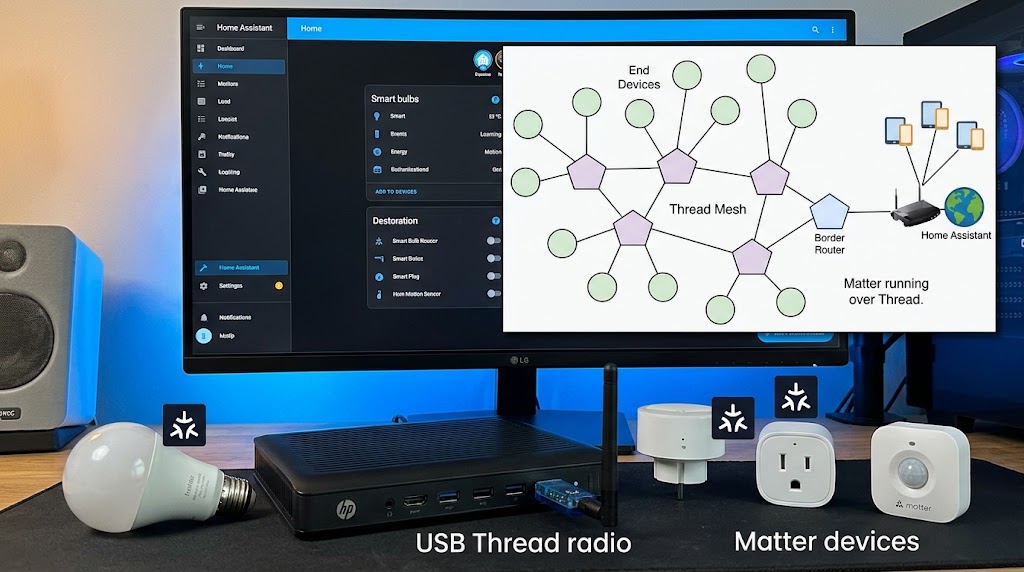
How to Use Home Assistant SkyConnect to Run Matter and Thread Simultaneously
SkyConnect can power a Home Assistant Thread network for Matter-over-Thread devices, but Matter and Thread are different layers—not two radio modes. Here is the correct 2026 setup.
How to Set Up an Offline Smart Home Network That Works When Wi-Fi Drops
Build a local-first smart home that keeps critical lights, sensors, locks, and automations working during internet outages—and can keep core automations alive even when the Wi-Fi access point itself fails.