
How to Set Up an Offline Smart Home Network That Works When Wi-Fi Drops
Build a local-first smart home that keeps critical lights, sensors, locks, and automations working during internet outages—and can keep core automations alive even when the Wi-Fi access point itself fails.
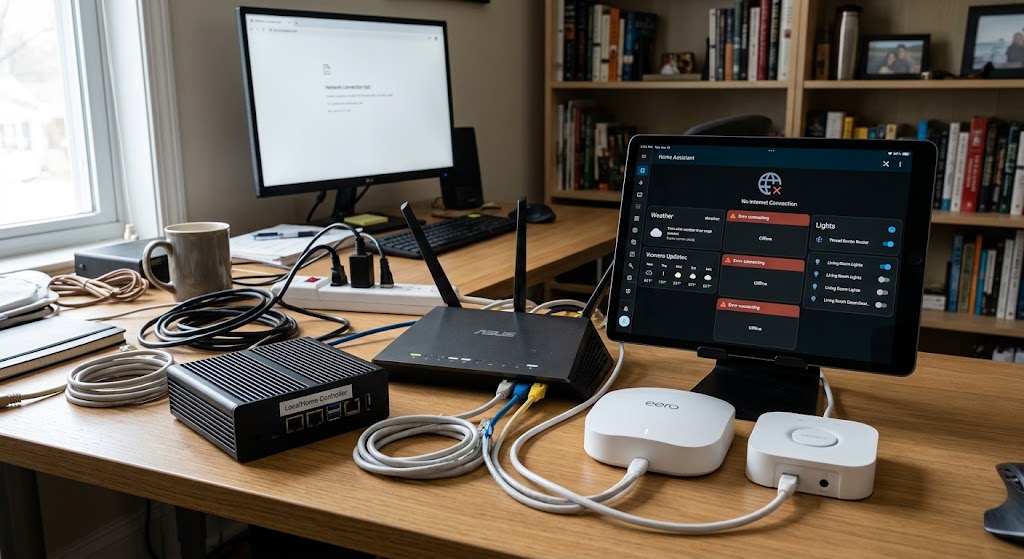
Quick answer
To build an offline smart home, run the automation controller locally on wired Ethernet, choose devices that support local protocols, and separate critical automation from cloud-dependent services. Zigbee and Z-Wave devices connected directly to a local coordinator can keep operating even when both the internet and Wi-Fi access point are unavailable. Matter-over-Thread can also remain independent of Wi-Fi for the device mesh, but Home Assistant still needs a working local path to a Thread Border Router; for maximum resilience, use a Border Router connected by Ethernet or integrated directly with the local controller. Matter-over-Wi-Fi and local Wi-Fi devices can survive an internet outage, but they stop communicating if the Wi-Fi access point itself goes down.
Table of contents
- Start by Defining the Three Failure Modes
- Failure Mode 1: Internet outage
- Failure Mode 2: Wi-Fi access point failure
- Failure Mode 3: Whole-network or power failure
- The Recommended Offline-First Architecture
- Layer 1: Local automation controller
- Layer 2: Wired network
- Layer 3: Independent smart-home radios
- Layer 4: Local Wi-Fi devices
- Layer 5: Cloud services
- Step 1: Put the Automation Controller on Ethernet
- What Ethernet protects you from
- Step 2: Decide Which Devices Are Critical
- Critical
- Convenience
- Cloud-native
- Step 3: Use Zigbee for Simple Local Devices
- Why Zigbee helps during a Wi-Fi outage
- Make the Zigbee mesh resilient
- Step 4: Use Z-Wave Where Its Device Ecosystem Fits
- Step 5: Understand Matter Before Using It as the Offline Layer
- Matter over Wi-Fi
- Matter over Thread
- Step 6: Make Thread Resilient the Right Way
- Border Router connected by Wi-Fi
- Border Router connected by Ethernet
- Border Router integrated with Home Assistant hardware
- Multiple Border Routers
- Step 7: Keep Wi-Fi for the Devices That Need It
- Good Wi-Fi role
- Poor Wi-Fi-only role
- Step 8: Prefer Local Integrations
- Local integration
- Cloud integration
- Step 9: Do Not Make DNS an Accidental Single Point of Failure
- Practical approach
- Step 10: Keep the LAN Simple
- Advanced IoT VLANs
- Step 11: Add Backup Power to the Infrastructure Layer
- Put these on backup power first
- Step 12: Keep Physical Controls
- Lighting
- Lock
- HVAC
- Blinds
- Water valve
- Step 13: Test the Internet-Outage Scenario
- Test procedure
- What should fail
- Step 14: Test the Wi-Fi-Outage Scenario
- Test procedure
- Expected result
- Step 15: Create a Failure Matrix
- Recommended Offline-First Device Roles
- Lighting
- Contact and motion sensors
- Locks
- Smart plugs
- Climate
- Cameras
- What About Bluetooth?
- ESPHome: Local Wi-Fi With an Important Limitation
- Internet down
- Wi-Fi AP down
- Should the Router and Wi-Fi AP Be Separate?
- Do you need enterprise networking?
- Thread Redundancy: Useful but Easy to Misconfigure
- Notifications During an Internet Outage
- Local response
- Remote notification
- Voice Control Without the Cloud
- Remote Access Is Not Part of Offline Operation
- Optional Upgrade: Secondary Internet
- A Practical Starter Stack
- Controller
- Core LAN
- Low-bandwidth automation
- Thread
- Wi-Fi
- Power
- Common Mistakes
- Mistake 1: Calling an internet outage a Wi-Fi outage
- Mistake 2: Assuming local Wi-Fi means Wi-Fi-independent
- Mistake 3: Buying Matter without checking the transport
- Mistake 4: Adding Thread Border Routers without checking their backhaul
- Mistake 5: Putting critical automation in the cloud
- Mistake 6: Adding an IoT VLAN and breaking discovery
- Mistake 7: Forgetting backup power
- Mistake 8: Removing manual control
- Offline-Ready Checklist
- Conclusion
Key takeaways
- Design for internet failure and Wi-Fi access-point failure separately; they are not the same outage.
- A locally hosted controller on Ethernet is the foundation of an offline-first smart home.
- Zigbee and Z-Wave devices using coordinators attached directly to the controller can keep critical automations off Wi-Fi entirely.
- Matter-over-Thread avoids Wi-Fi at the device-radio layer, but the Thread Border Router still needs a live path to the local controller.
- Local Wi-Fi devices can survive an internet outage, but they cannot survive an access-point outage.
- Cloud-only cameras, appliances, voice assistants, and vendor APIs should be treated as optional layers rather than dependencies for critical automation.
Editorial transparency
Who worked on this article and how it was handled.
- Written by
- Daniel Reed
- Creation method
- Editorial research
AI assistance: AI assisted with research organization and drafting. Sources, network-resilience recommendations, current Home Assistant behavior, and the final article should be reviewed by a human editor before publication.
A smart home that stops working every time the internet drops is not very smart.
But there is a second failure mode that matters even more if reliability is your goal: the Wi-Fi access point itself can fail.
Those two outages are often described with the same phrase—“the Wi-Fi is down”—but they affect a smart home very differently.
If your internet connection fails while the router and Wi-Fi access point remain online, local Wi-Fi devices can still communicate inside the home. Home Assistant can keep running local automations. Zigbee, Z-Wave, Thread, Ethernet, Bluetooth, and local APIs can continue operating.
If the Wi-Fi radio or access point actually fails, every Wi-Fi device loses its local network connection as well. A local smart plug that does not need the cloud is still unreachable if the Wi-Fi network carrying its packets has disappeared.
That leads to the central design principle for an offline-first smart home:
Use Wi-Fi where it is useful, but do not make Wi-Fi the only path for critical automation.
The strongest setup combines a wired local controller with one or more independent smart-home networks such as Zigbee, Z-Wave, or Thread, then treats internet and cloud services as optional enhancements.
Start by Defining the Three Failure Modes
Before choosing hardware, decide what you want the house to survive.
Failure Mode 1: Internet outage
The modem or ISP connection fails.
But:
- router is powered;
- Ethernet LAN works;
- Wi-Fi works;
- Home Assistant is online locally.
This is the easiest outage to survive.
Failure Mode 2: Wi-Fi access point failure
The access point crashes, loses power, or is being rebooted.
But:
- Ethernet LAN may still work;
- Home Assistant may still be running;
- Zigbee, Z-Wave, and Thread radios may still be operating.
This is where an all-Wi-Fi smart home becomes fragile.
Failure Mode 3: Whole-network or power failure
Router, switches, controller, and radios lose power.
No smart-home protocol can automate a house if all of its infrastructure is off.
The solution here is not another protocol.
It is:
- reliable power;
- battery-powered end devices where appropriate;
- backup power for critical infrastructure;
- physical/manual control that still works.
A resilient architecture should know which failure modes it is designed to survive.
The Recommended Offline-First Architecture
A practical local smart home can be divided into five layers.
Layer 1: Local automation controller
Run Home Assistant or another local controller on hardware inside the home.
Connect it by Ethernet, not Wi-Fi, whenever practical.
Layer 2: Wired network
Keep critical infrastructure on Ethernet:
- Home Assistant host;
- primary router;
- network switch;
- selected Thread Border Routers;
- fixed bridges;
- network storage if used.
Layer 3: Independent smart-home radios
Use:
- Zigbee;
- Z-Wave;
- Thread;
- Bluetooth;
for low-bandwidth devices that do not need Wi-Fi.
Layer 4: Local Wi-Fi devices
Use Wi-Fi for devices that genuinely benefit from IP bandwidth:
- robot vacuum;
- portable AC;
- speakers;
- selected cameras;
- appliances;
- ESPHome devices;
- products with reliable local APIs.
These can survive an internet outage but not a Wi-Fi AP outage.
Layer 5: Cloud services
Treat these as optional:
- remote access;
- vendor clouds;
- AI camera analytics;
- Alexa / Google voice services;
- cloud notifications;
- firmware downloads;
- weather APIs.
If the cloud layer disappears, the core home should still function.
Step 1: Put the Automation Controller on Ethernet
The automation controller is infrastructure.
Do not make the device orchestrating the entire home depend on the same Wi-Fi radio whose failure you are trying to survive.
For Home Assistant:
- use Home Assistant OS where appropriate;
- connect the host to the router or switch by Ethernet;
- give it a stable local address through DHCP reservation or another deliberate address-management strategy.
Home Assistant itself runs locally and stores its data on your hardware.
That means local automations do not need the internet.
What Ethernet protects you from
If the Wi-Fi access point reboots:
- Home Assistant remains connected to the LAN;
- wired bridges remain connected;
- USB Zigbee/Z-Wave coordinators remain attached;
- local automations keep executing.
Your phone may temporarily lose the dashboard.
The automation engine does not have to stop.
Step 2: Decide Which Devices Are Critical
Not every device needs outage resilience.
Critical
Examples:
- entry lights;
- leak sensors;
- water-shutoff automation;
- door locks;
- smoke/CO integration;
- freeze protection;
- critical temperature sensors;
- sump or equipment monitoring;
- night lighting.
These should use the most local and independent path available.
Convenience
Examples:
- decorative lighting;
- robot vacuum;
- streaming speakers;
- mood scenes;
- coffee-machine reminders.
These can tolerate temporary downtime.
Cloud-native
Examples:
- vendor AI camera features;
- remote video history;
- weather services;
- mainstream cloud voice assistants.
These are expected to lose functionality without internet access.
Designing the system by criticality is more useful than trying to make every gadget survive every failure.
Step 3: Use Zigbee for Simple Local Devices
Zigbee is still one of the easiest ways to keep low-bandwidth home automation independent from Wi-Fi.
Home Assistant’s ZHA integration can connect many Zigbee devices directly through a compatible coordinator.
Typical Zigbee devices include:
- motion sensors;
- contact sensors;
- buttons;
- bulbs;
- switches;
- plugs;
- leak sensors;
- selected locks and climate devices.
Why Zigbee helps during a Wi-Fi outage
If the Zigbee coordinator is connected directly to the Home Assistant machine, the path is:
Zigbee device → Zigbee mesh → coordinator → Home Assistant
Wi-Fi is not involved.
The internet is not involved.
Make the Zigbee mesh resilient
Battery devices generally do not route traffic.
Mains-powered Zigbee products can often act as mesh routers.
A healthy network benefits from well-distributed powered routers such as:
- smart plugs;
- in-wall switches;
- compatible bulbs that remain powered.
Do not place the only coordinator in a metal cabinet or directly beside noisy USB and RF hardware.
Step 4: Use Z-Wave Where Its Device Ecosystem Fits
Z-Wave provides another independent local mesh.
A Home Assistant Z-Wave setup typically includes:
- local Z-Wave USB/network adapter;
- Z-Wave JS;
- Z-Wave end devices.
The key reliability advantage is the same:
the Z-Wave radio network does not depend on your Wi-Fi access point.
Z-Wave can be attractive for:
- locks;
- switches;
- relays;
- sensors;
- water valves.
The best protocol is often the one with the best certified hardware for the job.
You do not need to choose only one.
A Home Assistant installation can operate Zigbee, Z-Wave, Thread, Ethernet, Bluetooth, and Wi-Fi devices at the same time.
Step 5: Understand Matter Before Using It as the Offline Layer
Matter is local-friendly, but the word Matter alone does not tell you whether a device survives Wi-Fi failure.
Matter can use:
- Wi-Fi;
- Thread;
- Ethernet.
Matter over Wi-Fi
Path:
Device → Wi-Fi access point → local IP network → Matter controller
If the internet fails:
- it can keep working locally.
If the Wi-Fi AP fails:
- the device is disconnected.
Matter over Thread
Path:
Device → Thread mesh → Thread Border Router → local IP network → Matter controller
The end device does not use Wi-Fi.
That can provide better independence from the Wi-Fi access point—but only if the Border Router remains connected to the local controller.
Step 6: Make Thread Resilient the Right Way
Thread is a low-power IPv6 mesh designed for smart-home devices.
The mesh itself is not controlled by the Wi-Fi access point.
But a Matter-over-Thread device needs a Thread Border Router to reach Home Assistant or another Matter controller on the regular IP network.
Home Assistant documents that a Thread Border Router can connect to the LAN through:
- Ethernet;
- Wi-Fi.
That detail matters enormously for resilience.
Border Router connected by Wi-Fi
If the access point fails:
- Thread end devices may still form their local mesh;
- but that Border Router can lose its path to the LAN;
- Home Assistant may no longer reach those Thread devices.
Border Router connected by Ethernet
If the Wi-Fi AP fails but Ethernet LAN is still alive:
- the Border Router can keep forwarding Thread traffic to the local controller.
Border Router integrated with Home Assistant hardware
A Thread radio attached directly to the Home Assistant host can reduce another dependency, provided the Home Assistant Thread setup is correctly configured and supported.
Multiple Border Routers
Thread supports multiple Border Routers on a network.
Home Assistant and the Thread Group both note that multiple Border Routers can improve coverage and reduce single points of failure when they are operating on the same Thread network.
That makes redundancy possible without duplicating the device itself.
Step 7: Keep Wi-Fi for the Devices That Need It
An offline-first smart home is not an anti-Wi-Fi smart home.
Wi-Fi is excellent for:
- cameras;
- speakers;
- tablets;
- appliances;
- robot vacuums;
- higher-bandwidth sensors;
- local web interfaces.
The correct goal is:
Do not use Wi-Fi as the only control network for functions that must survive Wi-Fi failure.
Good Wi-Fi role
Use local Wi-Fi devices where temporary loss is acceptable.
Example:
- robot vacuum unavailable during AP restart;
- decorative lamp unavailable for five minutes;
- local camera unavailable until Wi-Fi returns.
Poor Wi-Fi-only role
Avoid making these depend solely on one AP if resilience matters:
- leak-shutoff logic;
- critical door sensor;
- emergency night lighting;
- freeze protection.
Step 8: Prefer Local Integrations
Home Assistant’s official documentation is explicit: devices using local protocols such as Zigbee, Z-Wave, Matter, Thread, and ESPHome can continue working without an internet connection.
But Home Assistant can also connect to cloud-only devices.
A dashboard that looks unified can therefore contain two very different architectures.
Local integration
Example:
Home Assistant → local device IP or radio protocol
Works without internet.
Cloud integration
Example:
Home Assistant → internet → vendor cloud → device
Fails when the internet fails.
Before buying a device, check whether the Home Assistant integration is:
- local push;
- local polling;
- cloud polling;
- cloud push.
For critical devices, prioritize local.
Step 9: Do Not Make DNS an Accidental Single Point of Failure
Local automations normally operate through device IDs, IP networking, radio networks, or controller connections.
But human access can still depend on names such as:
homeassistant.local
If the network’s DNS/mDNS services are unavailable, you may think Home Assistant itself is down when only name resolution has failed.
Practical approach
Know:
- the local IP address of the Home Assistant host;
- the router address;
- how to reach the controller without public DNS.
Use a stable local addressing plan.
This is especially helpful during network maintenance.
Step 10: Keep the LAN Simple
Complex network segmentation can be valuable.
It can also break local smart-home discovery if configured incorrectly.
Home Assistant’s Matter documentation specifically warns that multicast optimization, network topology, VLAN separation, and discovery behavior can interfere with Matter.
For a normal home:
- keep Home Assistant and local smart-home controllers on a straightforward LAN;
- do not isolate devices unless you understand which local protocols must cross the boundary;
- preserve mDNS and IPv6 where required.
Advanced IoT VLANs
A dedicated IoT VLAN can be excellent if you know how to configure:
- firewall rules;
- multicast DNS;
- IPv6;
- Matter discovery;
- controller access.
Do not create one only because “smart devices belong on a VLAN.”
A broken local-control network is not more secure in any useful sense.
Step 11: Add Backup Power to the Infrastructure Layer
A network cannot be offline-resilient if every brief power fluctuation shuts down:
- router;
- Home Assistant;
- Zigbee coordinator;
- Z-Wave adapter;
- Thread Border Router;
- Ethernet switch.
A small UPS can keep the control plane running through short outages and brownouts.
Put these on backup power first
Priority order:
- Home Assistant/controller
- Router
- Ethernet switch
- critical radio coordinators/bridges
- Thread Border Router
- modem/ONT if you also want internet resilience
If the ISP is down, the modem is not required for local automation.
If power is down across the entire house, smart switches may not have anything meaningful left to control—but battery sensors, locks, and the controller can still preserve state and recover cleanly.
Step 12: Keep Physical Controls
Offline-first should not mean software-only.
Every critical system should have a usable manual fallback.
Examples:
Lighting
Normal wall switch still works.
Lock
Physical key or mechanical override remains available.
HVAC
Thermostat can still be operated locally.
Blinds
Manual override remains possible where the hardware supports it.
Water valve
Manual valve access remains possible.
A resilient smart home adds automation on top of basic control.
It does not remove the basic control.
Step 13: Test the Internet-Outage Scenario
Do not assume local control works.
Test it.
Test procedure
- Leave the router and Wi-Fi powered.
- Disconnect the WAN/internet cable or disable internet access.
- Do not change the LAN configuration.
- Wait for cloud services to time out.
- Test local automations.
Verify:
- lights;
- sensors;
- locks;
- HVAC;
- local notifications;
- dashboards;
- Zigbee;
- Z-Wave;
- Matter;
- Thread.
What should fail
Expect internet-dependent features to fail:
- remote access;
- vendor clouds;
- weather APIs;
- cloud voice assistants;
- cloud video recording;
- external notifications that need internet routing.
Document those dependencies.
Step 14: Test the Wi-Fi-Outage Scenario
This test is more revealing.
Test procedure
- Keep Home Assistant and Ethernet LAN powered.
- Disable the Wi-Fi radios or unplug the access point.
- Keep the router/switch alive if they are separate from the AP.
- Wait several minutes.
- Observe core automations.
Expected result
Should continue:
- Home Assistant local automation engine;
- USB-connected Zigbee;
- USB/network Z-Wave over Ethernet;
- wired devices;
- Thread devices whose Border Router still has an Ethernet/local path;
- local schedules running directly on devices.
Will likely stop:
- Matter-over-Wi-Fi;
- ESPHome Wi-Fi devices;
- local Wi-Fi plugs;
- Wi-Fi cameras;
- phones/tablets using Wi-Fi;
- Wi-Fi-only Thread Border Routers that have lost LAN access.
This test tells you whether the system is truly Wi-Fi-independent or merely cloud-independent.
Step 15: Create a Failure Matrix
A small table is more useful than vague claims about “offline support.”
Example:
| Device / automation | Internet down | Wi-Fi AP down | Home Assistant down | Manual fallback |
|---|---|---|---|---|
| Zigbee hallway light | Works | Works | Depends on direct binding / controller | Wall switch |
| Matter-over-Wi-Fi plug | Works locally | Fails | Fails | Button |
| Matter-over-Thread lock | Works | Works if Border Router path survives | Ecosystem-dependent | Physical key |
| Cloud camera | Partial / fails | Fails | Vendor-dependent | None |
| Z-Wave water valve | Works | Works | Controller-dependent | Manual valve |
Fill this out for your actual devices.
The objective is not “everything works forever.”
It is knowing exactly what fails and what remains.
Recommended Offline-First Device Roles
Lighting
Best options:
- Zigbee;
- Z-Wave;
- Matter over Thread;
- hardwired local control.
Keep wall switches usable.
Contact and motion sensors
Best options:
- Zigbee;
- Z-Wave;
- Thread.
These are low-bandwidth devices that do not need Wi-Fi.
Locks
Good options:
- Z-Wave;
- Matter over Thread;
- other local-first lock integrations.
Keep a physical fallback.
Smart plugs
Good options:
- Zigbee;
- Z-Wave;
- Matter over Thread;
- local Wi-Fi for noncritical loads.
Climate
Prefer:
- local thermostat integration;
- Z-Wave;
- Zigbee where supported;
- Matter;
- local API.
Avoid making freeze or overheat protection depend only on a vendor cloud.
Cameras
Cameras are usually the hardest category to make fully independent.
Prefer products with local standards or local streams when local operation matters.
But recognize that many advanced camera features remain:
- cloud-dependent;
- app-dependent;
- storage-dependent.
Do not let camera architecture dictate the reliability of lights, locks, or HVAC.
What About Bluetooth?
Bluetooth is local and does not require Wi-Fi.
It can be useful for:
- thermometers;
- plant sensors;
- locks;
- presence beacons;
- low-bandwidth devices.
Home Assistant can expand Bluetooth coverage through proxies.
However, Bluetooth is not usually the first protocol I would choose as the primary whole-home resilience layer because range and topology differ significantly from Zigbee, Z-Wave, and Thread mesh designs.
Use it where the device ecosystem fits.
ESPHome: Local Wi-Fi With an Important Limitation
ESPHome is an excellent local-first platform.
Home Assistant lists ESPHome among protocols that can operate without internet access.
But most ESPHome devices use Wi-Fi.
Therefore:
Internet down
They can continue working locally.
Wi-Fi AP down
They lose their network path unless the hardware uses another supported transport.
This is a good example of why local and Wi-Fi-independent are not synonymous.
Should the Router and Wi-Fi AP Be Separate?
For advanced reliability, there is a strong architectural argument for separating:
- router/firewall;
- Ethernet switching;
- Wi-Fi access point.
If the AP crashes, the wired LAN can remain operational.
In many consumer routers, all three functions live inside one box.
If that box reboots, you can lose:
- routing;
- switching;
- Wi-Fi;
- DHCP;
- DNS;
at the same time.
Do you need enterprise networking?
No.
But if smart-home resilience matters, using a wired router plus independent AP can reduce the blast radius of one component failure.
For a normal household, the simpler alternative is:
- reliable router/AP;
- Home Assistant on Ethernet;
- Zigbee/Z-Wave/Thread for critical devices;
- UPS for core equipment.
That already provides most of the benefit.
Thread Redundancy: Useful but Easy to Misconfigure
Thread supports multiple Border Routers.
That can increase:
- coverage;
- path redundancy;
- resilience.
But the Border Routers need to participate in the same Thread network to provide the intended redundancy.
Home Assistant’s Thread documentation notes that homes can end up with separate Apple, Google, and Home Assistant Thread networks using different credentials.
Separate Thread networks do not automatically merge into one redundant mesh.
Before adding “more Border Routers,” inspect:
- which Thread network each belongs to;
- whether credentials are shared;
- whether Home Assistant can see and use the preferred network.
More hardware is only redundant when it is actually part of the same logical network.
Notifications During an Internet Outage
Local automation can detect:
- leak;
- smoke integration;
- temperature problem;
- door event.
But sending a push notification to your phone outside the home usually requires internet connectivity.
That means you need to distinguish:
Local response
Examples:
- close valve;
- sound local siren;
- flash lights;
- stop appliance.
Remote notification
Examples:
- push notification;
- email;
- SMS;
- cloud call.
During internet failure, the local response should happen first.
The notification is secondary.
For safety automation, never make the corrective action depend on cloud notification success.
Voice Control Without the Cloud
Mainstream Alexa and Google voice experiences rely heavily on external cloud infrastructure.
An offline-first smart home should not require voice commands for essential control.
Home Assistant also supports local voice-assistant architecture, but that is a separate project and can require additional hardware and configuration.
For a starter resilience build:
- physical control first;
- automation second;
- local dashboard third;
- voice last.
Remote Access Is Not Part of Offline Operation
Home Assistant is local-network-only by default.
Remote access can be added through:
- Home Assistant Cloud;
- VPN;
- properly secured self-hosted methods.
But if the home’s internet is down, remote access from outside is down too unless you have a second WAN path such as cellular failover.
That is a different reliability problem.
The purpose of an offline smart home is not to guarantee that you can control the house from another city during an ISP outage.
It is to guarantee that the house can continue controlling itself.
Optional Upgrade: Secondary Internet
If remote monitoring during ISP failure matters, consider:
- cellular backup;
- second ISP;
- router WAN failover.
That can restore:
- remote Home Assistant access;
- cloud notifications;
- cloud cameras;
- voice services.
But secondary WAN is not required for local automation.
Build the local system first.
Then decide whether internet redundancy is worth the recurring cost.
A Practical Starter Stack
For a reliable local-first home:
Controller
- Home Assistant OS on reliable hardware
- Ethernet-connected
Core LAN
- router
- Ethernet switch where needed
- optional separate AP
Low-bandwidth automation
- Zigbee or Z-Wave coordinator
- Matter-over-Thread where ecosystem support fits
Thread
- at least one Border Router
- preferably an Ethernet-backed or controller-integrated path for Wi-Fi-failure resilience
Wi-Fi
Use selectively for:
- cameras;
- appliances;
- robot vacuum;
- media devices;
- noncritical local devices.
Power
- UPS for controller and networking
- manual fallback for critical systems
That architecture can survive far more than an all-cloud, all-Wi-Fi smart home.
Common Mistakes
Mistake 1: Calling an internet outage a Wi-Fi outage
The distinction changes the entire design.
Mistake 2: Assuming local Wi-Fi means Wi-Fi-independent
Local Wi-Fi still needs the AP.
Mistake 3: Buying Matter without checking the transport
Matter-over-Wi-Fi and Matter-over-Thread have different failure modes.
Mistake 4: Adding Thread Border Routers without checking their backhaul
A Wi-Fi-connected Border Router does not solve an AP failure.
Mistake 5: Putting critical automation in the cloud
The corrective action should happen locally.
Mistake 6: Adding an IoT VLAN and breaking discovery
Network segmentation requires proper local routing and multicast support.
Mistake 7: Forgetting backup power
A perfect local architecture still fails when every controller loses power.
Mistake 8: Removing manual control
Smart-home reliability should improve physical systems, not make them dependent on software.
Offline-Ready Checklist
Before calling the home resilient:
- Automation controller runs locally.
- Controller uses Ethernet.
- Critical sensors do not rely only on Wi-Fi.
- Critical switches/relays have local or physical control.
- Zigbee/Z-Wave coordinators connect locally to the controller.
- Matter devices are identified as Wi-Fi or Thread.
- Thread Border Router has a resilience plan for Wi-Fi failure.
- Core router/controller/radios have backup power where needed.
- Cloud-only integrations are documented.
- I know the local Home Assistant IP address.
- Internet outage has been tested.
- Wi-Fi AP outage has been tested separately.
- Local safety actions do not depend on push notifications.
- Every critical system has a manual fallback.
- Backups exist for the Home Assistant controller configuration.
Conclusion
An offline smart home is not created by removing the internet.
It is created by removing unnecessary dependencies.
Run the automation controller locally and connect it by Ethernet. Put critical low-bandwidth devices on independent local networks such as Zigbee, Z-Wave, or Matter over Thread. Use Wi-Fi for devices that benefit from it, but recognize that local Wi-Fi still disappears when the access point fails. Keep Thread Border Routers on resilient local paths, provide backup power for the control plane, and preserve physical/manual controls.
Then test two outages separately:
- Internet disconnected, Wi-Fi still alive
- Wi-Fi access point offline, wired LAN still alive
A system that passes the first test is cloud-independent.
A system that keeps its critical automations running through the second test is genuinely Wi-Fi-resilient.
That is the architecture you want if your goal is a smart home that keeps behaving like a home even when the network is having a bad day.
Common questions
Questions this guide answers
Will Home Assistant work if the internet goes down?
Yes. Home Assistant runs on hardware inside your home and can continue running local automations without internet access. Devices using local protocols such as Zigbee, Z-Wave, Matter, Thread, and ESPHome can continue to work locally, while cloud-only devices and remote-access services will be unavailable until internet connectivity returns.
What happens if Wi-Fi itself goes down, not just the internet?
Wi-Fi devices lose their local network connection when the access point fails, even if they normally use a local API. Zigbee and Z-Wave networks using coordinators attached directly to the local controller can continue operating. Thread devices can continue forming their mesh, but communication to the controller depends on at least one functioning Thread Border Router with a working path to the local LAN.
Does Matter work without Wi-Fi?
Matter can run over Wi-Fi, Ethernet, or Thread. A Matter-over-Wi-Fi device needs the Wi-Fi network even if the internet is down. A Matter-over-Thread device does not use Wi-Fi for its device radio link, but it needs a Thread Border Router to reach the Matter controller on the local IP network.
What smart-home protocol is best for an offline-first setup?
There is no single best protocol. Zigbee and Z-Wave are excellent for local sensors, switches, plugs, and locks because they use their own mesh networks. Matter over Thread is a strong newer option for low-power interoperable devices. Ethernet is ideal for controllers and fixed infrastructure. Wi-Fi remains useful for higher-bandwidth devices, but critical automation should not depend exclusively on Wi-Fi if access-point failure is part of your resilience goal.
Evidence & further reading
Sources & references
Primary and authoritative references used to support or contextualize this article. Links open the original source.
- 1Does Home Assistant work without an internet connection?
Home Assistant · Accessed Aug 10, 2026
Supports Home Assistant continuing to run locally during internet outages and identifies Zigbee, Z-Wave, Matter, Thread, and ESPHome as local protocols that do not require internet connectivity.
- 2Is my smart home data private with Home Assistant?
Home Assistant · Accessed Aug 10, 2026
Supports local data storage, direct local device communication where available, and optional rather than mandatory Home Assistant cloud services.
- 3Matter
Home Assistant · Accessed Aug 10, 2026
Supports Home Assistant as a local Matter controller, Matter operation over local Wi-Fi or Thread, Thread Border Router requirements, and the recommendation to keep Matter network topology simple.
- 4Thread
Home Assistant · Accessed Aug 10, 2026
Supports Thread as a low-power mesh, the role of Thread Border Routers, Ethernet or Wi-Fi Border Router backhaul, multiple Border Routers, IPv6 requirements, and current Home Assistant Thread configuration guidance.
- 5Zigbee Home Automation
Home Assistant · Accessed Aug 10, 2026
Supports directly connecting Zigbee devices to Home Assistant through a local Zigbee coordinator and replacing proprietary Zigbee gateways.
- 6Z-Wave
Home Assistant · Accessed Aug 10, 2026
Supports Home Assistant's local Z-Wave architecture using a Z-Wave adapter, Z-Wave JS server, and end devices.
- 7Matter FAQs
Connectivity Standards Alliance · Accessed Aug 10, 2026
Supports Matter using Wi-Fi, Thread, and Ethernet as underlying IP transports and distinguishes Matter from the network technologies underneath it.
- 8Multiple Thread Networks and The Seamless Interconnectivity of IP
Thread Group · Accessed Aug 10, 2026
Supports multiple Thread Border Routers providing redundancy when they share the same Thread network credentials.
- 9Remote access to Home Assistant
Home Assistant · Accessed Aug 10, 2026
Supports Home Assistant being local-network-only by default and frames remote access as an optional separate layer.

About the author
Daniel Reed
Daniel writes about connected-home standards, small-space technology, device interoperability, and privacy-conscious urban living.
More from Daniel →Make your home smarter without buying every gadget.
One useful idea, one product worth knowing, and one energy-saving action—delivered weekly.
No spam. Unsubscribe anytime.
Semantic recommendations
Related reading
Selected from topic cluster, entities, tags, search intent, and editorial relationships.
Home Assistant Starter Guide: How to Build a Private, Local Smart Home
Home Assistant lets you run automations, dashboards, and device control on hardware inside your home. This beginner guide shows the cleanest 2026 path to a private, local-first setup.
5 Essential Home Assistant Automations for Energy Saving
These five Home Assistant automations target the biggest sources of avoidable household energy use: HVAC runtime, unnecessary lighting, standby loads, expensive tariff windows, and solar heat gain.

Smart Motion Sensor Automations for Dark Apartment Hallways
Build hallway lighting that turns on only when needed, stays dim at night, and avoids the annoying false-offs common with basic motion automations.
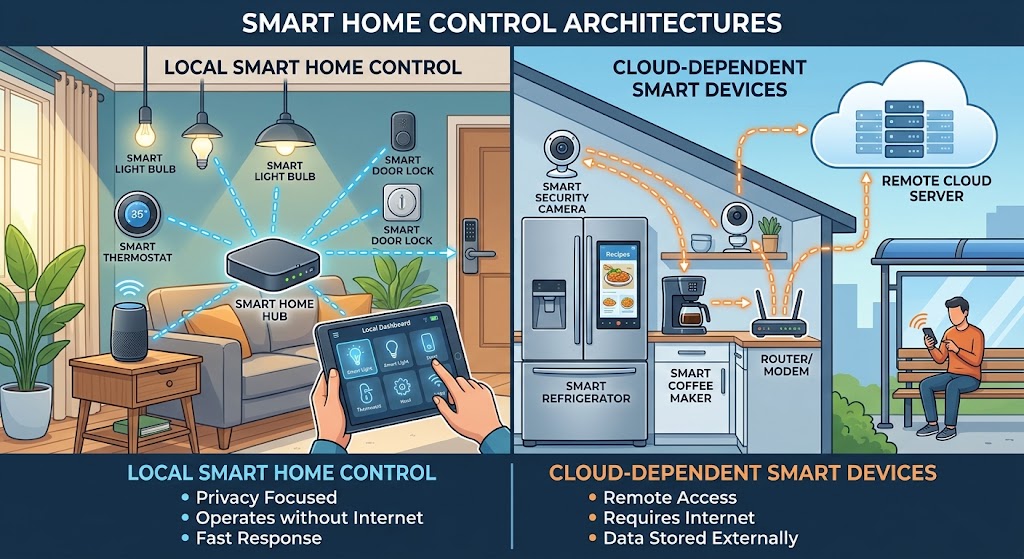
Local Control vs. Cloud Smart Home: Why You Should Avoid Cloud Dependency
Cloud features are useful, but your lights, locks, sensors, and core automations should not stop working when the internet or a vendor service fails. Here is how to build a local-first smart home in 2026.