
Local Control vs. Cloud Smart Home: Why You Should Avoid Cloud Dependency
Cloud features are useful, but your lights, locks, sensors, and core automations should not stop working when the internet or a vendor service fails. Here is how to build a local-first smart home in 2026.
Quick answer
A smart home should be local-first rather than cloud-dependent. Core functions such as lights, switches, locks, sensors, climate automations, and safety routines should continue operating on the home network when the internet is unavailable. Cloud services are still useful for remote access, voice assistants, notifications, AI features, and off-site services, but they should sit on top of a functional local system rather than being required for basic operation. Matter improves this model because it uses local connectivity, while platforms such as Home Assistant, Hubitat, and openHAB can execute many automations locally.
Table of contents
- Local Control vs. Cloud Control
- Cloud-dependent path
- Local-control path
- The Real Goal Is Local-First, Not Cloud-Free
- Cloud-Connected vs. Cloud-Dependent
- Cloud-connected device
- Cloud-dependent device
- Reason 1: The Internet Will Eventually Go Down
- What should survive an internet outage?
- Reason 2: Vendor Clouds Can Disappear Before the Hardware Does
- Local Control Does Not Eliminate End-of-Support Risk
- Reason 3: Local Automations Are Usually More Direct
- Cloud latency is not always slow
- Reason 4: Household Data Does Not Need to Leave the House for Every Action
- Local does not automatically mean private
- Reason 5: Subscriptions Should Buy Services, Not Basic Switch Functionality
- Matter Is Moving the Industry Back Toward Local Control
- Remote access still uses the internet
- At home
- Away from home
- Matter Does Not Guarantee a Cloud-Free Product
- Matter 1.6 Continues the Multi-Ecosystem Direction
- Three Strong Local-First Platforms
- Home Assistant
- Hubitat Elevation
- openHAB
- What About Apple Home, Google Home, Alexa, and SmartThings?
- The Local-First Device Hierarchy
- Tier 1: Open or standardized local protocol
- Tier 2: Documented local LAN API
- Tier 3: Local protocol plus optional cloud
- Tier 4: Cloud-first with limited local fallback
- Tier 5: Cloud-only for basic control
- Devices Where Local Control Matters Most
- Locks
- Lights and switches
- Thermostats
- Leak sensors and shutoff valves
- Door and motion sensors
- Cameras
- Devices Where Cloud Dependence Is Less Concerning
- Weather services
- AI assistants
- Package tracking
- Music streaming
- Remote notifications
- How to Audit Your Current Smart Home
- Run the Internet-Outage Test
- Migrate Automations Before Devices
- Replace Cloud-Only Devices Gradually
- Build Remote Access on Top of the Local Home
- Backups Matter More When You Own the Controller
- Security: Do Not Confuse “Local” With “Safe”
- A better security principle
- The Best 2026 Architecture
- Core automation server
- Local device layer
- Optional cloud layer
- Manual fallback
- A Buying Checklist for Local-First Devices
- Conclusion
Key takeaways
- The goal is not a cloud-free home; it is a home whose essential automations do not require the cloud to function.
- Local control improves outage resilience and can reduce latency and unnecessary exposure of household activity to external services.
- Cloud-only devices create lifecycle risk because vendor outages, account problems, business changes, or end-of-support decisions can affect functionality.
- Matter is explicitly designed around local connectivity and can provide a stronger local-control baseline than many older vendor-specific cloud integrations.
- A strong 2026 architecture uses local protocols and controllers for the core home, with optional cloud services layered on top for remote access and convenience.
Editorial transparency
Who worked on this article and how it was handled.
- Written by
- Maya Chen
- Creation method
- Editorial research
AI assistance: AI assisted with research organization and drafting. Sources, technical claims, platform behavior, and the final article should be reviewed by a human editor before publication.
A smart light that stops responding because your internet provider is having an outage is not especially smart.
Neither is a thermostat that requires an external server to apply a schedule inside the same house, or a door sensor whose automation travels hundreds of miles to a data center before turning on a hallway light ten feet away.
Cloud-connected smart homes became popular for a good reason. The cloud made early IoT products easier to deploy. Manufacturers could put a Wi-Fi chip inside a device, connect it to an account, and use their servers to handle:
- remote access;
- device discovery;
- authentication;
- automations;
- app synchronization;
- integrations.
That model made smart-home products accessible to millions of people without requiring a local controller.
It also created a design problem that is becoming harder to ignore in 2026:
many homes do not merely use the cloud—they depend on it.
There is an important distinction between those two ideas.
A cloud service can be extremely useful.
A cloud service should not necessarily be the thing standing between your bedroom motion sensor and the lights in your bedroom.
The better architecture is local-first:
Your home should function locally. The cloud should add capabilities on top.
Local Control vs. Cloud Control
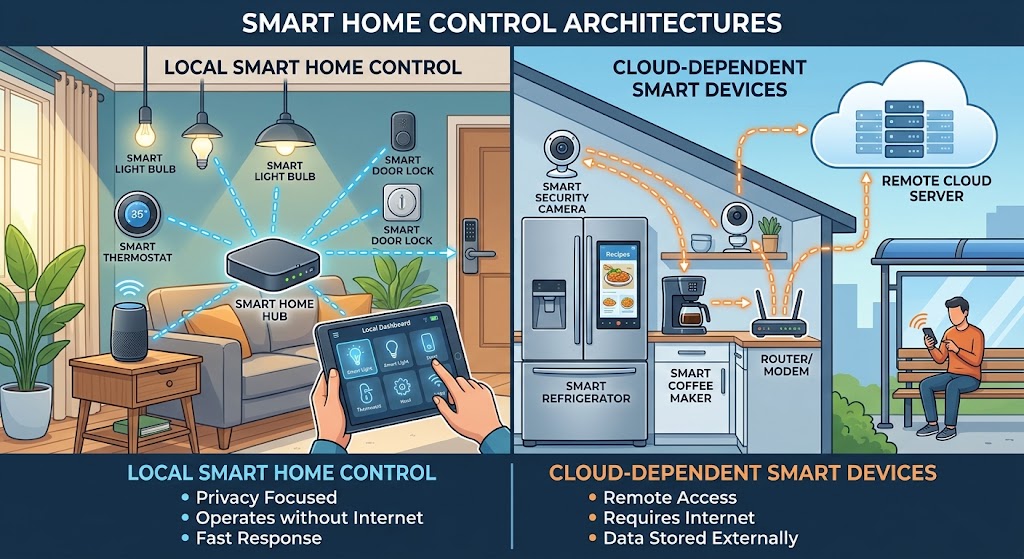
Home Assistant’s current glossary gives a useful definition of local control: the smart-home platform talks directly to devices over the local network rather than sending commands through a vendor cloud first.
That sounds like a small architectural difference.
It changes almost everything.
Cloud-dependent path
A simplified cloud-only command might look like:
Phone → Internet → Vendor Cloud → Internet → Smart Device
An automation can be even more complicated:
Motion Sensor → Vendor Cloud → Automation Service → Vendor Cloud → Light
Local-control path
A local automation can look like:
Motion Sensor → Local Controller → Light
The internet does not need to be involved.
That does not mean every packet literally takes those exact paths, but the diagrams illustrate where the control dependency lives.
The Real Goal Is Local-First, Not Cloud-Free
There is a tendency in smart-home communities to turn local versus cloud into an ideological argument.
That is unnecessary.
Cloud computing is excellent at tasks that actually benefit from remote infrastructure.
Good cloud use cases include:
- controlling your home while traveling;
- sending push notifications outside the home;
- large language model or AI processing;
- cloud voice assistants;
- off-site backup;
- weather data;
- security monitoring services;
- cross-home coordination.
Home Assistant itself demonstrates the right architectural distinction.
Its core system runs locally, while Home Assistant Cloud is an optional service for remote access, Google Assistant, Amazon Alexa, and related hosted capabilities.
The local home still exists without the subscription.
That is the architecture to copy.
Cloud-Connected vs. Cloud-Dependent
When evaluating a smart product, ask:
If I disconnect the home’s internet connection but leave Wi-Fi and the local network running, what still works?
Cloud-connected device
A well-designed cloud-connected product may still support:
- local button control;
- local automation;
- local API;
- Matter;
- HomeKit local control;
- Zigbee or Z-Wave through a local hub.
The internet adds features but is not required for its basic purpose.
Cloud-dependent device
A cloud-dependent product may lose:
- app control;
- automations;
- sensor updates;
- schedules;
- API integration;
- voice commands;
- remote and local software control.
The physical button may continue working, but the “smart” part becomes unavailable.
The difference matters more than whether the box says Wi-Fi, Matter, Zigbee, or “AI.”
Reason 1: The Internet Will Eventually Go Down
Your smart home exists inside your house.
Your cloud service does not.
Between the device and the vendor server are multiple dependencies:
- home Wi-Fi;
- router;
- modem or ONT;
- ISP network;
- DNS;
- internet routing;
- cloud provider;
- vendor backend;
- authentication system;
- mobile app services.
Any of those can fail.
A local network is not immune to failure either. A local hub can crash. A Zigbee coordinator can fail. Your router can die.
But local-first architecture removes several external components from the critical path.
What should survive an internet outage?
At minimum:
- wall switches;
- motion-triggered lighting;
- door and window sensors;
- local alarms;
- thermostat schedules;
- leak automations;
- occupancy routines;
- local dashboards;
- time-based automations.
Home Assistant’s current documentation states that locally connected Zigbee, Z-Wave, Matter, Thread, and ESPHome devices can keep operating and participating in automations when the internet is down.
That should be a baseline expectation, not an enthusiast-only feature.
Reason 2: Vendor Clouds Can Disappear Before the Hardware Does
A physical switch can last ten years.
A cloud business model may not.
Smart-home products can be affected by:
- company shutdown;
- acquisition;
- product-line cancellation;
- server retirement;
- API changes;
- account-system migration;
- subscription changes;
- support termination.
The hardware may still be electrically healthy while its external software dependency disappears.
NIST has specifically studied the problem of loss of manufacturer support for smart-home devices.
Its research notes that unsupported products can create security and safety concerns, particularly when patches are no longer available.
NIST’s 2026 update to its foundational IoT cybersecurity guidance also places greater emphasis on:
- maintenance;
- support;
- product lifecycle;
- customer communication;
- end-of-life.
That is a useful purchasing lesson.
When you buy a cloud-only smart device, you are not only buying hardware.
You are implicitly betting on the future operation of the manufacturer’s servers.
Local Control Does Not Eliminate End-of-Support Risk
This needs to be stated clearly.
Local-first hardware is more resilient to cloud shutdown, but it is not magically immortal.
A locally controlled product can still have:
- security vulnerabilities;
- firmware bugs;
- radio failures;
- obsolete cryptography;
- unsupported software.
NIST’s guidance about updates and lifecycle support still applies.
The difference is that local control gives you more options.
An unsupported local sensor may continue functioning on an isolated local network while you plan its replacement.
A cloud-only device can lose functionality because a third party changes something outside your home.
That is a much less comfortable dependency.
Reason 3: Local Automations Are Usually More Direct
Imagine this automation:
When the pantry door opens, turn on the pantry light.
The action needs to feel instant.
If it takes a second or two, the delay becomes more noticeable than the automation itself.
Local protocols are designed for this type of control.
Zigbee, Z-Wave, Matter, Thread, ESPHome, and local LAN APIs can allow a controller to respond without leaving the property.
Home Assistant explicitly identifies faster response as one advantage of local control.
Hubitat makes the same architectural choice: its compatible automations execute on the hub.
Cloud latency is not always slow
Modern cloud services can respond very quickly.
This is not an argument that every cloud command takes seconds.
The point is that local control removes:
- WAN latency;
- remote server load;
- internet routing;
- external authentication availability
from the normal command path.
For a physical home, the shortest reasonable control loop is usually preferable.
Reason 4: Household Data Does Not Need to Leave the House for Every Action
A smart home generates unusually intimate telemetry.
Depending on the devices, the system can infer:
- when people wake;
- when people arrive;
- when bedrooms are occupied;
- when doors open;
- room temperatures;
- power use;
- camera activity;
- voice commands;
- sleep routines.
A cloud architecture may send some of that information to external services because the service needs it to operate.
A local architecture can reduce how much data must leave the property for ordinary automation.
Home Assistant states that its locally controlled data is stored on the user’s own hardware and that direct local protocols do not require an internet connection.
openHAB uses a similar philosophy, describing its platform as no-cloud-required and locally hosted.
Local does not automatically mean private
This is another important nuance.
A Wi-Fi device can have a local API and independently communicate with the manufacturer’s cloud.
A local controller can also have telemetry enabled.
A privacy-conscious architecture still requires:
- understanding outbound network traffic;
- controlling accounts and permissions;
- installing security updates;
- using trustworthy firmware;
- configuring remote access safely.
Local control reduces dependency and potential data exposure.
It does not eliminate cybersecurity work.
Reason 5: Subscriptions Should Buy Services, Not Basic Switch Functionality
Recurring subscriptions can be perfectly legitimate.
Cloud infrastructure costs money.
Examples of reasonable paid services include:
- cellular alarm monitoring;
- cloud video storage;
- hosted remote access;
- AI processing;
- premium analytics;
- professional monitoring.
The warning sign is when the product’s core function is inseparable from a remote account that may later change commercial terms.
Before buying a smart device, ask:
What remains if I cancel every optional subscription and block its internet access?
The more useful the answer, the better the ownership model.
Matter Is Moving the Industry Back Toward Local Control
Matter is one of the most important changes in this discussion.
The Connectivity Standards Alliance describes Matter as local connectivity technology.
The Matter FAQ specifically says that many smart products historically connected to apps and platforms through the cloud, while Matter allows those products to use a local connection for greater reliability and responsiveness.
Matter devices typically communicate over:
- Ethernet;
- Wi-Fi;
- Thread.
Remote access still uses the internet
Local-first does not mean you lose remote control.
The Matter FAQ explains that remote access can be provided by an internet-connected Matter controller in the home.
So the architecture becomes:
At home
Matter Controller ↔ Matter Device
local network.
Away from home
Phone → secure remote ecosystem → home controller → local Matter device
The internet is required because you are remote, not because the light bulb and controller are incapable of speaking locally.
That distinction is excellent.
Matter Does Not Guarantee a Cloud-Free Product
Be careful with marketing shortcuts.
A Matter-certified device supports Matter interoperability for the Matter capabilities it exposes.
A manufacturer may still use its own cloud for:
- advanced settings;
- energy history;
- firmware services;
- camera storage;
- proprietary AI features;
- device-specific functionality outside Matter.
So the correct question is not:
Does this device support Matter?
It is:
Does the functionality I care about work locally through Matter or another documented local interface?
Matter creates a strong local baseline.
It does not prevent vendors from offering cloud layers above it.
Matter 1.6 Continues the Multi-Ecosystem Direction
Matter 1.6 was released in June 2026.
The Connectivity Standards Alliance describes the release as improving:
- setup;
- multi-ecosystem experiences;
- coordinated device management;
- contextual control.
This strengthens the local-first idea in another way: ownership of a device does not need to belong exclusively to one vendor app.
Matter’s multi-admin architecture lets users share the same device across multiple compatible ecosystems.
That reduces platform lock-in.
It does not eliminate it entirely—platform-specific features still exist—but it is a meaningful improvement over one-device-one-cloud thinking.
Three Strong Local-First Platforms
Home Assistant
Best for:
- maximum device flexibility;
- open-source users;
- advanced automations;
- local dashboards;
- mixed Zigbee/Z-Wave/Matter/Thread homes.
Home Assistant currently describes itself as local-control and privacy-first.
Its local protocol support includes:
- Zigbee;
- Z-Wave;
- Matter;
- Thread;
- ESPHome;
- many local network integrations.
In June 2026, Home Assistant also moved its Matter Server to the open-source matter.js architecture and updated its Thread stack toward Thread 1.4 support.
Home Assistant Cloud remains optional.
Hubitat Elevation
Best for:
- users who want a dedicated appliance-style automation hub;
- Zigbee and Z-Wave;
- local processing;
- fewer DIY server decisions.
Hubitat’s current platform emphasizes local processing and locally stored device data.
This gives it a simpler local-hub philosophy than a build-your-own Home Assistant server.
openHAB
Best for:
- open-source enthusiasts;
- vendor-neutral installations;
- highly customized integrations;
- users comfortable with deeper configuration.
openHAB explicitly says it runs on your hardware and does not require a cloud service to work.
Like Home Assistant, it can still connect to cloud services when useful.
That is the architecture this article recommends.
What About Apple Home, Google Home, Alexa, and SmartThings?
Major consumer ecosystems increasingly support local protocols, especially through Matter.
The exact local behavior varies by:
- device type;
- automation;
- platform;
- controller hardware;
- vendor integration.
So avoid a blanket statement such as:
“Alexa is cloud” or “Apple is local.”
Modern ecosystems are mixtures.
A Matter device may communicate locally to the ecosystem controller while the voice request that triggers it still involves an internet service.
When buying hardware, evaluate the specific path used by the device and automation.
The Local-First Device Hierarchy
When two devices perform the same job, I would rank architectures like this.
Tier 1: Open or standardized local protocol
Examples:
- Matter;
- Zigbee;
- Z-Wave;
- Thread as the network for Matter;
- ESPHome.
Strongest ownership model.
Tier 2: Documented local LAN API
Examples:
- device supports direct HTTP;
- MQTT;
- WebSocket;
- local push API.
Also excellent.
Tier 3: Local protocol plus optional cloud
Best of both worlds when implemented well.
Tier 4: Cloud-first with limited local fallback
Acceptable when the cloud feature is unusually valuable.
Tier 5: Cloud-only for basic control
Buy only when you accept the dependency.
Devices Where Local Control Matters Most
Not every device has the same reliability requirement.
Locks
A smart lock must preserve:
- physical access;
- local operation;
- reliable credentials.
Remote cloud features are secondary.
Lights and switches
Lighting automations happen constantly.
They should not need an internet round trip.
Thermostats
Local scheduling and basic climate control should continue during WAN outages.
Leak sensors and shutoff valves
Safety-related automation should be as independent as possible from external services.
Door and motion sensors
They are the foundation of many automations.
Their events should reach the local automation engine immediately.
Cameras
More complicated.
Local RTSP, ONVIF, or local recording can be valuable, but cloud camera services may provide useful:
- off-site recording;
- object recognition;
- encrypted event storage.
A hybrid architecture often makes the most sense.
Devices Where Cloud Dependence Is Less Concerning
Weather services
The data is external anyway.
AI assistants
Large-model processing may reasonably happen in the cloud.
Package tracking
This inherently depends on outside services.
Music streaming
Internet content requires internet services.
Remote notifications
The user is outside the LAN, so an external delivery path is expected.
The architectural rule is simple:
If the job exists entirely inside your house, ask why it must leave your house to work.
How to Audit Your Current Smart Home
You do not need to rebuild everything immediately.
Start with an inventory.
For every device, record:
| Device | Local control? | Cloud needed for basic use? | Cloud needed for advanced use? | Internet-outage behavior |
|---|---|---|---|---|
| Hallway sensor | Yes | No | No | Works |
| Wi-Fi plug | Unknown | Yes | Yes | App fails |
| Matter thermostat | Yes | No | Maybe | Basic controls work |
| Camera | Partial | Maybe | Cloud recording | Local stream works |
Do not guess.
Test.
Run the Internet-Outage Test
This is one of the best smart-home diagnostics.
Do not unplug your router.
That would kill the local network too.
Instead, disconnect the router’s WAN/internet connection while keeping:
- Wi-Fi;
- Ethernet;
- local controller;
- Zigbee/Z-Wave radios
running.
Then test:
- wall switches;
- motion lighting;
- thermostat control;
- door sensors;
- local dashboard;
- leak automation;
- schedules;
- voice control;
- cameras;
- notifications.
Record what fails.
You now have a cloud-dependency map.
Migrate Automations Before Devices
If your current devices have local integrations available, you may not need new hardware.
Move the automation logic from:
Vendor Cloud Routine
to:
Local Controller Automation
first.
Examples:
- Hue-compatible Zigbee lighting → local Zigbee coordinator;
- Matter devices → local Matter controller;
- Z-Wave lock → local Z-Wave controller;
- ESPHome sensors → direct local API;
- locally supported Wi-Fi plug → direct LAN integration.
The same physical device can become much more resilient when the control plane moves inside the house.
Replace Cloud-Only Devices Gradually
Do not create unnecessary e-waste.
Replace devices when:
- they fail;
- support ends;
- functionality becomes unreliable;
- the cloud requirement creates a real problem;
- a better local alternative is affordable.
Priority replacement order:
- safety and security devices;
- high-frequency automation devices;
- climate devices;
- lighting;
- convenience gadgets.
A cloud-only decorative lamp is less urgent than a cloud-dependent leak shutoff.
Build Remote Access on Top of the Local Home
Local-first architecture does not require giving up remote access.
You can use:
- Home Assistant Cloud;
- vendor-neutral secure remote services;
- VPN;
- platform-specific remote controllers.
Home Assistant’s own remote-access documentation recommends its hosted cloud option for users who want a simple secure path, while more advanced users can configure alternatives.
The important rule is:
Remote access should connect you to your local home.
It should not be the only place the home exists.
Backups Matter More When You Own the Controller
Cloud services often hide operational complexity from the user.
A local controller gives you control, but also responsibility.
Back up:
- automation configuration;
- device pairing information where supported;
- dashboards;
- secrets;
- controller settings.
Keep at least one backup outside the local controller.
Local-first should not become:
everything depends on one SD card under the desk.
Redundancy is part of ownership.
Security: Do Not Confuse “Local” With “Safe”
A local smart home can still be insecure.
Risks include:
- weak passwords;
- outdated firmware;
- exposed dashboards;
- insecure remote access;
- compromised PCs;
- untrusted third-party integrations;
- poorly segmented networks.
NIST’s IoT guidance continues to emphasize:
- secure updates;
- product support;
- vulnerability management;
- lifecycle security.
A better security principle
Use local control to reduce unnecessary dependency and exposure.
Then secure the local environment properly.
Do not avoid patches because a device is “offline.”
Do not port-forward an automation dashboard casually.
Do not install random integrations without understanding their access.
The Best 2026 Architecture
For a new smart home, I would use this structure.
Core automation server
One local controller:
- Home Assistant;
- Hubitat;
- openHAB;
- another genuinely local platform.
Local device layer
Prefer:
- Matter over Thread;
- Matter over Wi-Fi;
- Zigbee;
- Z-Wave;
- local LAN devices;
- ESPHome.
Optional cloud layer
Use external services for:
- remote access;
- notifications;
- voice;
- AI;
- cloud backup;
- external data.
Manual fallback
Critical devices should retain:
- physical switches;
- mechanical keys;
- local thermostatic controls;
- manual valve control.
The smartest home still works like a normal home when the automation system is unavailable.
A Buying Checklist for Local-First Devices
Before purchasing, ask:
- Does it work when the internet is disconnected?
- Does it support Matter, Zigbee, Z-Wave, or another documented local protocol?
- Is there a documented local API?
- Can I use it without the manufacturer’s app after setup?
- Does a cloud account remain mandatory?
- What happens if the company ends support?
- Are firmware updates available?
- Can the device be factory-reset and transferred?
- Are basic features hidden behind a subscription?
- Can I control it from more than one ecosystem?
- Is there a physical/manual fallback?
- Can I back up the controller configuration?
If the manufacturer cannot answer these questions, treat that uncertainty as part of the product cost.
Conclusion
You do not need to ban the cloud from your smart home.
You need to stop making the cloud the foundation of your smart home.
The strongest architecture in 2026 is local-first:
- local devices;
- local automations;
- local control;
- local fallbacks;
with cloud services added only where remote infrastructure genuinely improves the experience.
Matter is helping move mainstream products in this direction by making local connectivity a core part of the standard. Home Assistant, Hubitat, and openHAB demonstrate that complex home automation can execute inside the home while still supporting optional cloud features.
That is the key distinction.
A cloud service should make your home better.
Your home should not stop being smart when that service disappears.
Common questions
Questions this guide answers
What does local control mean in a smart home?
Local control means the controller communicates directly with devices across the home network or local radios instead of routing every command through a vendor's internet service. A locally controlled light or sensor can therefore keep participating in automations even if the broadband connection is down, provided the local controller and network are still operating.
Is cloud control always bad for smart homes?
No. Cloud services are useful for remote access, voice assistants, AI processing, backups, notifications, and features that genuinely require internet resources. The problem is cloud dependency: when a basic light switch, lock, thermostat, or automation cannot function normally without an external server.
Does Matter work without the internet?
Matter is designed as a local connectivity technology. Matter devices communicate locally over Wi-Fi, Ethernet, or Thread through a Matter controller. Internet access is generally needed for remote control, vendor cloud features, software updates, and some ecosystem services rather than for ordinary local Matter commands.
What happens if a smart-home vendor shuts down its cloud?
The result depends on the device architecture. A device with documented local control may continue working through a local platform, while a cloud-only product can lose app control, automations, integrations, or even core functionality. NIST has repeatedly highlighted the security and consumer risks associated with smart-home products that lose manufacturer support.
Evidence & further reading
Sources & references
Primary and authoritative references used to support or contextualize this article. Links open the original source.
- 1Glossary - Local control
Home Assistant · Accessed Aug 10, 2026
Supports the definition of local control and Home Assistant's explanation that local device communication improves responsiveness, privacy, and internet-outage resilience.
- 2Does Home Assistant work without an internet connection?
Home Assistant · Accessed Aug 10, 2026
Supports operation of local Zigbee, Z-Wave, Matter, Thread, and ESPHome devices and automations when internet connectivity is unavailable.
- 3Home Assistant Cloud
Home Assistant · Accessed Aug 10, 2026
Supports a local-first architecture where cloud services are optional and used for features such as remote access and voice integrations.
- 4Matter FAQs
Connectivity Standards Alliance · Accessed Aug 10, 2026
Supports Matter as local connectivity technology, local connections for improved reliability and responsiveness, multi-admin, and the role of internet-connected controllers for remote access.
- 5Matter 1.6 Enables More Intuitive Setup, Multi-Ecosystem Experiences, and Context-Driven Control
Connectivity Standards Alliance · Accessed Aug 10, 2026
Supports Matter 1.6 as the current June 2026 specification release and its continued focus on multi-ecosystem device management and control.
- 6Matter
Home Assistant · Accessed Aug 10, 2026
Supports local control of Matter devices over local Wi-Fi or Thread using Home Assistant's own Matter controller.
- 7The Matter upgrade you've been waiting for
Home Assistant · Accessed Aug 10, 2026
Supports the June 2026 Home Assistant Matter Server architecture, matter.js migration, Thread 1.4 support, and stronger local Matter tooling.
- 8Hubitat Elevation
Hubitat · Accessed Aug 10, 2026
Supports Hubitat's current local-processing architecture, locally stored device data, and execution of compatible automations on the hub.
- 9openHAB
openHAB · Accessed Aug 10, 2026
Supports openHAB's no-cloud-required design, local hardware operation, local device communication where possible, and optional cloud integrations.
- 10Consumer Perspectives on Loss of Support for Smart Home Devices
National Institute of Standards and Technology · Accessed Aug 10, 2026
Supports the security and safety concerns associated with smart-home devices that lose manufacturer support.
- 11Sharpening the Focus on Product Requirements and Cybersecurity Risks
National Institute of Standards and Technology · Accessed Aug 10, 2026
Supports NIST's 2026 emphasis on IoT product maintenance, support, communications, and end-of-life considerations across the product lifecycle.

About the author
Maya Chen
Maya covers residential energy, HVAC controls, and practical home automation, translating technical systems into useful decisions for homeowners and renters.
More from Maya →Make your home smarter without buying every gadget.
One useful idea, one product worth knowing, and one energy-saving action—delivered weekly.
No spam. Unsubscribe anytime.
Semantic recommendations
Related reading
Selected from topic cluster, entities, tags, search intent, and editorial relationships.
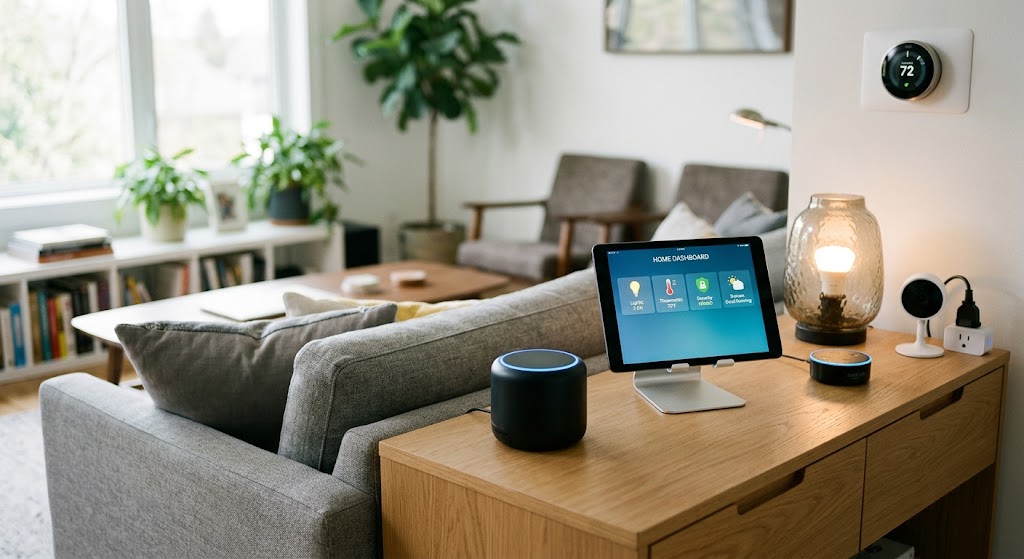
Home Assistant Starter Guide: How to Build a Private, Local Smart Home
Home Assistant lets you run automations, dashboards, and device control on hardware inside your home. This beginner guide shows the cleanest 2026 path to a private, local-first setup.
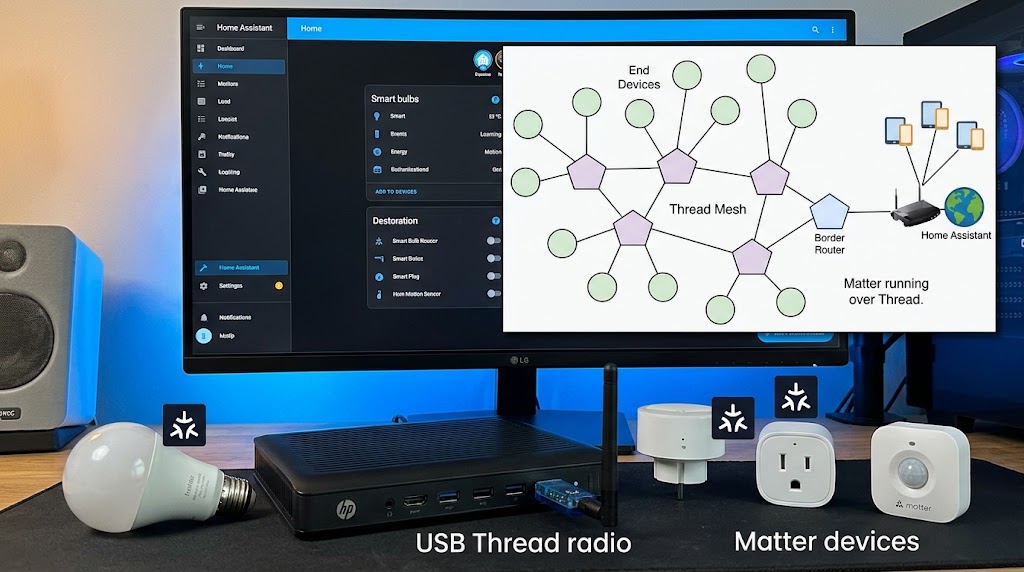
How to Use Home Assistant SkyConnect to Run Matter and Thread Simultaneously
SkyConnect can power a Home Assistant Thread network for Matter-over-Thread devices, but Matter and Thread are different layers—not two radio modes. Here is the correct 2026 setup.
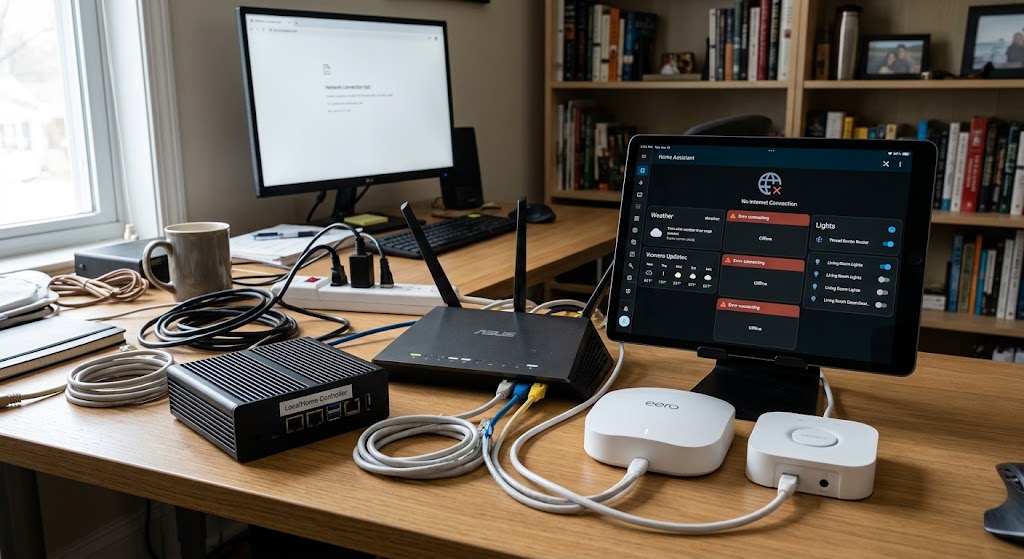
How to Set Up an Offline Smart Home Network That Works When Wi-Fi Drops
Build a local-first smart home that keeps critical lights, sensors, locks, and automations working during internet outages—and can keep core automations alive even when the Wi-Fi access point itself fails.
5 Essential Home Assistant Automations for Energy Saving
These five Home Assistant automations target the biggest sources of avoidable household energy use: HVAC runtime, unnecessary lighting, standby loads, expensive tariff windows, and solar heat gain.