
Smart Home Network Setup: Isolating IoT Devices on a Guest Wi-Fi
A guest Wi-Fi can isolate smart-home devices from laptops and personal data, but strict isolation may break Matter, casting, HomeKit, and local automation.
Quick answer
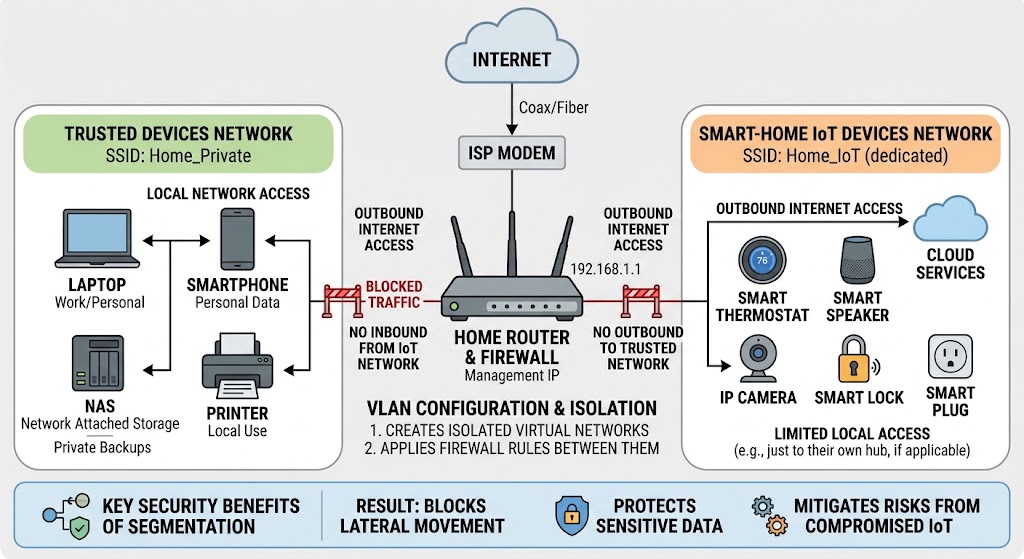
Putting IoT devices on a guest Wi-Fi can reduce their ability to reach laptops, NAS devices, and other trusted systems, making it a useful first layer of smart-home network segmentation. However, strict guest or client isolation can also block local discovery and hub-to-device traffic, so homes using Matter, Home Assistant, AirPlay, Chromecast, or other local protocols may need a dedicated IoT VLAN or SSID with carefully limited firewall and mDNS rules instead.
Table of contents
- What IoT isolation is trying to accomplish
- What a guest Wi-Fi normally does
- The simple guest-network model
- Network isolation and client isolation are not the same thing
- Network isolation
- Client isolation
- Why client isolation can break IoT
- The first decision: cloud-only IoT or local smart home?
- Group A: mostly cloud-controlled devices
- Group B: locally controlled devices
- Why Matter changes the guest-Wi-Fi discussion
- A fully isolated guest network can be too isolated for Matter
- Home Assistant has the same discovery problem
- The normal fix is controlled discovery forwarding
- Guest Wi-Fi vs dedicated IoT VLAN
- A safe simple setup for most households
- Step 1: Keep trusted devices on the main network
- Step 2: Create a dedicated IoT or guest SSID
- Step 3: Use modern Wi-Fi security
- Step 4: Block access from IoT to the private LAN
- Step 5: Do not enable client isolation blindly
- Step 6: Reconnect devices one category at a time
- A better architecture for Home Assistant and advanced local control
- Where should Home Assistant live?
- Why mDNS deserves special treatment
- Apple provides another useful security model
- Should IoT devices have internet access?
- Cloud-dependent device
- Local-first device
- A practical four-level isolation strategy
- Level 1: One flat home network
- Level 2: IoT on consumer guest Wi-Fi
- Level 3: Dedicated IoT VLAN
- Level 4: Multiple segmented device classes
- Common smart-home segmentation mistakes
- Mistake 1: Treating “Guest Wi-Fi” as a security guarantee
- Mistake 2: Turning on client isolation for every IoT device
- Mistake 3: Breaking Matter by ignoring IPv6
- Mistake 4: Allowing every port between VLANs after discovery fails
- Mistake 5: Putting your home controller on the least-trusted network
- Mistake 6: Forgetting wired IoT devices
- Mistake 7: Migrating every device before testing
- A troubleshooting checklist when an isolated device disappears
- 1. Does it have an IP address?
- 2. Does it reach the internet?
- 3. Is access to the trusted LAN intentionally blocked?
- 4. Is client isolation enabled?
- 5. Does the device depend on mDNS or another discovery protocol?
- 6. Is IPv6 working?
- 7. Is the firewall allowing only one direction?
- 8. Is the phone on the network expected by the setup flow?
- 9. Does the device require 2.4 GHz?
- A recommended architecture by smart-home type
- The minimum secure setup I would choose
- Conclusion
Key takeaways
- Guest Wi-Fi is a useful first layer of IoT segmentation because it can keep smart devices away from laptops, NAS systems, and other trusted clients.
- Do not assume every guest network behaves the same; some block only access to the main LAN, while others also isolate guest clients from each other.
- Matter, Home Assistant, AirPlay, Chromecast, and other local services may depend on IPv6, mDNS, multicast, or direct LAN traffic that strict isolation can block.
- A dedicated IoT VLAN with explicit firewall rules is usually the better architecture when you need both isolation and controlled local smart-home communication.
Editorial transparency
Who worked on this article and how it was handled.
- Written by
- Maya Chen
- Creation method
- Editorial research
AI assistance: AI assisted with research organization and drafting. Sources, factual claims, and the final article should be reviewed by a human editor before publication.
Smart-home devices are often the least trusted computers in the house. A smart plug, camera, thermostat, speaker, or inexpensive Wi-Fi bulb may receive fewer years of software support than your laptop, yet it can sit on the same network as personal files, printers, work computers, and network storage.
Moving IoT devices to a guest Wi-Fi is one of the simplest ways to reduce that exposure. CISA’s home-network guidance specifically describes segmentation as separating device groups such as guests, IoT hardware, personal computers, and work systems, and notes that the guest Wi-Fi function found on many routers can be a simple way to create that separation.
The catch is that a smart home also depends on devices talking locally. Matter, Home Assistant, casting, speakers, bridges, and local controllers can rely on IPv6, multicast discovery, mDNS, or direct LAN connections. If the guest network blocks too much, your “more secure” setup can turn into a home where devices disappear from apps or only work through the cloud.
What IoT isolation is trying to accomplish
The goal is not to make every smart device invisible to every other system.
The useful security goal is narrower:
An IoT device should have only the network access it actually needs.
For many homes, that means preventing a smart bulb or camera from initiating connections to:
- personal laptops;
- desktop computers;
- work devices;
- NAS storage;
- local file shares;
- printer administration pages;
- router management interfaces.
At the same time, the device may still need:
- internet access for its vendor cloud;
- DNS;
- DHCP;
- NTP or other time services;
- a local smart-home hub;
- a Matter controller;
- a Home Assistant server;
- another device in the same product ecosystem.
Segmentation is therefore not simply “internet or no internet.” It is about defining trust boundaries.
What a guest Wi-Fi normally does
A consumer router’s guest-network feature usually creates a separate wireless network for less-trusted clients.
The exact implementation varies by router.
Depending on the model, a guest network may:
- provide internet access but block the main LAN;
- place guests on a separate subnet;
- isolate every wireless guest from every other guest;
- enable a captive portal;
- apply separate DNS, parental-control, or bandwidth policies.
This variation matters because “Guest Wi-Fi” is a product label, not a universal networking standard.
The simple guest-network model
For basic cloud-connected IoT, the ideal simple behavior is:
Trusted LAN
- Laptop
- Phone
- NAS
- Work computer
       X
       X  blocked
       X
IoT / Guest Wi-Fi
- Smart plug
- Wi-Fi bulb
- Robot vacuum
- Cloud camera
       |
       | allowed
       v
    Internet
The IoT device reaches its cloud service but cannot initiate a connection to your laptop or NAS.
For a basic smart home, that can be a meaningful improvement with almost no network administration.
Network isolation and client isolation are not the same thing
This distinction causes many smart-home failures.
Network isolation
Network isolation blocks communication between different networks or VLANs.
Example:
IoT network  ->  Trusted LAN     BLOCK
IoT network  ->  Internet        ALLOW
Your smart plug cannot reach your laptop, but two devices on the IoT network may still be able to communicate with each other.
Client isolation
Client isolation blocks communication between devices on the same wireless network or access point.
Example:
Smart speaker  X  Smart display
Camera         X  Local hub
Bulb           X  Bridge
Ubiquiti documents these as different controls: network isolation restricts communication between networks, while client isolation prevents device-to-device traffic even within the same Wi-Fi environment.
That second option is useful for public guest Wi-Fi where strangers should not see one another.
It can be a poor default for a smart home.
Why client isolation can break IoT
Many smart-home products are not independent cloud terminals.
They may expect to discover or reach:
- a local bridge;
- a speaker;
- a TV;
- a media receiver;
- a home hub;
- a controller;
- another accessory.
If client isolation blocks that east-west traffic, the devices can each have working internet access while still failing as a smart-home system.
You may see symptoms such as:
- a device appearing offline in a local controller;
- casting targets disappearing;
- a bridge failing to find accessories;
- setup working in the vendor app but not in another ecosystem;
- local automation failing while cloud control still works.
So do not enable client isolation on an IoT SSID simply because the word “isolation” sounds more secure.
Use it only when you know the devices do not need to communicate locally.
The first decision: cloud-only IoT or local smart home?
Before changing your network, classify the devices.
Group A: mostly cloud-controlled devices
Examples may include simple vendor-app plugs, bulbs, vacuums, and cameras that primarily communicate with their manufacturer’s internet service.
These devices are the easiest candidates for a consumer guest network.
A practical policy can be:
IoT -> Trusted LAN: BLOCK
IoT -> Internet: ALLOW
IoT -> Other IoT clients: ALLOW unless unnecessary
Group B: locally controlled devices
These may use:
- Matter;
- Home Assistant;
- HomeKit;
- Chromecast;
- AirPlay;
- local APIs;
- local bridges;
- MQTT;
- local media discovery.
For these devices, an all-or-nothing guest network may be too restrictive.
A dedicated IoT network with selective firewall rules is usually more flexible.
Why Matter changes the guest-Wi-Fi discussion
Matter is designed around local IP networking.
Google’s Matter documentation states that Matter-enabled devices carry out commands over the existing home network rather than requiring every command to travel through a vendor cloud. Google also states that IPv6 must be enabled for Matter to operate properly.
That is a major architectural difference from older cloud-only Wi-Fi devices.
A Matter setup can include:
- Matter accessory;
- Matter controller;
- home hub;
- Thread border router for Thread devices;
- phone used for commissioning;
- additional ecosystem controllers.
Those components need the network to permit the required local communication.
A fully isolated guest network can be too isolated for Matter
Suppose:
- your phone is on the trusted Wi-Fi;
- a Google Home or Apple home hub is on the trusted LAN;
- the new Matter plug is placed on a guest network that cannot communicate with the trusted network.
The plug may have internet access, but Matter’s local control path is now separated by a firewall boundary.
Depending on the router and commissioning flow, setup may fail or the accessory may become unreliable after setup.
The lesson is not “Matter cannot use VLANs.”
The lesson is:
Matter segmentation requires deliberate IPv6, routing, firewall, and discovery design.
Do not assume a consumer router’s “block local network access” switch understands the needs of Matter automatically.
Home Assistant has the same discovery problem
Home Assistant supports many devices that are discovered with mDNS/Zeroconf.
Its documentation describes Zeroconf as a method for devices to advertise services on the local network and notes that some integrations rely on that traffic.
mDNS typically uses multicast on the local network. Network boundaries such as VLANs do not automatically forward that discovery traffic.
That creates a common situation:
Trusted VLAN
- Home Assistant
- Laptop
- Phone

IoT VLAN
- Local smart plug
- Speaker
- Bridge
Direct IP communication might be allowed by firewall rules, but Home Assistant still may not automatically discover the devices because the discovery messages do not cross the VLAN.
The normal fix is controlled discovery forwarding
Business and prosumer routers may provide:
- mDNS reflector;
- mDNS repeater;
- mDNS proxy;
- service-specific discovery relay.
Ubiquiti, for example, documents an mDNS proxy that can forward discovery between selected VLANs and can limit which service types are relayed.
This is much better than simply allowing all traffic between the trusted and IoT networks.
The architecture becomes:
Trusted devices
      |
      | selected control traffic
      | selected mDNS discovery
      v
   Firewall
      |
      v
IoT devices

IoT -> Trusted general access: BLOCK
That is the main advantage of an IoT VLAN over a basic guest network: controlled exceptions.
Guest Wi-Fi vs dedicated IoT VLAN
For many readers, this is the real decision.
| Feature | Guest Wi-Fi | Dedicated IoT VLAN |
|---|---|---|
| Setup difficulty | Low | Medium to high |
| Separate SSID | Usually | Usually |
| Blocks access to main LAN | Often | Configurable |
| Client-to-client isolation | Sometimes automatic | Configurable |
| Custom firewall rules | Limited on many consumer routers | Usually available |
| Cross-network mDNS | Often unsupported | Can be relayed selectively |
| Matter/Home Assistant flexibility | Limited | Much better |
| Best for | Simple cloud IoT | Advanced local smart homes |
A VLAN is not inherently more secure just because it has a VLAN ID.
The security comes from the routing and firewall policy between networks.
A safe simple setup for most households
If your smart home is mostly vendor-cloud devices and your router has a normal guest-network option, start simple.
Step 1: Keep trusted devices on the main network
Put these on the normal private Wi-Fi:
- phones;
- laptops;
- desktops;
- NAS systems;
- work computers;
- router-management clients.
Step 2: Create a dedicated IoT or guest SSID
Use a name that does not expose personal information.
The network does not need to be literally called “Guest.” Some consumer routers let you create a second SSID with guest-style isolation.
Step 3: Use modern Wi-Fi security
Use the strongest security mode supported by both the router and the devices.
Some older IoT hardware may support only WPA2, while newer networks may support WPA3. Avoid weakening the trusted network just to accommodate one legacy device if your router can provide a separate compatible IoT SSID.
Step 4: Block access from IoT to the private LAN
If the router has a setting such as:
- Allow guests to access local network;
- Access intranet;
- Access LAN;
- Guest network isolation;
disable guest access to the trusted LAN.
Router wording varies.
Step 5: Do not enable client isolation blindly
If every IoT device is cloud-only, client isolation may be acceptable.
If you use:
- local hubs;
- speakers;
- casting;
- Matter;
- local bridges;
- Home Assistant;
test carefully before enabling it.
Step 6: Reconnect devices one category at a time
Move a few devices first.
Test:
- vendor app;
- local voice control;
- routines;
- physical switches;
- casting;
- remote access;
- notifications.
Do not migrate 40 devices in one evening and then try to identify which network feature failed.
A better architecture for Home Assistant and advanced local control
Once you need selective communication, move beyond the “Guest” abstraction.
A common architecture is:
VLAN 10 - Trusted
- Phones
- Laptops
- NAS

VLAN 20 - IoT
- Smart plugs
- Lights
- Thermostats
- Speakers
- Bridges

VLAN 30 - Guest
- Visitors
Then apply policies such as:
Trusted -> IoT:
ALLOW required control traffic

IoT -> Trusted:
BLOCK by default

IoT -> Home Assistant:
ALLOW only when required

IoT -> Internet:
ALLOW, restrict, or block by device need

Guest -> Trusted:
BLOCK

Guest -> IoT:
BLOCK
The exact rule set depends on your devices.
Avoid copying random port lists from forums without verifying each integration. Different products can use HTTP, HTTPS, MQTT, proprietary TCP/UDP protocols, multicast discovery, or dynamically negotiated connections.
Start with a deny boundary and add the minimum exceptions you can validate.
Where should Home Assistant live?
There is no one mandatory answer, but the trust boundary matters.
A common design keeps Home Assistant on the trusted or server network because it stores credentials and can control many devices.
Then firewall rules allow the controller to reach IoT devices without giving every IoT device broad access back to the trusted LAN.
That relationship can be conceptualized as:
Home Assistant  --->  IoT devices
     ALLOW

IoT device  --->  Laptop / NAS
     BLOCK
Some integrations require connections initiated from the device toward Home Assistant, so the rule cannot always be strictly one-directional.
The correct policy is integration-specific.
Why mDNS deserves special treatment
mDNS is commonly associated with:
- Bonjour;
- AirPlay;
- AirPrint;
- Chromecast discovery;
- smart-home commissioning;
- local service discovery.
It is convenient precisely because devices can discover services without manual IP configuration.
Segmentation stops that broadcast-domain convenience.
A router with an mDNS relay can restore selected discovery across networks without merging the networks into one unrestricted LAN.
Ubiquiti’s current documentation, for example, supports forwarding mDNS between selected VLANs and limiting relayed service types.
That is the right mental model:
Relay discovery intentionally; do not remove segmentation just to make discovery work.
Apple provides another useful security model
Apple’s HomeKit router security design shows a more granular alternative to unrestricted IoT networking.
Apple documents a “Restrict to Home” mode in which an accessory cannot freely access the internet or local network but can still make the connections required for HomeKit discovery and control.
The exact feature depends on compatible routers and Apple Home architecture, so it is not a universal solution.
But the security principle is broadly useful:
Smart-home isolation works best when required control paths are allowed explicitly while unrelated network access remains blocked.
That is more sophisticated than putting everything on a public-style guest SSID and hoping it still works.
Should IoT devices have internet access?
Not every device needs the same answer.
Cloud-dependent device
If removing internet access breaks the vendor app entirely, it obviously needs outbound internet access for normal operation.
Local-first device
A locally controlled plug, sensor, or bridge may continue working without internet after setup, depending on its architecture.
Blocking internet can reduce unnecessary external communication, but it can also stop:
- firmware updates;
- time synchronization;
- push notifications;
- cloud voice assistants;
- remote access;
- certificate validation;
- vendor app functions.
Do not block internet purely as a security ritual.
Test the device and understand what functionality is lost.
A practical four-level isolation strategy
You do not need enterprise networking to make progress.
Level 1: One flat home network
Everything shares the same LAN.
Best for: maximum simplicity.
Weakness: a compromised IoT device has more local reach.
Level 2: IoT on consumer guest Wi-Fi
Trusted devices stay on the main LAN; IoT devices move to the guest network.
Best for: cloud-oriented smart homes and nontechnical households.
Weakness: limited control over exceptions; local ecosystems may break.
Level 3: Dedicated IoT VLAN
IoT devices have their own subnet with explicit firewall rules.
Best for: Home Assistant, Matter-heavy homes, local cameras, media devices, and advanced automation.
Weakness: more configuration and troubleshooting.
Level 4: Multiple segmented device classes
Separate networks for:
- trusted clients;
- IoT;
- cameras;
- servers;
- guests;
- work systems.
Best for: enthusiasts with a clear reason to manage that complexity.
Weakness: configuration burden grows quickly.
For a normal home, Level 2 or Level 3 is usually the practical target.
Common smart-home segmentation mistakes
Mistake 1: Treating “Guest Wi-Fi” as a security guarantee
Check what the router actually blocks.
A guest SSID with full access to the LAN is just another SSID.
Mistake 2: Turning on client isolation for every IoT device
That can break devices that need local peer communication.
Mistake 3: Breaking Matter by ignoring IPv6
Google explicitly states that IPv6 must be enabled on the home network for Matter to work properly.
An IPv4-only segmentation design is not a complete Matter design.
Mistake 4: Allowing every port between VLANs after discovery fails
This restores functionality by effectively defeating the point of segmentation.
Fix discovery or required control flows instead.
Mistake 5: Putting your home controller on the least-trusted network
Your central controller may contain tokens, credentials, device keys, automation data, and access to the rest of the smart home.
Treat it as more trusted than a commodity light bulb.
Mistake 6: Forgetting wired IoT devices
An IoT SSID protects only devices actually connected to it.
Ethernet hubs, TVs, bridges, cameras, and controllers connected to a default switch port may still sit on the trusted LAN unless the wired network is segmented too.
Mistake 7: Migrating every device before testing
Move one device category, verify it, then continue.
Network problems are much easier to diagnose when only three devices changed.
A troubleshooting checklist when an isolated device disappears
If a device works on the main Wi-Fi but not on the IoT or guest network, check in this order.
1. Does it have an IP address?
Confirm DHCP succeeded.
2. Does it reach the internet?
If the device is cloud-dependent, test vendor-app control.
3. Is access to the trusted LAN intentionally blocked?
If yes, determine whether the device requires a local hub or controller there.
4. Is client isolation enabled?
Disable it temporarily and retest.
5. Does the device depend on mDNS or another discovery protocol?
Home Assistant’s Zeroconf Browser can help identify devices advertised through mDNS.
6. Is IPv6 working?
This is especially important for Matter.
7. Is the firewall allowing only one direction?
Some integrations require device-initiated responses or connections.
8. Is the phone on the network expected by the setup flow?
Some commissioning processes expect the phone, hub, and accessory to be locally reachable during setup.
9. Does the device require 2.4 GHz?
Frequency-band support is separate from segmentation, but it often gets blamed on the new network because users change both at the same time.
A recommended architecture by smart-home type
| Your setup | Recommended network approach |
|---|---|
| A few cloud plugs and bulbs | Guest Wi-Fi with LAN access blocked |
| Cloud cameras and vacuum | Guest/IoT network; verify notifications and remote viewing |
| Home Assistant with local integrations | Dedicated IoT VLAN with controlled firewall rules |
| Matter-heavy smart home | VLAN-capable design with IPv6 and tested controller/accessory communication |
| AirPlay/Chromecast across networks | VLANs plus selective mDNS forwarding |
| Public visitors | Separate true guest network with client isolation |
| Security cameras/NVR | Consider a dedicated camera VLAN if your hardware supports it |
The key is to avoid using one network policy for every untrusted device category.
Visitors and smart bulbs are both “less trusted,” but they do not have the same communication requirements.
The minimum secure setup I would choose
For a typical household that wants better security without becoming a network administrator:
- Keep phones, laptops, work systems, and storage on the trusted SSID.
- Put straightforward cloud IoT on a separate IoT/guest SSID.
- Block IoT access to the trusted LAN.
- Leave IoT client-to-client communication enabled unless you know it is unnecessary.
- Keep a separate actual guest SSID for visitors if the router supports it.
- If Matter, Home Assistant, or local media discovery starts requiring exceptions, upgrade to a router that supports VLANs and firewall policies instead of punching broad holes through guest isolation.
- Keep router firmware and IoT firmware updated and remove abandoned devices from the network.
That approach delivers most of the security benefit without turning a small apartment or house into a miniature enterprise network.
Conclusion
Isolating IoT devices on guest Wi-Fi is a good starting point, not a universal smart-home architecture.
For simple cloud-connected plugs, bulbs, vacuums, and similar devices, a guest network that blocks access to your trusted LAN can reduce unnecessary exposure with very little setup. The problem begins when that same network also blocks the local communication your smart home actually needs.
If you use Matter, Home Assistant, AirPlay, Chromecast, local bridges, or other LAN-based control, move toward a dedicated IoT VLAN or SSID with explicit firewall rules and selective discovery forwarding. Keep IoT access to laptops and storage blocked, but allow the minimum paths needed for hubs and controllers to work.
The right network is not the one with the most isolation switches enabled. It is the one that clearly separates trust while preserving only the communication your smart home genuinely requires.
Common questions
Questions this guide answers
Should smart home devices be on a guest Wi-Fi?
Yes, for simple cloud-connected devices a guest Wi-Fi is often a practical way to separate less-trusted IoT hardware from computers and personal storage. CISA specifically describes guest Wi-Fi as one possible way to segment IoT devices, but the exact isolation behavior depends on the router.
Why do some smart devices stop working on a guest network?
Guest networks often block traffic to the main LAN and may also block communication between clients on the guest SSID. Local smart-home technologies can rely on mDNS, multicast, IPv6, or direct hub-to-device connections, so aggressive isolation can prevent discovery or control.
Will Matter devices work on an isolated IoT network?
Matter is designed to operate locally over the home network and requires working IPv6. It can work across a segmented network only when the router, firewall, and discovery path allow the Matter controller, border router or hub, and accessory to communicate as required. A fully isolated guest network may therefore break commissioning or normal control.
Is an IoT VLAN better than a guest Wi-Fi?
For advanced smart homes, usually yes. A dedicated IoT VLAN lets you block IoT access to trusted devices while selectively allowing traffic to a home hub, controller, DNS service, or required discovery protocol. A basic guest network often provides only all-or-nothing isolation.
Should client isolation be enabled for an IoT Wi-Fi?
Only when the devices do not need to communicate with one another. Client isolation blocks device-to-device traffic on the same wireless network and can break casting, local discovery, bridges, cameras, speakers, or other hub-based smart-home workflows.
Evidence & further reading
Sources & references
Primary and authoritative references used to support or contextualize this article. Links open the original source.
- 1Federal Mobile Workplace Security
Cybersecurity and Infrastructure Security Agency · Accessed Aug 29, 2026
Supports home-network segmentation and the use of separate networks, including guest Wi-Fi, for IoT and other device groups.
- 2Prepare your smart home for Matter
Google Home and Nest Help · Accessed Aug 29, 2026
Supports Matter's local-network operation, hub requirements, and the requirement for IPv6 on the home network.
- 3Zero-configuration networking (zeroconf)
Home Assistant · Accessed Aug 29, 2026
Supports Home Assistant's use of mDNS/Zeroconf for local device discovery and notes that some integrations depend on Zeroconf traffic.
- 4Network Configuration
Home Assistant · Accessed Aug 29, 2026
Supports Home Assistant network-interface selection and mDNS broadcast handling.
- 5Implementing Network and Client Isolation in UniFi
Ubiquiti · Accessed Aug 29, 2026
Supports the distinction between inter-VLAN network isolation and client isolation within a Wi-Fi network.
- 6UniFi Gateway - Multicast DNS (mDNS) Proxy
Ubiquiti · Accessed Aug 29, 2026
Supports selectively relaying mDNS discovery across VLANs for services such as AirPlay, AirPrint, and Chromecast.
- 7Securing routers with HomeKit
Apple Platform Security · Accessed Aug 29, 2026
Supports the principle of restricting smart-home accessories while still permitting the local connections required for discovery and control.

About the author
Maya Chen
Maya covers residential energy, HVAC controls, and practical home automation, translating technical systems into useful decisions for homeowners and renters.
More from Maya →Make your home smarter without buying every gadget.
One useful idea, one product worth knowing, and one energy-saving action—delivered weekly.
No spam. Unsubscribe anytime.
Semantic recommendations
Related reading
Selected from topic cluster, entities, tags, search intent, and editorial relationships.
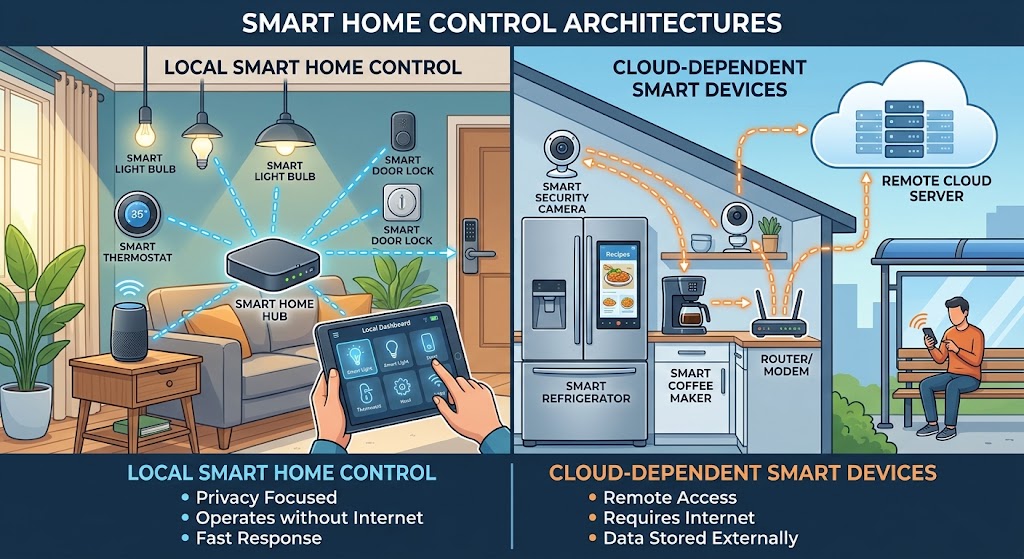
Local Control vs. Cloud Smart Home: Why You Should Avoid Cloud Dependency
Cloud features are useful, but your lights, locks, sensors, and core automations should not stop working when the internet or a vendor service fails. Here is how to build a local-first smart home in 2026.
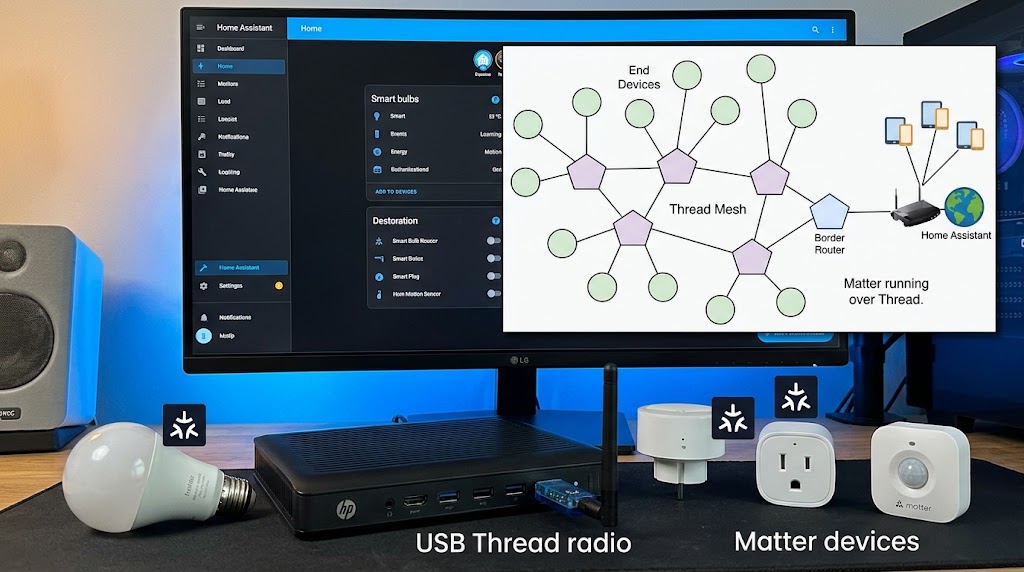
How to Use Home Assistant SkyConnect to Run Matter and Thread Simultaneously
SkyConnect can power a Home Assistant Thread network for Matter-over-Thread devices, but Matter and Thread are different layers—not two radio modes. Here is the correct 2026 setup.
Matter Protocol in 2026: What It Is and Why Your Next Device Needs It
Matter 1.6 is the latest smart-home interoperability standard in 2026. Learn what Matter actually does, how Thread and Wi-Fi fit in, and when you should insist on Matter certification.
Local DIY Smart Home Hub vs Cloud Ecosystems for Studio Apartments
Compare local smart home hubs with Apple Home, Google Home, Alexa, and other cloud ecosystems to choose the right setup for a small studio apartment.