
Smart Garage Door Opener Security Settings for Labor Day Trips
Before a holiday trip, tighten smart garage security with instant alerts, scheduled closing, temporary access, account protection, and a simple pre-departure test.
Quick answer
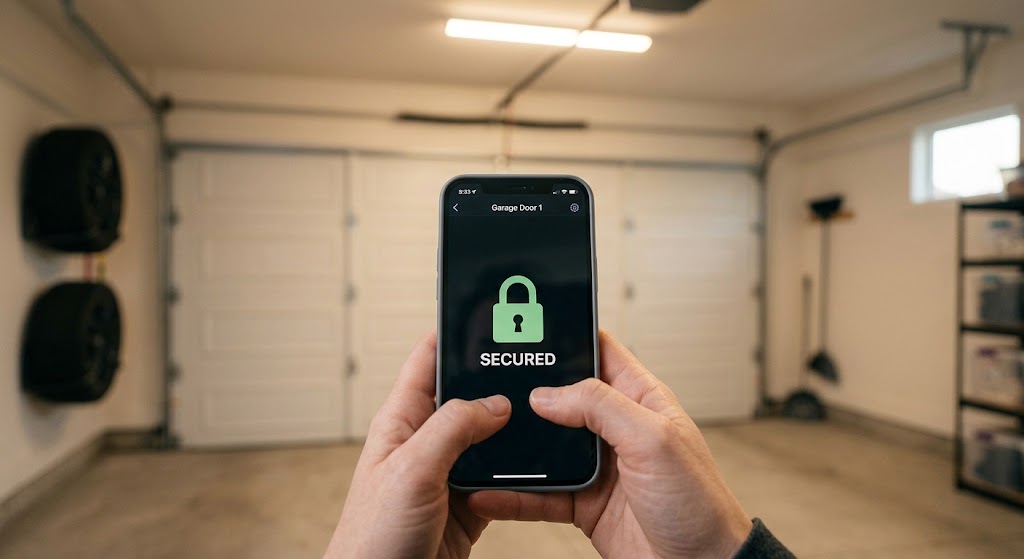
Before a Labor Day trip, configure your smart garage opener to send immediate open and close alerts, warn you if the door stays open, automatically close at a safe scheduled time where supported, and give helpers their own temporary access instead of sharing your main account. Also secure the app with MFA or device-level biometric protection, review existing users and integrations, and test the door sensor, safety sensors, Wi-Fi connection, and remote status before you leave.
Table of contents
- Start with immediate open and close alerts
- Use immediate alerts for activity, delayed alerts for mistakes
- Add a scheduled close as a backup—not as your primary plan
- Why “close only” is the right direction for vacation automation
- Give helpers temporary access instead of your password
- Full access should be the exception
- Review the access list before you leave
- Turn on MFA and app-level security
- Do not enable security features five minutes before departure
- Check activity history instead of relying only on push notifications
- Verify the door sensor before trusting remote status
- Check Wi-Fi and power resilience
- Do not disable garage-door safety systems for convenience
- Lock down the rest of the garage, too
- A 10-minute smart garage pre-trip checklist
- The best security configuration for most trips
- Conclusion
Key takeaways
- Immediate door activity alerts and a door-left-open reminder provide more useful travel security than repeatedly checking the app manually.
- Temporary or scheduled guest access is safer and easier to revoke than sharing the owner's garage account credentials.
- A scheduled close is a useful backup, but it should never be treated as a substitute for confirming that the door, safety sensors, and physical hardware are working correctly before departure.
Editorial transparency
Who worked on this article and how it was handled.
- Written by
- Maya Chen
- Creation method
- Editorial research
AI assistance: AI assisted with research organization and drafting. Sources, factual claims, and the final article should be reviewed by a human editor before publication.
A long-weekend trip creates exactly the kind of garage-door uncertainty smart openers are supposed to solve: you are already miles from home when someone asks, “Did we actually close the garage?” The app may answer that question, but remote control alone is not a complete security setup.
The better approach is to configure the garage before leaving so it tells you when something happens, closes itself when a predictable mistake occurs, and gives trusted helpers narrowly scoped access instead of exposing the owner account. Those settings are more valuable than opening the app every few hours to check a door that should already be secure.
This guide covers the smart garage security settings worth reviewing before a Labor Day trip, including alerts, scheduled closing, temporary access, account protection, and a pre-departure test. The exact menu names vary by platform, so use your opener manufacturer’s documentation when a feature behaves differently from the examples below.
Start with immediate open and close alerts
For travel, the most useful garage automation is often the simplest: tell me immediately when the door changes state.
Chamberlain’s myQ app supports notifications for connected-device activity, including garage-door events, and Genie Aladdin Connect provides real-time status and notifications. These alerts turn the garage from something you have to remember to check into an entry point that reports unexpected activity to you.
Before leaving, enable at least:
- door opened notifications;
- door closed notifications;
- a door left open or delayed reminder if your platform offers one;
- sound or vibration for security-relevant alerts if your phone normally suppresses routine smart-home notifications.
The first two establish a simple event trail. The delayed reminder handles a different problem: a family member opens the garage while packing the car and everyone drives away assuming someone else closed it.
Use immediate alerts for activity, delayed alerts for mistakes
These are not redundant.
An immediate “garage opened” notification tells you that an event happened. A delayed “garage has remained open” reminder tells you that the event has become a security problem.
For travel, a practical configuration is to make open/close activity immediate and set a second reminder if the door remains open beyond the amount of time your household normally needs to load or unload.
Do not set the delay so aggressively that normal activity generates constant nuisance notifications. Alerts that fire too often tend to get muted, which defeats the purpose.
Add a scheduled close as a backup—not as your primary plan
A scheduled close is useful because forgetting to close the garage is predictable. Smart garage systems can handle that mistake better than they can handle every possible security problem.
myQ supports schedules that can close a garage door at a defined time. Chamberlain explicitly notes that garage doors can only be scheduled to close, not open, for security reasons. Genie Aladdin Connect also supports time-based close rules and rules that close the door after it has remained open for a set period.
A travel-oriented schedule could look like this:
| Rule | Purpose |
|---|---|
| Close every evening at a chosen time | Catches a door accidentally left open after a helper visits |
| Close after the door remains open too long | Reduces exposure after loading, deliveries, or maintenance visits |
| Notify when the scheduled close runs | Confirms that the automation executed |
Why “close only” is the right direction for vacation automation
You do not want a time-based rule opening a physical entry point while nobody is home. A close-only schedule provides a useful safety net without creating a new predictable access window.
Even so, scheduled closing is not permission to skip the physical check before departure. A garage door should still close completely, reverse correctly when the safety system requires it, and report the correct state in the app.
If the door does not move smoothly, the opener reports inconsistent position, or a safety sensor is misaligned, fix that before relying on remote automation.
Give helpers temporary access instead of your password
If a neighbor, pet sitter, cleaner, contractor, or family member needs garage access while you are away, do not solve the problem by texting them the owner’s login credentials.
Genie Aladdin Connect supports Virtual Keys with scheduled or recurring access. Genie also distinguishes between primary/master control and invited users, which lets the owner retain authority over rules and access management.
The security model is straightforward:
one person, one access grant, one reason to have it.
That approach gives you several advantages:
- access can be revoked without changing the owner’s password;
- the helper does not inherit account-management privileges;
- activity can be associated with an authorized user rather than a shared credential;
- access can expire automatically when the trip ends.
Full access should be the exception
A roommate or close family member may genuinely need ongoing control. A dog walker arriving twice during the weekend probably does not.
Use the narrowest access type that fits the job:
| Person | Better access model |
|---|---|
| Household member | Ongoing individual access |
| Neighbor checking the house once | Temporary access |
| Pet sitter visiting at fixed times | Scheduled or recurring access |
| Contractor with one appointment | Short-lived temporary access |
| Delivery driver | Use the platform’s supported delivery/access workflow rather than sharing owner credentials |
After the trip, remove temporary users you no longer need instead of letting old access accumulate indefinitely.
Review the access list before you leave
Smart-home accounts get messy over time. Old phones, former roommates, relatives, installers, and short-term helpers can remain connected long after anyone remembers why they were added.
Before travel, open the garage platform’s user or invitation settings and ask:
- Who currently has access?
- Does each person still need it?
- Is anyone using a shared owner account when they could have individual access?
- Are there pending invitations that should be canceled?
- Are there old integrations you no longer use?
This is especially important if the garage connects to a broader smart-home platform, voice assistant, delivery service, or automation system. The garage app may not be the only route capable of issuing a command.
Removing unnecessary access reduces the number of credentials and integrations you have to trust while you are away.
Turn on MFA and app-level security
A smart garage app controls a physical entry point, so account security deserves more attention than it would for a low-risk convenience device.
Chamberlain currently supports Two-Step Verification for myQ. The feature adds a one-time verification code in addition to the account password during qualifying sign-in and security events. myQ also exposes app-level security settings that can require the phone’s biometric authentication or a passcode when opening the app, viewing the account, or controlling doors and gates.
Before the trip:
- Enable MFA or the platform’s equivalent if available.
- Confirm the recovery phone number and email address are current.
- Use a unique password that is not reused for another service.
- Enable phone-level biometric or passcode protection for the garage app if supported.
- Make sure you can still sign in after the security change before leaving home.
Do not enable security features five minutes before departure
Account hardening is valuable, but last-minute changes can create lockout problems if recovery information is outdated.
Make changes early enough to test them. Sign out and back in if appropriate, verify that recovery codes or methods reach you, and confirm that every household member who legitimately needs access still has it.
Check activity history instead of relying only on push notifications
Push notifications are useful, but mobile operating systems and message-delivery services can delay or suppress them. Genie notes that Aladdin Connect maintains history reports for each opener, which gives you a second way to verify what happened.
Activity history helps answer questions such as:
- Did the door actually close after the pet sitter left?
- Was the garage opened at an unusual hour?
- Did an authorized user operate it during their access window?
- Was an alert missed because the phone was offline or in a focus mode?
History is especially useful when traveling across time zones or spending long periods without reliable cellular service.
Treat it as a verification tool, not a guarantee that every event will always be logged. Cloud services, home internet, power, and device connectivity can all affect what gets recorded.
Verify the door sensor before trusting remote status
A remote status indicator is only useful if the opener correctly knows whether the door is open or closed.
Before leaving:
- Stand where you can safely observe the garage door.
- Open it normally and confirm the app changes to open.
- Close it normally and confirm the app changes to closed.
- Wait for the status to refresh rather than assuming an old screen is current.
- Trigger a test notification and verify it reaches the phones that matter.
If the app reports the wrong position, troubleshoot the door-position sensor or opener connection before travel. A false “closed” state is worse than no smart monitoring because it can create confidence in information that is not accurate.
Check Wi-Fi and power resilience
Smart garage monitoring depends on more than the opener motor. The chain usually includes:
garage opener → sensor/controller → home Wi-Fi → internet service → cloud service → phone app.
If any part of that chain is unavailable, remote status and alerts may stop working even though the physical door still operates locally.
Before a trip, check that:
- the garage has a stable Wi-Fi signal;
- the opener/controller shows normal connectivity;
- the home router is not scheduled to reboot or power down while you are away;
- your phone app reports live status rather than stale data;
- someone local can access the property if a prolonged outage requires intervention.
A UPS for networking equipment may improve short power-outage resilience, but it does not guarantee that the garage opener itself can operate without power. Battery-backup capability depends on the opener model.
Do not disable garage-door safety systems for convenience
Travel security does not justify bypassing safety hardware.
Photo-eye sensors, obstruction detection, warning signals, and manufacturer-required closing behavior exist to prevent injury or property damage. If an automation refuses to close the door because a safety sensor is blocked or misaligned, solve the underlying problem rather than trying to defeat the protection.
Also avoid improvised remote-closing workarounds that bypass the opener’s supported smart controls.
If the door binds, reverses unexpectedly, closes unevenly, or has damaged springs, cables, tracks, or rollers, use a qualified garage-door professional. Springs and other high-tension components can cause serious injury and are not appropriate for casual DIY adjustment.
Lock down the rest of the garage, too
A smart opener secures one control path. It does not make the contents of the garage invisible or physically resistant to every form of entry.
Before leaving for a long weekend:
- close and lock any interior door between the garage and living space;
- remove garage-door remotes from vehicles left outdoors if practical;
- avoid leaving keys, wallets, or visible valuables in the garage;
- confirm side doors and garage windows are secured;
- make sure emergency-release hardware has not been altered in an unsafe way.
If the opener or wall console includes a manufacturer-supported vacation or lock function, read the documentation before enabling it. These modes vary by model and may disable some remote controls while leaving other forms of access available. Do not assume “vacation mode” behaves the same across brands.
A 10-minute smart garage pre-trip checklist
Use this the day before departure rather than while everyone is loading luggage.
- Open and close the garage once and confirm the app reports both states correctly.
- Enable immediate open and close notifications.
- Add a reminder for a door left open longer than normal.
- Confirm the scheduled close rule, if you use one.
- Review every shared user and remove obsolete access.
- Create time-limited access for any helper who needs the garage during the trip.
- Enable MFA or Two-Step Verification where available.
- Turn on app biometric/passcode protection if supported.
- Confirm your account recovery phone and email still work.
- Check Wi-Fi connectivity in the garage.
- Verify the safety sensors are unobstructed and the door closes normally.
- Lock the interior garage-to-house door and secure other garage entry points.
The goal is not to add as many automations as possible. It is to remove uncertainty while keeping the system predictable.
The best security configuration for most trips
For a typical household leaving for a long weekend, a strong setup looks like this:
| Setting | Recommended travel configuration |
|---|---|
| Open alert | Immediate |
| Close alert | Immediate |
| Door-left-open alert | Enabled with a sensible delay |
| Scheduled close | Enabled as a backup if supported |
| Guest access | Individual and time-limited |
| Owner password sharing | Avoid |
| MFA | Enable if available |
| App biometrics/passcode | Enable if supported |
| Activity history | Review when an unexpected event occurs |
| Door-position test | Complete before departure |
| Safety sensors | Leave enabled and unobstructed |
This configuration does not make the garage immune to every failure. It does make the most common travel problems—forgotten closing, unnecessary shared access, missed events, and weak account security—much easier to control.
Conclusion
The most useful smart garage security settings for a Labor Day trip are the ones that reduce both uncertainty and unnecessary access. Turn on immediate door alerts, add a left-open reminder and a safe close schedule where supported, give helpers temporary credentials, and protect the owner account with MFA or app-level security.
Then test the system while you are still standing in the driveway. Confirm the app sees the correct door position, notifications arrive, Wi-Fi is stable, and the physical door and safety sensors work normally. A smart opener is most valuable while you are traveling when it is configured as a monitored entry point—not just a remote button on your phone.
Common questions
Questions this guide answers
What smart garage door settings should I enable before going on vacation?
Enable immediate open and close notifications, a door-left-open reminder, and a scheduled closing rule if your system supports it. Then review shared users, remove access that is no longer needed, protect your account with MFA or app biometrics, and verify that remote door status is updating correctly before departure.
Can I schedule a smart garage door to close automatically?
Yes on supported systems. myQ allows garage doors to be scheduled to close, while Genie Aladdin Connect supports time-based close rules and rules that close a door after it has remained open for a specified period. For security reasons, myQ does not allow scheduled garage-door opening.
Should I share my smart garage account with a pet sitter or neighbor?
Avoid sharing the primary account password. Use the platform's guest or virtual-key feature when available so each person receives separate access that can be limited by time and revoked without changing the owner's credentials.
Does a smart garage door opener make a garage secure by itself?
No. Smart controls improve awareness and access management, but they do not replace a properly closing door, working photo-eye safety sensors, physical door hardware, or sensible account security. Remote control is an additional layer, not a substitute for mechanical security.
Is MFA worth enabling for a garage door app?
Yes. A garage door app can control a physical entry point, so account takeover has higher consequences than losing access to an ordinary convenience app. myQ supports Two-Step Verification and also offers device-level biometric or passcode security options in its app.
Evidence & further reading
Sources & references
Primary and authoritative references used to support or contextualize this article. Links open the original source.
- 1Set Up Notifications and Alerts in the myQ App
Chamberlain Group · Accessed Aug 27, 2026
Supports immediate and delayed myQ notifications for connected garage door activity.
- 2How to Create, Manage, and Delete myQ Schedules
Chamberlain Group · Accessed Aug 27, 2026
Supports scheduled garage-door closing and the security limitation that garage doors can only be scheduled to close.
- 3myQ App | How to Set Up Multi Factor Authorization (Two-Step Verification)
Chamberlain Group · Accessed Aug 27, 2026
Supports enabling myQ Two-Step Verification using phone and email verification methods.
- 4How to Configure the Settings for the myQ App
Chamberlain Group · Accessed Aug 27, 2026
Supports app-level biometric and passcode security for login, account viewing, and opening doors or gates.
- 5Connected Smart Home
The Genie Company · Accessed Aug 27, 2026
Supports real-time garage status, activity history, scheduled or recurring Virtual Keys, and automatic close rules in Aladdin Connect.
- 6myQ App | Change or Reset Account Password
Chamberlain Group · Accessed Aug 27, 2026
Supports current myQ password requirements and account-password management guidance.

About the author
Maya Chen
Maya covers residential energy, HVAC controls, and practical home automation, translating technical systems into useful decisions for homeowners and renters.
More from Maya →Make your home smarter without buying every gadget.
One useful idea, one product worth knowing, and one energy-saving action—delivered weekly.
No spam. Unsubscribe anytime.
Semantic recommendations
Related reading
Selected from topic cluster, entities, tags, search intent, and editorial relationships.

How to Set Up Perimeter Lighting That Triggers During Security Alerts
Turn outdoor lights into a coordinated security response. This guide shows how to connect alarm states, door sensors, motion events, cameras, and Home Assistant so perimeter lighting activates only when it should.
Outdoor Motion Sensor Lighting: How to Prevent False Alarms from Animals
Outdoor motion lights that trigger for cats, raccoons, birds, or swaying branches usually need better sensor placement, sensitivity, and detection-zone control rather than a brighter fixture.
Fingerprint Smart Locks vs. Keypad Locks: Which Is More Reliable in Cold Weather?
Fingerprint smart locks are fast and convenient, but keypad locks are usually the more dependable cold-weather choice because they do not rely on biometric image quality.
5 Essential Home Assistant Automations for Energy Saving
These five Home Assistant automations target the biggest sources of avoidable household energy use: HVAC runtime, unnecessary lighting, standby loads, expensive tariff windows, and solar heat gain.