
Smart Air Purifiers for Late-Summer Ragweed & Pollen Season
Choose and automate a smart air purifier for late-summer ragweed and pollen using the right CADR, room size, schedules, and filtration strategy.
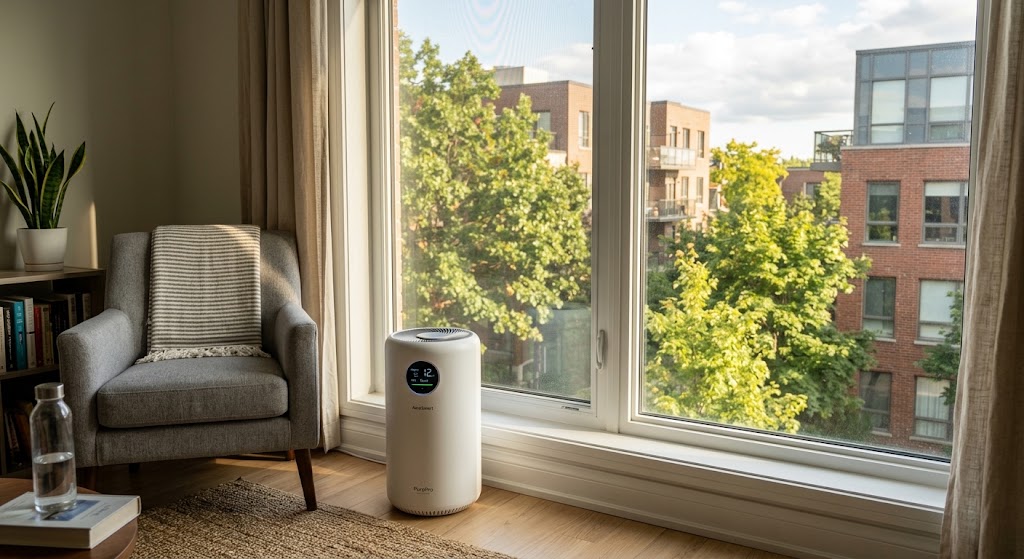
Quick answer
A smart air purifier can help reduce airborne pollen indoors when it is correctly sized for the room, uses effective particle filtration, and runs long enough to move substantial air through the filter. For late-summer ragweed season, prioritize verified CADR and room coverage first, then use smart schedules, app control, and auto mode to keep filtration running when pollen exposure is most likely.
Table of contents
- Why late summer becomes pollen season again
- Pollen enters the home in more ways than one
- Start with CADR, not Wi-Fi
- Do not compare room-size claims without checking air changes
- HEPA matters, but the whole purifier matters more than the filter label
- The smart features that are actually useful during ragweed season
- Scheduling
- Remote control
- Filter-life alerts
- Air-quality history
- Why Auto mode should not be your only pollen-season automation
- A stronger setup
- Three current smart purifier examples and what their specs tell us
- Levoit Core 400S-P: useful when compact size and scheduling matter
- Coway Airmega 250S: useful when you want explicit pollen CADR
- Blueair Blue Pure 211i Max: useful when the priority is high airflow
- A late-summer smart purifier schedule that makes sense
- If your app supports scenes or voice assistants
- Keep pollen outside so the purifier has less work to do
- Run time and fan speed matter more than many buyers expect
- Do not size a purifier for the edge of its capability
- What about energy use if the purifier runs all season?
- Avoid ozone-generating shortcuts
- Filter maintenance matters most when pollen load is high
- Where should the purifier go?
- What a purifier cannot promise
- A five-minute buying checklist
- Conclusion
Key takeaways
- For pollen control, verified clean-air delivery and correct room sizing matter more than app features or voice assistants.
- Late-summer ragweed season commonly runs from August into November in the United States, with levels often peaking around September, although timing varies by region and weather.
- Smart scheduling is useful because purifier auto modes usually respond to indoor particle sensors rather than directly knowing when outdoor ragweed pollen is high.
- Air purification should supplement source control: keeping windows closed during high-pollen periods and reducing pollen tracked indoors can lower the load the purifier has to handle.
Editorial transparency
Who worked on this article and how it was handled.
- Written by
- Maya Chen
- Creation method
- Editorial research
AI assistance: AI assisted with research organization and drafting. Sources, factual claims, and the final article should be reviewed by a human editor before publication.
Late August can be confusing for allergy-sensitive households. Spring tree pollen has faded, summer grass pollen may be easing, yet sneezing, congestion, and itchy eyes can suddenly return as ragweed and other weed pollens rise.
A smart air purifier can reduce airborne particles indoors, but the word smart is not what makes it effective. A beautifully designed app cannot compensate for a purifier that is undersized for the room, runs too slowly, has an overloaded filter, or sits in a home where open windows continuously replace filtered air with outdoor pollen.
The best late-summer setup therefore combines two ideas: choose enough filtration capacity for the space, then use automation to keep that filtration working when your household is most likely to bring pollen indoors. This guide explains how to size a purifier, which smart features are actually useful, and how to build a practical ragweed-season routine without treating an air cleaner as a medical cure.
Why late summer becomes pollen season again
Ragweed is one of the main reasons allergy season can feel like it starts over just as summer begins winding down.
The National Institute of Environmental Health Sciences says the U.S. ragweed pollen season generally runs from August to November, with levels often peaking around mid-September. The American College of Allergy, Asthma & Immunology gives the same broad seasonal pattern and notes that timing and severity vary by region and weather.
That variation matters. A household in the Upper Midwest may experience a different peak than one in Texas or the Southeast. Smart-home automation should therefore be based on local conditions and household behavior rather than one national calendar date.
Pollen enters the home in more ways than one
Closing a window helps, but pollen can still arrive on:
- clothing;
- hair;
- shoes;
- pets that spend time outside;
- doors that open frequently;
- outdoor air entering through ventilation or leakage.
ACAAI recommends keeping windows closed during high-pollen periods and using air conditioning. That source-control step is important because an air purifier works much better when it is not fighting a continuous stream of new outdoor pollen.
Start with CADR, not Wi-Fi
If you remember only one buying rule, make it this one:
Choose filtration capacity first. Choose smart features second.
The U.S. Environmental Protection Agency recommends matching a portable air cleaner’s Clean Air Delivery Rate (CADR) to the size of the room. CADR is a measure of how much contaminant-free air the purifier can deliver, expressed in cubic feet per minute.
A higher CADR generally means the purifier can remove particles faster or serve a larger room.
EPA provides this estimation table for rooms with roughly 8-foot ceilings:
| Room area | Estimated minimum CADR |
|---|---|
| 100 sq ft | 65 cfm |
| 200 sq ft | 130 cfm |
| 300 sq ft | 195 cfm |
| 400 sq ft | 260 cfm |
| 500 sq ft | 325 cfm |
| 600 sq ft | 390 cfm |
If your ceiling is substantially higher than 8 feet, EPA advises considering a purifier sized for a larger space.
Do not compare room-size claims without checking air changes
Manufacturer room-coverage numbers can look enormous because different claims may be based on different numbers of air changes per hour.
A purifier might be advertised for a very large room if the claim assumes only one complete air change per hour. For allergy-season particle removal, you will usually learn more by looking for the CADR or a room-size figure tied to a clearly stated air-change rate.
For example, Levoit currently lists the Core 400S-P at 231 cfm CADR and approximately 358 square feet at 4.8 air changes per hour. The same product page also advertises 1,718 square feet at one air change per hour. Both figures describe the same machine, but they imply very different filtration intensity.
That is why CADR is the better comparison tool.
HEPA matters, but the whole purifier matters more than the filter label
HEPA filtration is a sensible starting point for airborne particles such as pollen. EPA notes that portable air cleaners often achieve high CADR using high-efficiency particulate air filters.
But a filter label by itself does not tell you how quickly the complete machine cleans a room.
A small purifier with an excellent filter but weak airflow may remove particles slowly. A larger purifier with enough airflow can cycle more room air through its filter and reduce particle concentrations faster.
The practical buying order is:
- Room size and CADR
- Effective particle filtration
- Noise at the fan speed you will actually use
- Replacement-filter availability and cost
- Smart features
That ordering is especially important for bedrooms. A purifier that is powerful enough only at a fan speed you cannot tolerate while sleeping may spend most of its life running too slowly.
The smart features that are actually useful during ragweed season
Smart air purifiers often advertise a long list of app features. Only a few materially improve a pollen-season routine.
Scheduling
Scheduling is one of the most useful features because it lets you run the purifier harder before predictable exposure periods.
A good late-summer schedule might include:
- higher filtration before bedtime;
- a stronger cycle after family members return from work, school, sports, or yard activities;
- quieter overnight operation;
- a morning boost if local ragweed levels are commonly high at that time;
- longer high-speed operation on days when windows or doors have been open more often.
ACAAI notes that ragweed pollen levels are often highest in the morning during late summer and early fall. That does not mean every home needs the purifier at maximum speed every morning, but it gives you a useful starting point for automations.
Remote control
Remote control is valuable mainly because it prevents the purifier from being forgotten.
If you leave home and realize the bedroom purifier is off, an app lets you start it before you return. If outdoor conditions change or someone opens windows, you can increase filtration without being in the room.
Filter-life alerts
This is more practical than it sounds. EPA notes that overloaded filters do not work well. Smart reminders reduce the chance that a purifier quietly runs for months with a filter well beyond its intended service condition.
Air-quality history
Trend data can help you understand when indoor particle levels rise, but do not mistake the sensor graph for a pollen detector.
Many smart purifiers monitor particle concentrations such as PM2.5. That is useful, but the onboard sensor generally does not identify whether a particle came from ragweed, cooking, outdoor smoke, dust, or another source.
Use the graph to understand indoor air behavior, not to diagnose what allergen is present.
Why Auto mode should not be your only pollen-season automation
Auto mode sounds ideal: the purifier senses dirty air and increases fan speed automatically.
The limitation is that the purifier reacts only to what its sensor detects. If your household has known high-pollen exposure but the built-in particle sensor does not register a strong change, Auto mode may stay quiet even though you would prefer more filtration.
For that reason, combine Auto mode with fixed routines.
A stronger setup
Use:
- Auto mode for unpredictable indoor particle spikes;
- scheduled high-speed windows for predictable pollen exposure;
- manual boost after unusually heavy outdoor exposure.
For example, if children come home from outdoor sports at 5 p.m., schedule the living-room purifier to increase fan speed shortly before they arrive and continue for an hour or two afterward.
The automation is not trying to predict an allergic reaction. It is simply making sure more room air passes through the filter during a likely high-load period.
Three current smart purifier examples and what their specs tell us
These examples illustrate how to compare products. They are not claims that one model will relieve allergy symptoms better than another, and product availability varies by market.
| Model | Verified current specification | Smart features | Best interpreted as |
|---|---|---|---|
| Levoit Core 400S-P | 231 cfm CADR; 358 sq ft at 4.8 ACH; 38 W rated power | App control, schedules, air-quality updates, filter-life monitoring, voice control | Compact smart option for a bedroom or medium room when 231 cfm suits the space |
| Coway Airmega 250S | 230 cfm pollen CADR; 465 sq ft at 4 ACH; 64 W | IoCare+ app, scheduler, Auto/Sleep/Eco modes, filter indicator, voice control | Larger rectangular format with explicit pollen CADR and strong automation options |
| Blueair Blue Pure 211i Max | 450 cfm pollen CADR; 674 sq ft recommended room size at 4.8 ACH; 46 W | Auto and Night modes, app features, filter-life tracking | High-airflow option for a larger living area where higher CADR is useful |
The interesting point is not which brand has the longest feature list. It is how the purifier’s airflow, room size, noise, power use, and controls fit your actual room.
Levoit Core 400S-P: useful when compact size and scheduling matter
Levoit currently lists the Core 400S-P at 231 cfm CADR, with 358 square feet as its 4.8-ACH room-size figure. Its app can control settings, show air-quality information, check filter life, and create schedules.
That makes it a straightforward fit for a bedroom or smaller living space where you want recurring pollen-season automations without buying a very large appliance.
Coway Airmega 250S: useful when you want explicit pollen CADR
Coway publishes separate CADR figures for smoke, dust, and pollen on the Airmega 250S. The current pollen CADR is 230 cfm, and the company lists 465 square feet at four air changes per hour.
Its Smart Mode can automatically adjust airflow, while the app supports scheduling and monitoring. That combination works well for households that want both fixed routines and automatic response.
Blueair Blue Pure 211i Max: useful when the priority is high airflow
Blueair’s current main product page lists a pollen CADR of 450 cfm and a recommended room size of 674 square feet at 4.8 air changes per hour.
That is substantially more clean-air delivery than the two smaller examples above. For an open living room or a larger bedroom suite, higher CADR can matter more than adding another automation feature.
A late-summer smart purifier schedule that makes sense
You do not need complicated Home Assistant logic to create a useful routine. Most manufacturer apps can handle a basic schedule.
Here is a practical starting point:
| Time or trigger | Purifier action | Reason |
|---|---|---|
| 30–60 minutes before waking | Medium or high | Increase filtration before morning activity |
| Morning departure | Auto or medium | Maintain filtration without unnecessary maximum fan speed |
| Before household returns | High | Prepare the room before people bring outdoor pollen inside |
| 1–2 hours after arrival | High, then Auto | Clear the higher particle load after outdoor activity |
| 30–60 minutes before bed | Medium or high | Reduce airborne particles before sleeping |
| Overnight | Sleep or lowest acceptable continuous speed | Preserve noise comfort while continuing filtration |
This is a template, not a universal prescription. Adjust it based on room size, purifier capacity, outdoor pollen patterns, noise tolerance, and how often people enter and leave the home.
If your app supports scenes or voice assistants
You can create simple commands such as:
- Pollen mode: high fan for 90 minutes;
- Back home: living-room and bedroom purifiers run high;
- Sleep: bedroom purifier moves to a quieter continuous setting;
- Cleaning mode: high filtration while vacuuming and for a period afterward.
The best automation is one you will leave enabled all season.
Keep pollen outside so the purifier has less work to do
An air purifier is one layer of exposure reduction, not the entire strategy.
ACAAI recommends keeping windows closed during high-pollen periods and using air conditioning. It also recommends changing clothes and showering after outdoor exposure to reduce the pollen carried inside.
For a smart-home household, that translates into a useful rule:
Reduce pollen entry first, then automate filtration for what still gets indoors.
Practical steps include:
- keep bedroom windows closed when pollen is high;
- avoid drying bedding or clothing outdoors during pollen season;
- change clothing after prolonged outdoor activity;
- shower before bed if you have spent significant time outside;
- keep pets that have been outdoors away from beds until practical grooming or wiping is done;
- clean floors with methods that minimize re-suspending dust and pollen.
If the windows stay open all afternoon, even a powerful purifier has to keep processing newly arriving outdoor particles.
Run time and fan speed matter more than many buyers expect
EPA states that higher fan speeds and longer run times generally increase the amount of air filtered.
This creates an important trade-off between noise, energy use, and filtration.
A purifier running quietly on its lowest setting may be pleasant, but it may deliver far less clean air than the CADR printed on the box, because CADR is typically measured at the highest operating speed.
Do not size a purifier for the edge of its capability
If your bedroom is 300 square feet and you buy a purifier that only barely meets the room requirement at maximum speed, you may be forced to tolerate maximum fan noise whenever pollen is high.
Buying somewhat more capacity can let you operate at a lower, quieter speed while still moving meaningful amounts of air.
This is one reason the cheapest model that technically covers the room is not always the best value.
What about energy use if the purifier runs all season?
A purifier that runs for long periods becomes another continuous electrical load, so efficiency matters.
ENERGY STAR evaluates room air cleaners using clean-air delivery relative to power consumption. That is useful because a lower-wattage unit is not necessarily more efficient if it also delivers much less filtered air.
When comparing smart purifiers, look at:
- CADR;
- rated power consumption;
- how many hours per day you expect it to run;
- the fan speed you will actually use;
- whether Auto or Eco behavior reduces unnecessary high-speed operation without undermining your filtration goal.
For rough budgeting, a 40-watt purifier running 16 hours per day uses about 0.64 kWh per day before accounting for changes in fan speed. Your actual energy cost depends on the purifier’s real operating pattern and your electricity rate.
The smart feature that saves the most energy is often not Eco mode itself. It is reliable scheduling that prevents needless high-speed operation when the room is empty while still keeping sufficient filtration when the room is occupied.
Avoid ozone-generating shortcuts
Allergy-season marketing can make ionizers, plasma systems, or ozone-producing devices sound like an upgrade over ordinary filtration.
EPA advises against ozone generators in occupied spaces because ozone is a lung irritant. EPA also notes that some electronic air-cleaning technologies, including certain ionizers and plasma devices, may have the potential to emit ozone or other by-products.
For a household primarily trying to reduce airborne pollen, conventional particle filtration with a clearly stated CADR is the simpler benchmark.
If a purifier includes optional ionization or another electronic treatment technology, check the manufacturer’s documentation and independent certification rather than assuming the feature is automatically beneficial.
Filter maintenance matters most when pollen load is high
EPA’s guidance is straightforward: all filters need regular replacement, and an overloaded filter will not work well.
Smart filter-life indicators are convenient, but they should not replace visual inspection and the manufacturer’s maintenance instructions.
During a heavy pollen season, check:
- whether the pre-filter is visibly loaded with dust, hair, and debris;
- whether airflow seems weaker than usual;
- whether the app is reporting unusually short remaining filter life;
- whether the replacement filter is actually available before the current one reaches the end of its service period.
If your purifier has a washable pre-filter, clean it only as the manufacturer specifies. Do not wash a filter that is not designed to be washed.
Where should the purifier go?
The purifier needs room to move air.
Avoid wedging it tightly behind furniture, under a desk, or inside a corner where intake and exhaust are obstructed. Follow the manufacturer’s required clearances.
For pollen season, prioritize the rooms where people spend the most time, especially the bedroom. A single portable purifier cannot clean an entire multi-room home effectively when doors, walls, and airflow patterns separate the spaces.
If you only own one purifier, moving it between rooms can work, but automation becomes less useful because the app schedule no longer corresponds consistently to one environment.
In many homes, one correctly sized bedroom purifier plus one correctly sized living-area purifier is more practical than one very large unit expected to clean every room through doorways.
What a purifier cannot promise
Air filtration can reduce airborne particle concentrations. That does not mean a purifier can eliminate every allergen in the home or guarantee relief from allergic rhinitis or asthma symptoms.
EPA states that studies of portable HEPA air cleaners have found improvement in some allergy or asthma symptoms, but results are inconsistent and do not show major improvements in every symptom or every person.
If seasonal symptoms are persistent, severe, or affect breathing, sleep, school, or work, a smart appliance should not be treated as the diagnosis or treatment plan. An allergist or other qualified healthcare professional can help identify triggers and appropriate treatment.
For the smart-home layer, the goal is narrower and measurable: reduce airborne particles in the room and make that filtration consistent enough that you do not have to remember it every day.
A five-minute buying checklist
Before ordering a smart purifier for late-summer pollen, check these items in order:
- Measure the room’s length and width.
- Check ceiling height; size up if the room is taller than a typical 8-foot ceiling.
- Compare verified CADR, not only the largest marketing room-size number.
- Confirm the particle filter type and replacement-filter availability.
- Check noise specifications and whether the purifier can deliver useful airflow at a tolerable sound level.
- Verify app scheduling, Auto mode, filter-life alerts, and remote control if those features matter to you.
- Check rated power consumption if you expect long daily run times.
- Avoid devices that intentionally generate ozone in occupied spaces.
- Plan where the purifier will sit without blocking intake or exhaust.
- Create a schedule that matches your household’s actual pollen-exposure pattern.
Conclusion
The right smart air purifier for late-summer ragweed and pollen season is not necessarily the one with the most automation features. Start with verified CADR, correct room sizing, effective particle filtration, acceptable noise, and replacement-filter availability.
Then make the purifier smart in a way that matters: schedule stronger filtration before bedtime and after outdoor activity, use Auto mode for unexpected particle spikes, and keep windows closed during high-pollen periods so the purifier is not constantly fighting new outdoor air.
If you already own a smart purifier, the best next step may cost nothing: check its room sizing, inspect the filter, increase run time during peak pollen periods, and build a simple schedule that matches how your household actually moves through the day.
Common questions
Questions this guide answers
Do air purifiers remove ragweed pollen from indoor air?
Portable air cleaners can remove airborne particles, including pollen, when they provide enough clean-air delivery for the room and are operated for sufficient time. They do not eliminate all allergens, and filtration works best alongside measures that reduce pollen entering the home.
What CADR should I look for in an air purifier for pollen?
Match CADR to room size rather than buying by marketing coverage alone. EPA's consumer guidance gives estimated minimum CADRs of 130 cfm for 200 square feet, 195 cfm for 300 square feet, 260 cfm for 400 square feet, and 325 cfm for 500 square feet, assuming an 8-foot ceiling.
Should I leave a smart air purifier running all day during pollen season?
Longer run times and higher fan speeds generally filter more air, so continuous or extended operation can be useful during high-pollen periods. Smart schedules can reduce unnecessary high-speed operation while still keeping the purifier active before sleep, after outdoor activity, or during times when outdoor pollen is elevated.
Is Auto mode enough for ragweed season?
Auto mode is useful, but it should not be your only strategy. Many smart purifiers react to built-in particle sensors rather than directly reading outdoor pollen counts, so a fixed pollen-season schedule can provide more consistent filtration when you know exposure is likely.
Should I buy an air purifier with an ionizer for allergies?
Particle filtration with verified CADR should be the priority. EPA advises avoiding ozone generators in occupied spaces and notes that some ionization or electronic air-cleaning technologies can produce ozone or other by-products, so any optional ionization feature should be evaluated carefully.
Evidence & further reading
Sources & references
Primary and authoritative references used to support or contextualize this article. Links open the original source.
- 1Guide to Air Cleaners in the Home
U.S. Environmental Protection Agency · Accessed Aug 25, 2026
Supports CADR-based sizing, HEPA filtration, longer runtime and higher fan-speed guidance, filter maintenance, and ozone cautions.
- 2Pollen
National Institute of Environmental Health Sciences · Accessed Aug 25, 2026
Supports the typical August-to-November ragweed pollen season and common mid-September peak timing in the United States.
- 3Seasonal Allergies
American College of Allergy, Asthma & Immunology · Accessed Aug 25, 2026
Supports ragweed timing, regional and weather variation, and pollen-season context.
- 4Hay Fever (Rhinitis)
American College of Allergy, Asthma & Immunology · Accessed Aug 25, 2026
Supports keeping windows closed and using air conditioning during high-pollen periods as part of allergen avoidance.
- 52024 Room Air Cleaner Toolkit
ENERGY STAR · Accessed Aug 25, 2026
Supports evaluating room air cleaner energy efficiency using clean-air delivery relative to power consumption.
- 6Levoit Core® 400S-P Smart Air Purifier for Large Rooms
Levoit · Accessed Aug 25, 2026
Supports current Core 400S-P CADR, room-size, power, app-control, scheduling, and air-quality monitoring specifications.
- 7Coway Airmega 250S Smart Air Purifier for Large Rooms | Wifi & Mobile App
Coway · Accessed Aug 25, 2026
Supports current Airmega 250S pollen CADR, room coverage, Smart Mode, app scheduling, filter, and power specifications.
- 8Blue Pure 211i Max Air Purifier | Large Room HEPA Filter
Blueair · Accessed Aug 25, 2026
Supports current Blue Pure 211i Max pollen CADR, room-size, operating-mode, energy-use, and app-related specifications.

About the author
Maya Chen
Maya covers residential energy, HVAC controls, and practical home automation, translating technical systems into useful decisions for homeowners and renters.
More from Maya →Make your home smarter without buying every gadget.
One useful idea, one product worth knowing, and one energy-saving action—delivered weekly.
No spam. Unsubscribe anytime.
Semantic recommendations
Related reading
Selected from topic cluster, entities, tags, search intent, and editorial relationships.
How to Automate Ceiling Fans for Reverse Rotation in Upcoming Fall
Set ceiling fans for fall without climbing a ladder: learn which smart fans can reverse from an app, what can be automated, and the safest seasonal setup.
Smart Thermostat Geofencing for Back-to-School Family Schedules
Use smart thermostat geofencing without leaving kids, parents, or caregivers uncomfortable when back-to-school schedules change from day to day.
Smart Humidity Sensors: Preventing Attic Mold Before Autumn Rain
Use smart humidity sensors to catch attic moisture trends before autumn rain exposes roof leaks, condensation, air leakage, or ventilation problems.
How to Set Up NFC Tags Around the House for One-Touch Lighting
Use inexpensive NFC tags as intentional one-touch lighting controls for bedside scenes, entryways, desks, and whole-home off routines without adding wall switches.