
Matter-Compatible Smart Plugs: The 2026 Renter Buying Guide
A renter-focused guide to choosing Matter smart plugs in 2026, including Wi-Fi vs Thread, energy monitoring, load limits, and the best current options.
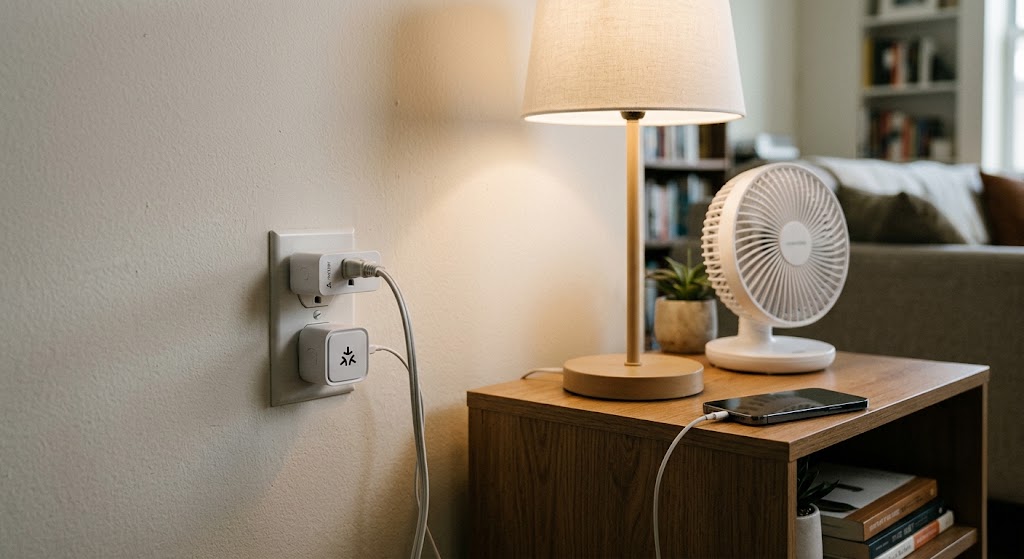
Quick answer
For most renters in 2026, the best Matter smart plug is a compact, certified model that fits the outlet standard in your country, supports the load you intend to control, and works with your preferred smart-home platform without locking you into one ecosystem. Kasa KP125M is a strong US all-around choice with energy monitoring, Eve Energy is the better Thread-based option for renters who value local multi-platform control, and Tapo P110M or Meross MSS315 are compelling energy-monitoring choices in regions where their Matter versions are available.
Table of contents
- The short version: which Matter smart plug should a renter buy?
- Matter in 2026: what renters actually need to know
- Matter certification matters more than vague compatibility language
- Wi-Fi Matter vs Thread Matter: which is better in an apartment?
- Matter over Wi-Fi
- Matter over Thread
- Why multi-admin is especially useful for renters and roommates
- Best overall for US renters: Kasa KP125M
- Why it fits renter life
- Where it is strongest
- Main caveat
- Best Thread choice: Eve Energy
- Why renters may prefer it
- What to check before buying
- Best simple compact option: Tapo P125M
- Best use cases
- Best energy-focused option where available: Tapo P110M
- The regional caveat is important
- Best alternative for multi-room expansion: Meross MSS315
- Why it works for renters
- Matter does not guarantee energy-monitoring parity
- Load ratings: the section renters should not skip
- Safe buying rule
- Be cautious with these appliances
- Renter buying checklist
- 1. Match the physical outlet
- 2. Check whether it blocks the second outlet
- 3. Decide whether you actually need energy monitoring
- 4. Inventory your existing hubs
- 5. Verify the Wi-Fi environment
- 6. Confirm your roommate ecosystem
- 7. Keep the Matter setup code
- What I would buy for four common renter scenarios
- Should renters wait for newer Matter 1.6 plugs?
- A note on privacy and local control
- Conclusion
Key takeaways
- Matter makes a smart plug easier to move between ecosystems, but it does not make every advanced feature identical across Apple Home, Alexa, Google Home, SmartThings, or manufacturer apps.
- For renters, physical size, outlet compatibility, hub requirements, energy monitoring, and safe load support matter more than buying the newest Matter version number.
- Wi-Fi Matter plugs are often the easiest value choice, while Thread-based plugs make more sense when the apartment already has a compatible Thread Border Router.
- Never assume a 15A or 16A rating means a plug is appropriate for every heater, air conditioner, refrigerator, washer, or other high-inrush appliance.
Editorial transparency
Who worked on this article and how it was handled.
- Written by
- Daniel Reed
- Creation method
- Editorial research
AI assistance: AI assisted with research organization and drafting. Sources, factual claims, and the final article should be reviewed by a human editor before publication.
Renters are almost the ideal audience for smart plugs. They add automation without replacing a wall switch, touching mains wiring, or asking a landlord for permission to alter the apartment. When you move, you unplug them and take the automation with you.
Matter improves that proposition because a certified plug is designed to work across multiple smart-home ecosystems instead of tying the renter permanently to one brand. The catch is that “Matter-compatible” does not mean every plug behaves identically, exposes the same energy data, or works safely with every appliance.
This 2026 buying guide focuses on the details that actually matter in an apartment: Wi-Fi versus Thread, hub requirements, outlet size, energy monitoring, multi-admin support, regional electrical ratings, and the difference between a good lamp plug and a safe plug for higher-load appliances.
The short version: which Matter smart plug should a renter buy?
If you want a fast answer, start here.
| Pick | Best for | Matter transport | Energy monitoring | Main renter advantage |
|---|---|---|---|---|
| Kasa KP125M | Best all-around US renter pick | Wi-Fi | Yes | Compact, broad ecosystem support, useful energy data |
| Eve Energy | Best Thread option | Thread | Yes | Local-first approach, multi-platform Matter, strengthens Thread mesh |
| Tapo P125M | Best simple compact US plug | Wi-Fi | No built-in energy-monitoring focus | Small size, 15A rating, straightforward Matter setup |
| Tapo P110M | Best energy-focused option where sold | Wi-Fi | Yes | Detailed usage and bill estimates in Tapo app |
| Meross MSS315 | Best alternative for inexpensive multi-room expansion | Wi-Fi | Yes | Matter, multi-admin, compact format, energy history |
The best choice is not the one with the longest feature list. It is the one that matches the apartment’s outlet standard, your existing Matter controller, the appliances you plan to control, and the smart-home platforms used by the people who live with you.
Matter in 2026: what renters actually need to know
As of August 2026, the Connectivity Standards Alliance has released Matter 1.6. The current specification adds improvements around setup, multi-ecosystem management, device capability reporting, and other platform-level behavior.
That does not mean you should reject a smart plug simply because it was originally certified under an earlier Matter version.
Matter versions are not a simple shopping score where 1.6 automatically makes one plug better than a 1.0-era product. For a renter buying an on/off plug, these questions matter more:
- Is the device genuinely Matter-certified?
- Does it work with the ecosystem you already use?
- Does it need Wi-Fi, Thread, or a particular hub?
- Are advanced features available in the platform you care about?
- Is the plug rated for the appliance you intend to connect?
- Will its body block the second outlet?
The Matter standard has supported plug-in on/off units since its early releases. Newer Matter revisions improve the broader ecosystem, but you do not need to wait for a plug specifically marketed as “Matter 1.6” to automate a lamp or fan reliably.
Matter certification matters more than vague compatibility language
For the simplest renter experience, look for a device sold as Matter-certified and carrying a Matter setup code.
A product that only “works with Matter” through a proprietary bridge can still be useful, but it creates another box you have to move, power, configure, and reconnect after changing apartments. Direct Matter plugs are generally easier to relocate.
Wi-Fi Matter vs Thread Matter: which is better in an apartment?
This is one of the most important buying decisions because it determines what infrastructure the plug needs.
Matter over Wi-Fi
Kasa KP125M, Tapo P125M, Tapo P110M, and Meross MSS315 are examples of Matter smart plugs that use Wi-Fi.
For renters, the benefits are straightforward:
- no Thread network required;
- easy fit with apartments that already have a normal Wi-Fi router;
- often cheaper than premium Thread alternatives;
- familiar troubleshooting when connectivity is weak.
The trade-off is that many smart plugs still use 2.4GHz Wi-Fi, not 5GHz. If your landlord supplies a managed building network, captive portal, client isolation, or unusual Wi-Fi configuration, onboarding IoT devices can be more difficult.
If you control your own router, Wi-Fi Matter plugs are usually the easiest value choice.
Matter over Thread
Eve Energy uses Thread and requires a compatible Matter controller with Thread Border Router functionality.
Thread is attractive in a smart apartment because a mains-powered device such as Eve Energy can act as a router node in the Thread mesh. Adding strategically placed Thread plugs can therefore improve connectivity for other Thread devices.
But Thread only makes sense if you already have the necessary infrastructure. Depending on the platform, that may be provided by a compatible HomePod, Apple TV, Nest Hub, Echo, SmartThings hub, or another controller with Thread Border Router capability.
If you would need to buy a new hub solely to make one plug work, Wi-Fi is often the more rational renter purchase.
Why multi-admin is especially useful for renters and roommates
Matter’s multi-admin model allows one device to participate in more than one smart-home ecosystem.
That matters more in shared housing than many product pages acknowledge.
Imagine this apartment:
- one roommate uses an iPhone and Apple Home;
- another prefers Alexa;
- you use Google Home;
- everyone needs to control the same floor lamp.
With a suitable Matter setup, the plug can be shared across ecosystems instead of forcing everyone to install one manufacturer’s app as the only control surface.
Matter 1.6 continues improving multi-ecosystem management, but real-world support still depends on the device firmware and the platforms involved. For that reason, treat “Matter multi-admin” as a capability to verify during setup, not a guarantee that every advanced feature will look identical everywhere.
Best overall for US renters: Kasa KP125M
The Kasa KP125M remains one of the easiest Matter plugs to recommend to a US renter because it balances interoperability with practical energy features.
TP-Link lists it as Matter-certified and compatible with Apple Home, Alexa, Google Assistant, and Samsung SmartThings. It also includes real-time and historical energy monitoring, schedules, timers, Away Mode, and a compact body designed not to block the neighboring outlet.
Why it fits renter life
Energy monitoring is especially useful when utilities are included only partially, when roommates divide electricity costs, or when you are trying to identify whether an old dehumidifier, gaming setup, fan, or entertainment system is consuming more power than expected.
The plug is also portable enough that it can move with you. You are not investing in an apartment-specific in-wall switch that stays behind when the lease ends.
Where it is strongest
Choose KP125M if you want:
- Matter interoperability without committing to Thread;
- energy monitoring;
- a compact US plug;
- broad support across major smart-home ecosystems;
- a device suitable for lamps, many fans, electronics, and supported household appliances within its specified load limits.
Main caveat
Kasa’s energy history and advanced controls may be richer in the Kasa or TP-Link app than in every Matter controller. Matter interoperability should not be interpreted as feature parity across all apps.
Best Thread choice: Eve Energy
Eve Energy is the stronger choice for a renter who already owns Thread-capable home hubs and wants a more local-first smart-home architecture.
Eve lists the plug as Matter-enabled and Thread-based, with support for Apple Home, Samsung SmartThings, Alexa, Google Home, and Home Assistant. It also functions as a Thread router node, helping relay traffic for other Thread accessories.
Eve publishes regional versions for the US and Canada, Europe, the UK, Australia, and Switzerland. That is useful for an international renter guide because electrical plugs are not globally interchangeable.
Why renters may prefer it
Eve emphasizes no subscription and no Eve cloud requirement for core operation. For renters who do not want another permanent cloud account tied to an apartment, that is appealing.
The Thread mesh benefit also grows as you add more devices. A plug in the living room can help form the network path for sensors or other Thread accessories deeper in the apartment.
What to check before buying
Eve Energy requires a compatible hub with Matter controller and Thread Border Router capability. If you do not already own one, include that cost and complexity in the decision.
Also pay attention to the regional load rating. Eve’s official specifications differ by country. For example, the US/Canada version is rated up to 15A / 1,800W at 120V, while the European version has different current and power limits.
Best simple compact option: Tapo P125M
The Tapo P125M is a strong choice when you want Matter control in a small plug but do not need energy monitoring as the headline feature.
TP-Link lists the US version as a 2.4GHz Wi-Fi Matter plug with Apple Home, Alexa, Google Assistant, and SmartThings compatibility. Its compact dimensions are particularly useful in apartments where every wall socket matters.
The US model is rated for 15A and 1,800W general-use/resistive loads at 120V, subject to the specific supported-load guidance for the appliance.
Best use cases
P125M makes sense for:
- bedside lamps;
- coffee-area automation within supported load guidance;
- decorative lights;
- fans within the manufacturer’s motor limits;
- TVs and entertainment equipment;
- routines where on/off scheduling matters more than energy analytics.
If you want detailed energy history, buy a model designed for that rather than assuming Matter itself provides it.
Best energy-focused option where available: Tapo P110M
The Tapo P110M adds a more energy-centric feature set.
TP-Link’s current regional product pages describe Matter certification, real-time power tracking, historical consumption, electricity-rate input, bill estimates, schedules, auto-off, and Away Mode.
That combination makes it particularly useful for renters who want to answer questions like:
- How much does my dehumidifier cost to run each month?
- Is this desk setup drawing meaningful standby power?
- Should I shift a device to off-peak hours?
- Which roommate appliance is responsible for a surprising jump in the bill?
The regional caveat is important
P110M specifications vary by market. Do not copy the amperage or wattage rating from a European or Indonesian product page and assume it applies to a US, UK, or Australian model.
Check the exact regional page and hardware version before connecting a high-power appliance.
Best alternative for multi-room expansion: Meross MSS315
The Meross MSS315 is another Matter Wi-Fi plug with built-in energy monitoring.
Meross lists real-time and historical power data, Matter setup, multi-admin support, and a US version rated for up to 15A at 120V. It requires an existing 2.4GHz Wi-Fi network, and Meross notes platform and hub requirements for the selected Matter ecosystem.
Why it works for renters
It is a practical option if you want several plugs across a small apartment without creating a single-vendor smart-home commitment.
Use cases include:
- desk electronics;
- lamps;
- entertainment centers;
- fans within rated limits;
- seasonal lights;
- measuring selected appliances before deciding whether scheduling would save energy.
Its main appeal is not that it does something radically different from Kasa or Tapo. It is that renters now have multiple Matter-certified Wi-Fi choices, which makes interoperability a real buying criterion rather than a single-brand promise.
Matter does not guarantee energy-monitoring parity
This is the biggest feature trap in smart-plug shopping.
A plug may support Matter and also have energy monitoring, but the energy dashboard may live primarily in the manufacturer’s app. Another ecosystem may expose only on/off state, schedules, or a smaller subset of data.
TP-Link explicitly maintains documentation showing that supported functions can vary across Matter ecosystems and firmware versions.
So when energy monitoring is important, ask two separate questions:
- Does the hardware measure power and energy?
- Where can I actually see that data?
If your goal is to monitor kWh inside Apple Home, Google Home, SmartThings, Alexa, or Home Assistant specifically, verify that workflow before buying a four-pack.
Matter has expanded energy-management capabilities over recent releases, but platform implementation is still part of the experience.
Load ratings: the section renters should not skip
The most dangerous smart-plug mistake is treating the headline amperage as permission to connect anything below that number.
Appliances are not all electrically equivalent.
A lamp is a simple load. A refrigerator or portable air conditioner has a compressor that can create a much higher startup current. Motors, pumps, power supplies, heating elements, and EV charging equipment all behave differently.
TP-Link’s 2026 load guidance warns that high-power motor or compressor loads can generate inrush current that exceeds smart-plug limits. The company also advises checking model-specific motor ratings and does not support EV charging on the referenced smart plugs.
Safe buying rule
Before connecting a high-power appliance:
- read the smart plug’s exact regional specifications;
- check the appliance label for voltage, current, wattage, and motor or compressor information;
- confirm the manufacturer explicitly supports that load type;
- do not assume a US rating applies to an EU variant or vice versa;
- avoid running a plug continuously at its absolute maximum unless the manufacturer says that use is appropriate.
TP-Link recommends keeping continuous long-term loads at 80% or less of the plug’s maximum rated power in its general guidance.
Be cautious with these appliances
Do extra verification before using a smart plug with:
- portable air conditioners;
- refrigerators and freezers;
- washing machines;
- space heaters;
- kettles and high-wattage kitchen appliances;
- pumps;
- large power adapters;
- EV chargers.
A Matter logo is an interoperability mark, not a universal electrical-load approval.
Renter buying checklist
Use this checklist before ordering.
1. Match the physical outlet
US Type B, UK Type G, European Type E/F, Australian Type I, and other sockets are different. Buy the correct regional hardware rather than using travel adapters for permanent appliance automation.
2. Check whether it blocks the second outlet
Compact dimensions matter in apartments. A bulky plug can turn a duplex outlet into a single usable socket.
3. Decide whether you actually need energy monitoring
For a lamp, energy monitoring may add little value. For a dehumidifier, entertainment center, workstation, or frequently used appliance, it can be useful.
4. Inventory your existing hubs
If you already own a Thread Border Router, Eve Energy becomes more attractive. If your apartment only has a conventional router, a Wi-Fi Matter plug may be simpler.
5. Verify the Wi-Fi environment
Many Wi-Fi Matter plugs use 2.4GHz. Building-managed networks, captive portals, enterprise authentication, and wireless client isolation can create problems that do not exist on a normal home router.
6. Confirm your roommate ecosystem
Matter is especially useful when the household mixes Apple Home, Alexa, Google Home, and SmartThings. If everyone uses the same platform, cross-ecosystem flexibility may be less important today—but it can still help when you move.
7. Keep the Matter setup code
Do not throw away the QR code or setup information after onboarding. Photograph or store it securely according to the manufacturer’s guidance so you can recommission the plug after moving or resetting it.
What I would buy for four common renter scenarios
| Renter scenario | Best fit | Why |
|---|---|---|
| US apartment, wants energy monitoring | Kasa KP125M | Compact, Matter, energy monitoring, broad ecosystem support |
| Already owns Thread Border Router | Eve Energy | Matter over Thread, local-first approach, Thread router function |
| Wants simple Matter on/off automation | Tapo P125M | Small, straightforward, broad platform support |
| Wants detailed energy data in a supported market | Tapo P110M | Strong energy-monitoring and billing features |
| Expanding several rooms on Wi-Fi | Meross MSS315 | Matter Wi-Fi, energy data, multi-admin, multiple regional variants |
There is no universal winner because the network and electrical system are part of the product decision.
Should renters wait for newer Matter 1.6 plugs?
Usually, no.
Matter 1.6 was released in June 2026 and improves setup and multi-ecosystem capabilities at the standard level. Those changes are valuable, but an existing certified plug does not become obsolete simply because a newer specification exists.
For a plug you need today, prioritize proven platform compatibility, current firmware support, electrical safety, physical size, and the feature set you will actually use.
Wait only if a specific Matter 1.6 feature is essential to your planned ecosystem and the devices you are considering do not support it.
For most renters, reliable on/off control, multi-admin, schedules, energy monitoring where needed, and safe load handling matter more than the version number printed in a specification document.
A note on privacy and local control
Matter was designed around local IP connectivity and secure commissioning, which can reduce dependence on cloud-to-cloud integrations for core device control.
That does not mean every smart plug is cloud-free.
Manufacturer apps may still use accounts or cloud services for remote access, analytics, firmware management, energy history, notifications, or extra features. Eve differentiates itself by emphasizing no Eve cloud for its Matter/Thread smart-home experience, while Wi-Fi plug vendors typically offer their own apps alongside Matter integration.
If privacy is a top priority, check what happens when:
- the internet connection is unavailable;
- the manufacturer’s cloud is unreachable;
- you decline optional accounts;
- you use the plug only through a local Matter controller.
The answer can be more useful than a generic “supports Matter” label.
Conclusion
Matter smart plugs are one of the easiest smart-home upgrades for renters because they are portable, reversible, and increasingly independent of a single ecosystem. In 2026, the buying decision should start with your apartment’s network and electrical needs rather than with the newest protocol badge.
For most US renters who want energy data, Kasa KP125M is the strongest all-around starting point. Choose Eve Energy when you already have Thread infrastructure and want a more local, multi-platform setup. Tapo P125M is the simpler compact choice, while Tapo P110M and Meross MSS315 are worth considering when energy monitoring is a priority in your region.
Before plugging in anything more demanding than ordinary electronics or lighting, verify the exact load type and regional electrical rating. Matter can make your apartment automation easier to move and easier to share—but safe electrical compatibility still comes first.
Common questions
Questions this guide answers
What is the best Matter smart plug for renters in 2026?
For US renters, Kasa KP125M is one of the strongest all-around choices because it combines Matter certification, a compact 15A form factor, energy monitoring, schedules, and support for Apple Home, Alexa, Google Home, and SmartThings. Eve Energy is a better fit when Thread, local-first operation, and cross-platform flexibility matter more than price.
Do Matter smart plugs need a hub?
It depends on the plug and the platform. Wi-Fi Matter plugs connect to your Wi-Fi network but generally still need a compatible Matter controller for third-party ecosystem control. Thread- based plugs such as Eve Energy require a Matter controller that also provides Thread Border Router functionality.
Is Matter over Thread better than Matter over Wi-Fi for a smart plug?
Neither is universally better. Thread can strengthen a Thread mesh because mains-powered plugs can act as router nodes, while Wi-Fi plugs are often simpler in homes that already have solid 2.4GHz coverage. Renters should choose based on the hubs and network they already own.
Does Matter guarantee energy monitoring works in every smart-home app?
No. Matter improves interoperability, but advanced functions can still vary by device firmware and ecosystem. Some smart plugs expose richer energy history, billing estimates, or protection features inside the manufacturer's own app even when basic on/off control works through Matter.
Can I use a Matter smart plug with an air conditioner or refrigerator?
Only if the specific plug manufacturer explicitly supports that appliance's load and startup current. Motor- and compressor-driven appliances can draw high inrush current, so checking the plug's rated load, motor rating, and manufacturer guidance is more important than the Matter logo.
Evidence & further reading
Sources & references
Primary and authoritative references used to support or contextualize this article. Links open the original source.
- 1Matter 1.6 Enables More Intuitive Setup, Multi-Ecosystem Experiences, and Context-Driven Control
Connectivity Standards Alliance · Accessed Aug 23, 2026
Supports Matter 1.6 as the current major release and its improvements to setup and multi-ecosystem device management.
- 2KP125M | Kasa Smart Wi-Fi Plug Slim, Energy Monitoring
TP-Link · Accessed Aug 23, 2026
Supports KP125M Matter certification, energy monitoring, compact design, schedules, and major ecosystem compatibility.
- 3Tapo P125M | Mini Smart Wi-Fi Plug
TP-Link · Accessed Aug 23, 2026
Supports Tapo P125M Matter certification, 2.4GHz Wi-Fi connectivity, compact dimensions, 15A US load rating, and multi-platform compatibility.
- 4Tapo P110M | Mini Smart Wi-Fi Plug, Energy Monitoring
TP-Link · Accessed Aug 23, 2026
Supports Tapo P110M Matter certification, energy monitoring, bill estimates, compact design, and regional electrical specifications.
- 5Eve Energy
Eve · Accessed Aug 23, 2026
Supports Eve Energy Matter and Thread connectivity, energy metering, multi-platform support, Thread router behavior, and regional load ratings.
- 6Matter Smart Plug with Energy Monitor
Meross · Accessed Aug 23, 2026
Supports MSS315 Matter interoperability, Wi-Fi requirements, energy monitoring, 15A US load rating, and multi-admin support.
- 7Features supported in different ecosystems for TP-Link Matter-Certified devices
TP-Link · Accessed Aug 23, 2026
Supports the caveat that feature availability can vary between Matter ecosystems, products, firmware versions, and regions.
- 8What Loads Can Be Connected to the Tapo/Kasa Plug
TP-Link · Accessed Aug 23, 2026
Supports load-selection guidance, motor and compressor inrush cautions, and the recommendation not to run plugs at maximum rated load continuously.

About the author
Daniel Reed
Daniel writes about connected-home standards, small-space technology, device interoperability, and privacy-conscious urban living.
More from Daniel →Make your home smarter without buying every gadget.
One useful idea, one product worth knowing, and one energy-saving action—delivered weekly.
No spam. Unsubscribe anytime.
Semantic recommendations
Related reading
Selected from topic cluster, entities, tags, search intent, and editorial relationships.
How to Set Up an Offline Smart Home Network That Works When Wi-Fi Drops
Build a local-first smart home that keeps critical lights, sensors, locks, and automations working during internet outages—and can keep core automations alive even when the Wi-Fi access point itself fails.
How to Create a Smart Home Setup in a Studio Apartment Without Wi-Fi Congestion
Build a responsive studio-apartment smart home without overloading Wi-Fi by using one well-placed router, Matter over Thread for low-bandwidth devices, and Wi-Fi only where it makes sense.

Best Outdoor Smart Plugs for Patio String Lights and Lanterns
Choose the right outdoor smart plug for patio lighting by comparing weather resistance, Matter support, dimming, schedules, outlet control, and safety.
Home Assistant Starter Guide: How to Build a Private, Local Smart Home
Home Assistant lets you run automations, dashboards, and device control on hardware inside your home. This beginner guide shows the cleanest 2026 path to a private, local-first setup.