
Smart Window Contact Sensors: Preventing Open Window AC Energy Waste
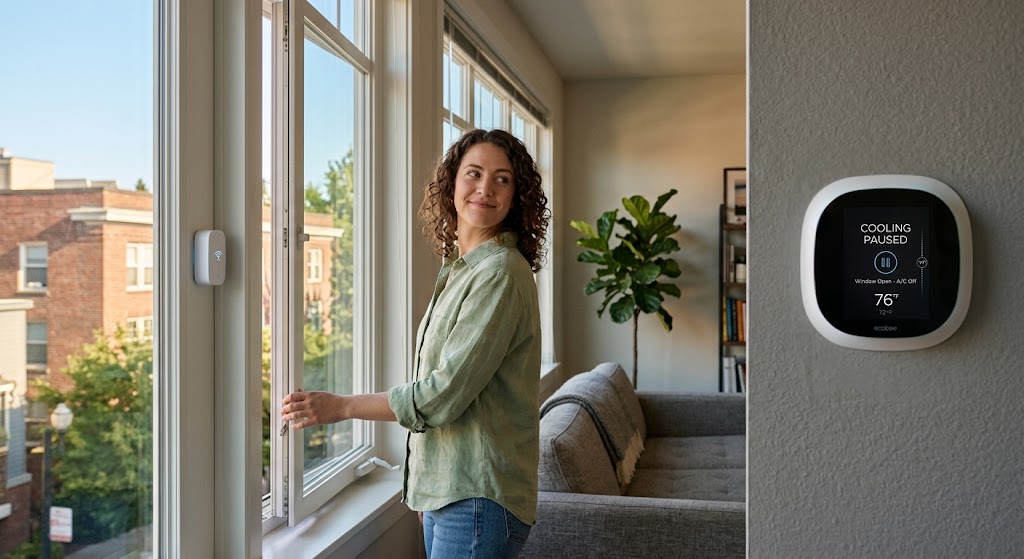
Use window contact sensors to pause cooling only after a window stays open, then restore the previous HVAC state safely after every monitored window is closed.
Quick answer
A smart window contact sensor can reduce avoidable cooling waste by triggering an automation when a monitored window remains open. The best logic does not shut the HVAC off instantly: it waits through a short grace period, pauses cooling or raises the setpoint through the thermostat's supported controls, and resumes only after all relevant windows are closed. Avoid cutting power to an air conditioner with an ordinary smart plug, and preserve the HVAC equipment's own compressor-protection logic.
Table of contents
- Why an open window matters while the AC is running
- The goal is not “windows should never open”
- How a contact sensor works
- The best automation is not “window open → AC off”
- Add a grace period
- Do not repeatedly power-cycle the air conditioner
- Use climate controls, not mains-power interruption
- Three good control strategies
- Strategy 1: Pause cooling
- Strategy 2: Raise the setpoint
- Strategy 3: Notify only
- Store the previous HVAC state
- Remember whether cooling was active
- Multiple windows need “any open / all closed” logic
- Match sensors to HVAC zones
- Central HVAC is the easiest case
- Preserve thermostat autonomy
- Mini-splits require platform compatibility
- Avoid blind IR control if state synchronization matters
- Window air conditioners need extra caution
- Do not switch a compressor load with a random plug
- Portable ACs have the same control problem
- Matter-over-Thread contact sensors are a clean renter option
- Infrastructure is still required
- Ecosystem feature support can differ
- A Home Assistant implementation pattern
- The restore automation needs more care
- Add a close delay too
- Do not over-optimize compressor timing yourself
- Humidity changes the decision
- Temperature difference can be another guardrail
- Contact sensor placement matters
- Sliding windows
- Casement windows
- Double-hung windows
- Tilt-and-turn windows
- Renter-friendly installation
- Do not interfere with egress or window operation
- Battery monitoring is part of HVAC automation reliability
- Add a “window open too long” notification
- Create an away-mode guardrail
- Measure whether the automation actually helps
- A good automation state machine
- Recommended logic by AC type
- Common mistakes
- Instant shutoff on every open event
- Instant restart on every close event
- Forgetting the original HVAC state
- One sensor for two independently movable sashes
- Using a smart plug because it is easy
- Assuming Matter guarantees the automation exists
- No battery alerts
- No manual override
- Treating every open window as an emergency
- The recommended setup for most apartments
- Conclusion
Key takeaways
- A contact sensor should trigger a control decision, not directly interrupt HVAC power; use supported thermostat or air-conditioner controls whenever possible.
- Add an open-window grace period so a brief opening does not repeatedly stop and restart cooling.
- For rooms or HVAC zones with multiple windows, pause cooling when any monitored window remains open and resume only when all relevant windows are closed.
- Store or infer the previous HVAC state before pausing so closing a window does not accidentally start cooling that was already off.
Editorial transparency
Who worked on this article and how it was handled.
- Written by
- Maya Chen
- Creation method
- Editorial research
AI assistance: AI assisted with research organization and drafting. Sources, factual claims, and the final article should be reviewed by a human editor before publication.
Running air conditioning with a window left open is one of the easiest cooling mistakes to automate away. Conditioned indoor air is being replaced by warmer or more humid outdoor air while the HVAC system keeps trying to maintain the thermostat setpoint.
A small contact sensor can solve the human-memory part of the problem. Mounted as two aligned pieces on the window and frame, it reports a simple state—open or closed—to the smart-home controller. That state can then pause cooling, raise the thermostat setpoint, or send a warning if the window remains open.
The important part is not the sensor itself. It is the automation logic around the HVAC equipment. A good setup includes a grace period, understands multiple windows, remembers whether cooling was actually active, and restores the previous state only when the room is sealed again. A bad setup instantly toggles the AC every time someone cracks a window for 20 seconds.
Why an open window matters while the AC is running
Air conditioning works by removing heat from the indoor space and, during normal cooling operation, also removing moisture.
An open window creates intentional air exchange with outdoors.
The HVAC system may then have to deal with:
- warmer outdoor air;
- humid outdoor air;
- solar-heated air around the opening;
- pressure-driven airflow from wind;
- additional moisture load.
The Department of Energy notes that air leakage through windows contributes to heating and cooling loads and recommends keeping windows tightly closed when outside temperatures are extreme.
An open sash creates a much larger pathway than ordinary leakage around a closed window.
The goal is not “windows should never open”
Natural ventilation can be useful when outdoor conditions are favorable.
ENERGY STAR homeowner guidance has long recommended taking advantage of cool outdoor air when conditions allow, including turning cooling off while windows are open.
The waste occurs when two incompatible strategies happen at once:
Window open for natural ventilation
+
Mechanical cooling trying to hold setpoint
The contact sensor is a coordination tool between those two modes.
How a contact sensor works
Most window contact sensors use two pieces:
- main sensor;
- magnet or secondary contact piece.
When the two pieces align, the system reports the window as closed.
When they separate beyond the sensing threshold, the system reports open.
Aqara’s Door and Window Sensor P2 documentation describes a Hall sensor that detects changes in the relationship between the sensor and magnet.
That simple binary state is ideal for automation.
You do not need the sensor to know:
- how far the window opened;
- why it opened;
- who opened it.
You only need to know whether the building envelope is open enough that cooling should change behavior.
The best automation is not “window open → AC off”
That rule is too aggressive.
Consider normal apartment behavior:
- open window for 20 seconds to adjust a screen;
- pass something through the window;
- crack it briefly after cooking;
- clean the sill;
- check outdoor conditions.
If the AC stops instantly every time, the automation becomes noticeable and annoying.
Add a grace period
A better rule is:
IF window remains open for 2–5 minutes
AND cooling is active
THEN pause or relax cooling
Home Assistant’s official window-open example uses a two-minute open period before turning off cooling for a skylight.
That is a useful pattern.
It is not a universal required delay.
For your home, try:
- 2 minutes for a bedroom window;
- 3–5 minutes for a frequently handled kitchen window;
- longer if the window is routinely opened briefly.
The goal is to ignore accidental or momentary openings while still catching genuine ventilation.
Do not repeatedly power-cycle the air conditioner
A compressor is not a lamp.
Air conditioners have control logic around:
- compressor startup;
- pressure equalization;
- minimum off time;
- restart delay;
- motor current.
Smart thermostats and connected air conditioners may already enforce protection delays.
Do not build an automation that tries to defeat those controls.
Use climate controls, not mains-power interruption
Prefer:
smart thermostat
-> change mode/setpoint
or:
connected room AC
-> supported off/eco command
rather than:
generic smart plug
-> cut AC power
Home Assistant, for example, provides a climate turn-off action specifically for thermostats and air conditioners.
An ordinary smart plug may not be rated for compressor startup current, and repeated external power interruption may not match the AC manufacturer’s intended operation.
If the air conditioner does not provide a supported smart-control path, use notifications rather than improvising electrical switching.
Three good control strategies
You do not always need to shut cooling completely off.
Strategy 1: Pause cooling
Best when:
- window is deliberately open for ventilation;
- HVAC can be safely paused through its normal thermostat;
- outdoor conditions are temporarily preferred.
Automation:
Window open for 3 minutes
-> cooling off

All windows closed for 1 minute
-> restore previous cooling mode
Strategy 2: Raise the setpoint
Best when:
- humidity control still matters;
- the household does not want complete HVAC shutdown;
- the system or thermostat handles setpoint changes more cleanly than mode changes.
Example:
Window open for 3 minutes
-> set cooling target to 82°F

Window closed
-> restore previous setpoint
The exact temperature is household- and climate-specific.
Do not treat 82°F as a universal recommendation.
Strategy 3: Notify only
Best when:
- the thermostat is not integrated;
- the AC is landlord-controlled;
- automation access is unreliable;
- residents want final control.
Example:
Window open for 5 minutes
AND cooling active
-> "Bedroom window is open while AC is cooling."
A notification still eliminates much of the memory problem without touching HVAC state.
Store the previous HVAC state
This is the difference between a good automation and an annoying one.
Imagine the AC was already off.
Then:
- window opens;
- automation sees open state;
- nothing meaningful should change;
- window closes;
- automation blindly turns AC on.
Now the automation has created energy use instead of reducing it.
Remember whether cooling was active
Before pausing the HVAC, record or infer:
- operating mode;
- target temperature;
- whether cooling was enabled;
- possibly fan mode.
Then restore only what was changed.
Conceptually:
IF window open
AND HVAC was cooling
-> remember state
-> pause cooling

IF all windows closed
AND automation previously paused HVAC
-> restore remembered state
Do not interpret every close event as permission to start cooling.
Multiple windows need “any open / all closed” logic
A room may have two windows.
A whole HVAC zone may have six.
The correct logic is usually:
ANY monitored window open long enough
-> pause cooling
and:
ALL monitored windows closed
-> allow cooling restoration
Not:
Window A closes
-> turn cooling back on
while Window B remains open.
Home Assistant’s current window triggers and conditions support behavior across multiple targeted windows, including conditions that evaluate whether any relevant window remains open.
This is one reason grouping sensors by HVAC zone is useful.
Match sensors to HVAC zones
If one thermostat controls the entire apartment, every operable window in that conditioned space can potentially matter.
If the home has true HVAC zoning, the logic should follow those zones.
Example:
Bedroom window open
-> pause bedroom zone

Living-room windows closed
-> living-room zone remains unchanged
Do not pause an entire multi-zone system because a window opened in a zone that can be independently controlled.
Likewise, do not assign a window to the wrong thermostat simply because the devices appear in the same smart-home room.
The automation boundary should match the physical HVAC boundary.
Central HVAC is the easiest case
A central smart thermostat usually exposes a clear climate-control interface.
Possible actions include:
- turn cooling off;
- set HVAC mode;
- raise cooling setpoint;
- resume schedule.
That makes the architecture straightforward:
Window sensor
   ↓
Smart-home automation
   ↓
Smart thermostat
   ↓
Central HVAC
ENERGY STAR certified smart thermostats also provide schedules and HVAC-use information, making it easier to verify whether the open-window automation actually changes runtime.
Preserve thermostat autonomy
Do not send commands every few seconds.
Let the thermostat manage:
- compressor delays;
- staging;
- fan behavior;
- equipment protection.
The contact sensor should change the desired HVAC state, not micromanage mechanical operation.
Mini-splits require platform compatibility
A ductless mini-split may be controlled through:
- manufacturer’s Wi-Fi module;
- wall controller;
- supported thermostat interface;
- third-party integration.
The right method depends on the equipment.
Avoid blind IR control if state synchronization matters
Infrared controllers can emulate the handheld remote for some mini-splits.
They are useful, but state can become uncertain if:
- someone uses the original remote;
- an IR command is missed;
- the controller assumes a mode that the unit did not receive.
For a simple “window open → AC off” workflow, uncertain state can become a problem when restoring operation.
If possible, use a control method that reports actual unit state.
Window air conditioners need extra caution
A smart window AC may have:
- built-in Wi-Fi;
- app scheduling;
- connected thermostat behavior;
- energy monitoring.
That is the ideal control path.
ENERGY STAR notes that many current room air conditioners offer connected functionality.
If your unit exposes supported commands, use them.
Do not switch a compressor load with a random plug
A plug labeled 15 A is not automatically approved for air-conditioner motor loads.
Compressor startup current, continuous load, plug temperature, manufacturer requirements, and restart behavior all matter.
If the AC manufacturer does not support external power switching, do not create a DIY mains-control solution just to make the contact sensor “automatic.”
Use an alert instead.
Portable ACs have the same control problem
Portable air conditioners also contain compressors.
The same rule applies:
Prefer:
- built-in app;
- supported climate integration;
- manufacturer-approved control interface.
Avoid:
- generic power-cut automation.
Also remember that opening the same window used for a portable AC exhaust kit can invalidate the installation seal.
A contact sensor is useful only if the window can actually change position independently from the exhaust setup.
Matter-over-Thread contact sensors are a clean renter option
Modern contact sensors can avoid a proprietary Zigbee hub by using Matter over Thread.
Two current examples are:
- Eve Door & Window;
- Aqara Door and Window Sensor P2.
Both are battery-powered contact sensors designed to expose open/closed status to compatible smart-home ecosystems.
Infrastructure is still required
Matter over Thread normally requires:
- Matter controller;
- Thread Border Router.
Depending on the ecosystem, one device may provide both functions.
Aqara and Eve both document this requirement for their current Matter-over-Thread sensors.
Before buying the sensor, verify that your existing home platform can:
- commission the sensor;
- expose open/closed state to automations;
- control your thermostat or AC.
The sensor alone does not create the HVAC integration.
Ecosystem feature support can differ
“Matter compatible” does not mean every smart-home platform exposes the exact same automation builder.
Aqara explicitly notes that automation conditions can vary by ecosystem.
So check whether your platform supports:
- open contact as a trigger;
- duration such as “open for 3 minutes”;
- multiple-window conditions;
- thermostat mode or setpoint control;
- state restoration.
If the native app is too limited, Home Assistant can provide more explicit logic.
A Home Assistant implementation pattern
Home Assistant now provides dedicated window-open triggers and climate actions.
A conceptual automation is:
alias: Pause cooling when bedroom window stays open

triggers:
  - trigger: window.opened
    target:
      entity_id:
        - binary_sensor.bedroom_window_left
        - binary_sensor.bedroom_window_right
    options:
      behavior: first
      for: "00:03:00"

conditions:
  - condition: state
    entity_id: climate.bedroom
    state: "cool"

actions:
  - action: climate.turn_off
    target:
      entity_id: climate.bedroom
Entity names and available climate states vary by integration.
The official Home Assistant documentation already provides a similar example for pausing cooling after a skylight remains open for two minutes.
The restore automation needs more care
Do not simply say:
window closed
-> climate.turn_on
Instead, restore only if the open-window automation was responsible for pausing it.
One method is to use a helper flag:
input_boolean.ac_paused_for_open_windowWhen the automation pauses cooling:
set helper ONWhen every relevant window is closed:
IF helper is ON
-> restore HVAC state
-> set helper OFF
This prevents a close event from starting cooling that the resident had intentionally turned off.
Add a close delay too
The open grace period gets most of the attention.
A close delay can also improve stability.
Example:
All windows closed
for 60 seconds
-> resume
Why?
A resident may:
- close one window;
- reopen it to adjust the latch;
- move to another window;
- briefly crack it again.
A short close delay gives the building envelope time to reach a stable state before HVAC resumes.
This is especially useful when several windows are being opened and closed together.
Do not over-optimize compressor timing yourself
A common DIY temptation is to add exact rules like:
Never restart compressor within 5 minutes.Many thermostats and AC control boards already enforce anti-short-cycle protection.
Adding a second timer in the automation can create confusing behavior.
Better:
- use the thermostat’s supported mode or setpoint control;
- let the HVAC controller enforce equipment-specific protection;
- use automation delays mainly to filter human window behavior.
If the equipment documentation requires a specific restart procedure, follow it.
Humidity changes the decision
In hot, humid climates, an open window introduces moisture as well as heat.
That can make “turn off AC and enjoy fresh air” less attractive.
A smarter automation can include outdoor or indoor humidity.
Example:
IF window open
AND outdoor air is cooler
AND outdoor humidity is acceptable
-> pause cooling

ELSE
-> send warning that AC is running with window open
This is more complex and depends on reliable environmental data.
For most households, a simple open-window pause is easier to maintain.
The key is not to assume that every cool evening is a good natural-ventilation opportunity.
Temperature difference can be another guardrail
Suppose the outdoor temperature is 68°F and the apartment is 76°F.
Opening a window may provide useful free cooling.
Suppose the outdoor temperature is 95°F.
The same action adds heat.
A sophisticated system can use:
- outdoor temperature;
- indoor temperature;
- humidity;
- window state;
- HVAC mode.
But do not let complexity undermine reliability.
A window contact sensor’s strongest feature is that it converts a simple physical fact into a simple automation decision.
Contact sensor placement matters
The sensor only works if the magnet alignment reliably changes with the window.
Test before permanent mounting.
Sliding windows
Mount the pieces so they align when fully closed and separate early enough when the sash moves.
Casement windows
Use a frame location where opening the sash clearly changes the sensor state.
Double-hung windows
Decide whether the automation needs to detect:
- lower sash;
- upper sash;
- both.
One sensor may not detect every possible opening configuration.
Tilt-and-turn windows
These can be more complicated because the sash can move in different directions.
Verify the sensor reports open for every ventilation position you care about.
Renter-friendly installation
Battery contact sensors are well suited to rentals because they can be attached without wiring.
Aqara advertises adhesive installation for its P2 sensor, and Eve similarly markets tool-free installation.
Still, adhesive is not guaranteed to be damage-free on every paint or window finish.
Before mounting:
- confirm lease restrictions;
- clean the surface as the manufacturer recommends;
- test sensor alignment;
- test phone/hub connectivity;
- use removable mounting methods where practical.
Avoid drilling into landlord-owned window frames unless you have permission.
Do not interfere with egress or window operation
A sensor should not:
- prevent the window from latching;
- obstruct an emergency egress opening;
- interfere with locks;
- prevent screens from operating;
- create a sharp edge;
- block drainage channels.
The sensor is optional.
The window’s normal safety and weather functions are not.
Battery monitoring is part of HVAC automation reliability
A dead contact-sensor battery can silently break the energy-saving logic.
If the platform exposes battery state:
- add a low-battery alert;
- replace the battery before it becomes unreliable;
- verify contact state after replacement.
Do not assume long advertised battery life means the sensor never needs maintenance.
Battery life depends on radio conditions, reporting behavior, temperature, and platform.
For Thread devices, poor mesh connectivity can also affect battery behavior because additional communication retries cost energy.
Add a “window open too long” notification
Pausing cooling prevents waste.
A notification addresses comfort and security.
Example:
Window open for 20 minutes
AND HVAC paused
-> "Bedroom window has been open for 20 minutes."
This is useful when someone:
- leaves home;
- goes to bed;
- forgets the window before a storm.
Do not turn a contact sensor into surveillance.
A simple household notification is enough.
Create an away-mode guardrail
If everyone leaves and a window remains open, the HVAC may stay paused indefinitely.
That may be fine in mild weather.
It may be undesirable during:
- extreme heat;
- extreme humidity;
- freezing conditions;
- pet occupancy;
- moisture-sensitive conditions.
A separate away routine can say:
Nobody home
AND window open
-> send urgent notification
rather than silently changing the thermostat.
Remote automation should not physically close a manual window unless the window system is specifically motorized and designed for that operation.
Measure whether the automation actually helps
Do not claim a fixed percentage savings.
The result depends on:
- climate;
- how often windows were previously left open;
- HVAC size;
- utility rate;
- window area;
- indoor setpoint;
- humidity.
Use the smart thermostat’s runtime or energy information.
ENERGY STAR certified smart thermostats provide HVAC-use feedback such as runtime.
Compare:
- similar hot days before automation;
- similar hot days after automation;
- number of open-window events;
- total cooling runtime.
Weather normalization is difficult for a homeowner, so treat this as directional evidence rather than a controlled experiment.
A good automation state machine
For a single HVAC zone, the logic can be summarized as:
STATE: NORMAL

If any monitored window opens:
    start grace timer

If window closes before timer expires:
    remain NORMAL

If window still open after timer:
    if cooling active:
        remember HVAC state
        pause/relax cooling
        mark PAUSED_BY_WINDOW = true

STATE: WINDOW OPEN

If another window opens:
    remain WINDOW OPEN

If one window closes but another remains open:
    remain WINDOW OPEN

If all windows remain closed for close delay:
    if PAUSED_BY_WINDOW = true:
        restore previous HVAC state
    clear PAUSED_BY_WINDOW
    return NORMAL
This is much more robust than two independent “open = off / closed = on” automations.
Recommended logic by AC type
| Cooling system | Best open-window action | What to avoid |
|---|---|---|
| Central HVAC + smart thermostat | Pause cooling or raise setpoint | Cutting HVAC mains power |
| Zoned central HVAC | Pause only affected zone | Shutting all zones for one room |
| Connected mini-split | Use manufacturer-supported mode/setpoint command | Unsynchronized blind IR if state matters |
| Smart window AC | Use built-in app/integration | Generic smart-plug power cycling |
| Non-smart window AC | Notify resident | Improvised mains switching |
| Portable AC | Supported native control or notification | Generic smart-plug compressor switching |
Common mistakes
Instant shutoff on every open event
Brief window use causes annoying HVAC changes.
Instant restart on every close event
The AC can start even though another window remains open.
Forgetting the original HVAC state
Closing a window turns on cooling that was intentionally off.
One sensor for two independently movable sashes
The system may report closed while part of the window is open.
Using a smart plug because it is easy
Compressor loads deserve manufacturer-supported controls.
Assuming Matter guarantees the automation exists
Platform capabilities still differ.
No battery alerts
The automation silently stops working.
No manual override
Residents cannot choose ventilation behavior when the automation is inconvenient.
Treating every open window as an emergency
The best system filters intentional short openings instead of nagging constantly.
The recommended setup for most apartments
For a renter with a compatible smart thermostat:
- Put a contact sensor on each window that commonly stays open.
- Group sensors by HVAC zone.
- Trigger only after a 2–5 minute open grace period.
- Pause cooling or raise the setpoint through the thermostat.
- Set a helper/state flag indicating the automation paused HVAC.
- Resume only after every monitored window is closed.
- Add a short close delay.
- Restore the previous thermostat state.
- Add a low-battery alert.
- Keep normal manual thermostat control available.
For a room AC without supported smart controls, stop at step three and send a notification instead.
That still solves the behavior problem without creating an electrical one.
Conclusion
Smart window contact sensors are a simple way to prevent one of the most obvious forms of cooling waste: running the AC while the building envelope is intentionally open.
The hardware is straightforward. The automation is where quality matters. Use a grace period, pause cooling through supported HVAC controls, track which windows belong to each zone, and restore the previous thermostat state only after every relevant window is closed. Do not repeatedly interrupt compressor power with a generic smart plug.
For most apartments, the best system is almost invisible: open the window long enough for real ventilation and cooling quietly pauses; close the last window and the previous comfort schedule returns. The contact sensor does not make the air conditioner more efficient—it prevents the HVAC system from being asked to cool a room that is simultaneously exchanging conditioned air with outdoors.
Common questions
Questions this guide answers
Can a window sensor automatically turn off the AC?
Yes, if the contact sensor and thermostat or air conditioner are exposed to the same automation platform. Home Assistant, for example, supports window-open triggers and climate turn-off actions, including an official example that pauses cooling after a skylight has remained open for two minutes. Other ecosystems can offer similar behavior, but available triggers and HVAC controls vary by platform and device.
Should the AC turn off the instant a window opens?
Usually no. A grace period prevents brief actions such as opening a window to speak to someone, adjusting a screen, or moving an object from repeatedly changing HVAC state. A practical starting point is a few minutes, then adjust it to household behavior and the HVAC manufacturer's control requirements.
Should the automation turn the AC back on as soon as the window closes?
Only after confirming that every monitored window for that HVAC zone is closed and that cooling was actually active before the open-window event. Restoring the previous thermostat mode or setpoint is safer and more predictable than blindly issuing an AC-on command.
Can I use a smart plug to cut power to a window air conditioner?
Do not assume a generic smart plug is suitable. Air conditioners contain compressor motors with startup current and may have manufacturer requirements for power interruption and restart. Prefer the AC's built-in connected controls, an approved thermostat interface, or another manufacturer-supported control method rather than repeatedly switching mains power externally.
Are Matter window sensors good for this automation?
They can be. Products such as Eve Door & Window and Aqara Door and Window Sensor P2 expose open and closed state through Matter over Thread, but they require compatible Matter-controller and Thread Border Router infrastructure. Automation capabilities can differ by ecosystem, so verify that your platform can use the contact state and control your HVAC device before buying.
Evidence & further reading
Sources & references
Primary and authoritative references used to support or contextualize this article. Links open the original source.
- 1Purchasing Energy-Efficient Residential Windows, Doors, and Skylights
U.S. Department of Energy · Accessed Aug 31, 2026
Supports the energy impact of air infiltration through windows and the recommendation to keep windows tightly closed when outside temperatures are extreme.
- 2Smart Thermostats
ENERGY STAR · Accessed Aug 31, 2026
Supports using smart thermostats to reduce unnecessary heating and cooling and the importance of HVAC energy use in household energy consumption.
- 3Smart Thermostats Key Product Criteria
ENERGY STAR · Accessed Aug 31, 2026
Supports scheduling, HVAC runtime feedback, temperature-control requirements, and basic thermostat operation without cloud connectivity for certified models.
- 4Window opened
Home Assistant · Accessed Aug 31, 2026
Supports window-open automation triggers and provides an official example that pauses cooling after a window has remained open for two minutes.
- 5Window is open
Home Assistant · Accessed Aug 31, 2026
Supports checking one or more window states as automation conditions and an official energy-saving example that disables climate control after a window remains open.
- 6Turn off thermostat
Home Assistant · Accessed Aug 31, 2026
Supports controlling a thermostat or air conditioner through the climate turn-off action rather than interrupting mains power.
- 7Eve Door & Window
Eve · Accessed Aug 31, 2026
Supports current Matter-over-Thread contact sensing, automation use, replaceable battery operation, and Matter Controller plus Thread Border Router requirements.
- 8Eve Door & Window Smart Contact Sensor Product Booklet
Eve · Accessed Aug 31, 2026
Supports the use of an open/closed contact sensor to automatically pause heating while a window is open, demonstrating the same energy-control pattern applied in this guide.
- 9Door and Window Sensor P2
Aqara · Accessed Aug 31, 2026
Supports Matter-over-Thread operation, open/close detection, local automations, adhesive installation, and the requirement for compatible Matter and Thread infrastructure.
- 10Aqara Door and Window Sensor P2 User Guide
Aqara · Accessed Aug 31, 2026
Supports Hall-sensor-based open/closed detection and use of contact-state changes as automation conditions.

About the author
Maya Chen
Maya covers residential energy, HVAC controls, and practical home automation, translating technical systems into useful decisions for homeowners and renters.
More from Maya →Make your home smarter without buying every gadget.
One useful idea, one product worth knowing, and one energy-saving action—delivered weekly.
No spam. Unsubscribe anytime.
Semantic recommendations
Related reading
Selected from topic cluster, entities, tags, search intent, and editorial relationships.
End-of-Summer HVAC Maintenance Checklist for Smart Thermostat Owners
Use your smart thermostat's runtime, filter reminders, temperature sensors, and system alerts to close out cooling season and prepare HVAC equipment for fall.
How to Optimize Your Smart AC for Late-Summer Heatwaves
Use smarter cooling schedules, sensible setpoints, humidity control, room sensors, and maintenance checks to stay comfortable during late-summer heatwaves without wasting energy.

5 Smart Thermostat Placement Mistakes That Can Waste Hundreds on HVAC Bills
Wrong thermostat placement can distort temperature readings, increase HVAC runtime, and quietly undermine both comfort and energy savings.
Energy Star Smart Thermostats: How to Claim Your Local Utility Rebate
Local utilities often discount ENERGY STAR smart thermostats at checkout or reimburse eligible purchases. Here is how to find, verify, and claim the right 2026 offer.