
End-of-Summer HVAC Maintenance Checklist for Smart Thermostat Owners
Use your smart thermostat's runtime, filter reminders, temperature sensors, and system alerts to close out cooling season and prepare HVAC equipment for fall.
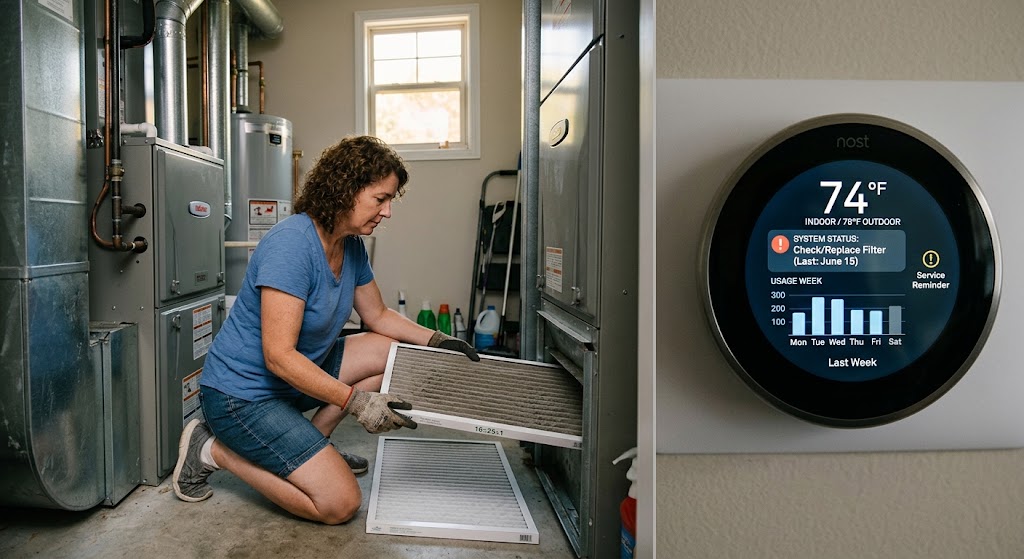
Quick answer
At the end of summer, smart thermostat owners should inspect or replace the HVAC filter, review cooling runtime and system alerts, verify thermostat and remote-sensor placement, check indoor humidity, keep indoor and outdoor HVAC components clear of debris, and have the heating side professionally serviced before cold weather if it is due. Long cooling cycles, repeated system alerts, unusual temperature differences, condensate problems, or declining comfort should be treated as diagnostic clues rather than reasons to keep lowering the thermostat setpoint.
Table of contents
- 1. Review cooling runtime before the season disappears from memory
- Long runtime is not automatically a fault
- Look for a change in pattern
- 2. Check the filter even if the app says nothing
- Why this matters after summer
- Smart reminders are helpful, not authoritative
- 3. Verify the replacement filter is actually appropriate
- 4. Inspect accessible condensate drainage
- What a homeowner can safely look for
- Water near the air handler is not normal maintenance evidence
- 5. Check indoor humidity trends
- Look for persistent humidity, not one isolated reading
- 6. Compare temperature sensors with the thermostat
- Why placement may suddenly become a problem in August
- 7. Review which sensor is active at which time
- Avoid sensor schedules that chase extreme rooms
- 8. Clear the outdoor unit
- Do not pressure-wash the coil
- 9. Confirm supply and return airflow is not obstructed
- 10. Review thermostat schedule before shoulder season
- 11. Be deliberate with auto heat/cool mode
- 12. Check thermostat power and connectivity
- Do not rewire the HVAC system casually
- 13. Update software, but do not treat firmware as maintenance
- 14. Review system-health alerts before dismissing them
- Start with nontechnical causes
- 15. Schedule fall heating maintenance before the first cold week
- A professional fall check can include
- 16. Heat-pump owners should review auxiliary heat behavior
- Why auxiliary heat deserves attention
- 17. Furnace owners should verify safety devices around the HVAC system
- 18. Look for evaporator icing evidence
- 19. Do not add refrigerant as routine maintenance
- 20. Use thermostat data to prepare a useful service call
- Screenshots can help
- 21. Create a baseline before heating season
- 22. Do not chase efficiency by sacrificing moisture control
- 23. Check the thermostat against an independent reference only when needed
- 24. Audit automations that can silently increase runtime
- 25. Review safety temperatures and vacation settings
- End-of-summer checklist
- Smart thermostat
- Homeowner HVAC checks
- Professional service
- When to call an HVAC professional now
- Conclusion
Key takeaways
- Use smart-thermostat data as a maintenance signal: compare recent runtime, alerts, and room temperatures with your normal summer pattern instead of treating the app as a diagnostic tool.
- ENERGY STAR recommends checking central HVAC filters monthly and scheduling professional pre-season maintenance, with cooling service in spring and heating service in fall.
- A clogged condensate drain, dirty coils, restricted airflow, or poor sensor placement can increase runtime or create comfort problems that thermostat setpoint changes will not fix.
- End-of-summer is a good time to reset schedules, inspect remote sensors, review filter reminders, and prepare heat-pump or furnace operation before the first cold spell.
Editorial transparency
Who worked on this article and how it was handled.
- Written by
- Maya Chen
- Creation method
- Editorial research
AI assistance: AI assisted with research organization and drafting. Sources, factual claims, and the final article should be reviewed by a human editor before publication.
The end of summer is a useful moment to look at your HVAC system while the season’s evidence is still visible. Your smart thermostat has just recorded weeks or months of cooling behavior, the air filter has accumulated peak-season dust, and the condensate system has spent the summer removing moisture from indoor air.
That makes late August a better maintenance checkpoint than simply waiting for the first cold morning. Instead of treating the thermostat only as a temperature control, use its runtime history, alerts, filter reminders, and remote-sensor readings to ask whether the HVAC system finished the cooling season behaving normally.
The objective is not to perform refrigerant, electrical, combustion, or internal equipment service yourself. It is to complete the safe homeowner checks, document anything unusual, reset the smart controls for the shoulder season, and know when the data justifies calling a qualified HVAC professional.
1. Review cooling runtime before the season disappears from memory
Start in the thermostat app.
Look at whatever historical information your model provides:
- daily cooling runtime;
- weekly or monthly runtime;
- comparison with previous periods;
- system-health alerts;
- indoor temperature;
- humidity where available;
- auxiliary or resistance-heat use on compatible heat-pump systems.
ENERGY STAR certified smart thermostats are required to provide information about HVAC energy use, such as monthly runtime, and to provide residents with energy feedback.
That makes runtime one of the most useful maintenance clues available to a homeowner.
Long runtime is not automatically a fault
A 95°F afternoon should require more cooling than a mild 78°F day.
Runtime can also change because of:
- higher humidity;
- more occupants;
- cooking;
- direct solar gain;
- doors being opened frequently;
- a new thermostat schedule;
- a remote sensor being prioritized in a warmer room.
Do not compare two days without context.
Look for a change in pattern
The more useful question is:
Did the system start needing noticeably more runtime to produce the same comfort under similar conditions?
That can justify a closer inspection.
Google Nest’s System Health Monitor, where available, uses operating patterns to identify issues such as cooling that runs longer than usual or a system that fails to cool the home as expected.
A thermostat alert is not a diagnosis.
It is evidence that something changed.
2. Check the filter even if the app says nothing
ENERGY STAR recommends inspecting, cleaning, or replacing filters in central air conditioners, furnaces, and heat pumps monthly.
That does not mean every disposable filter must be replaced every 30 days.
Filter life varies with:
- filter type;
- equipment;
- runtime;
- pets;
- renovation dust;
- wildfire smoke;
- indoor particle levels;
- return-air conditions.
The important maintenance action is inspection.
Why this matters after summer
A dirty filter increases airflow resistance.
ENERGY STAR warns that restricted airflow can make the system work harder, increase energy costs, and contribute to equipment problems or early failure.
At the end of a long cooling season, this is one of the first things to check when the thermostat shows unusually long runtime.
Smart reminders are helpful, not authoritative
Nest’s filter reminders can be based on how much the system has actually run rather than only a fixed calendar interval.
That is more useful than a generic six-month reminder.
But the thermostat cannot look at the physical filter.
If the filter is visibly dirty or the equipment/filter manufacturer says it should be replaced, service it even if the app has not sent a notification.
After replacement, reset the filter reminder if your thermostat requires it so the next alert starts from the correct point.
3. Verify the replacement filter is actually appropriate
Do not automatically install the highest filtration rating that fits physically.
The HVAC system needs adequate airflow.
Filter selection should follow:
- equipment manufacturer requirements;
- filter cabinet specifications;
- system design;
- household air-quality needs.
An overly restrictive filter in a system not designed for it can create airflow problems.
If you are unsure about filter type, size, or allowable resistance, ask the HVAC contractor rather than selecting only by marketing language.
Also check that the filter:
- is oriented in the correct airflow direction;
- sits properly in the rack;
- is not crushed or bypassing air around the edges;
- has the correct physical dimensions.
A smart thermostat cannot compensate for a poorly installed filter.
4. Inspect accessible condensate drainage
Air conditioning does two jobs:
- removes heat;
- removes moisture.
That moisture has to go somewhere.
ENERGY STAR includes condensate-drain inspection in its professional maintenance checklist because a blocked drain can contribute to water damage and indoor humidity problems.
EPA similarly recommends keeping HVAC drip pans clean and drain lines unobstructed.
What a homeowner can safely look for
Without opening electrical or refrigerant compartments, inspect accessible areas for:
- standing water;
- overflowing drain pan;
- water stains;
- dripping where there should not be dripping;
- algae or debris at an accessible drain termination;
- a condensate pump alarm or obvious pump failure.
If the system has a condensate safety switch, do not bypass it to keep the AC running.
A safety switch that stops the system may be preventing an overflow.
Water near the air handler is not normal maintenance evidence
If you find active leakage, shut down equipment if manufacturer guidance or immediate safety requires it and arrange service.
Do not keep lowering the thermostat and assuming the unit is “working harder because summer is hot.”
Water can indicate:
- blocked drainage;
- frozen-coil melt;
- pump failure;
- cracked or displaced drain components;
- another HVAC or plumbing issue.
5. Check indoor humidity trends
Late summer can expose humidity problems that are less obvious during dry weather.
EPA generally recommends keeping indoor relative humidity below 60 percent and ideally around 30 to 50 percent where practical.
Your smart thermostat may display humidity directly.
If it does not, a separate hygrometer can provide a useful reference.
Look for persistent humidity, not one isolated reading
Humidity naturally changes when:
- people shower;
- cooking produces steam;
- outdoor humidity rises;
- doors or windows stay open.
The concern is a persistent pattern.
If the home remains muggy while the AC is running normally, possible areas to investigate include:
- condensate drainage;
- HVAC sizing or operation;
- excessive outdoor-air leakage;
- ventilation;
- indoor moisture sources.
Do not solve a moisture problem only by driving the thermostat setpoint lower.
That may increase energy use without addressing the source.
6. Compare temperature sensors with the thermostat
Remote room sensors are excellent for comfort, but they can also create unnecessary runtime when placed badly.
Google’s Nest sensor guidance recommends avoiding locations:
- in direct sunlight;
- near windows;
- near vents or heat sources;
- on poorly insulated surfaces;
- inside enclosed areas with weak circulation;
- too high or low;
- outside the HVAC zone the thermostat controls.
End of summer is a good time to re-check those assumptions.
Why placement may suddenly become a problem in August
A sensor that worked well in spring may behave differently when late-afternoon sun reaches the wall.
A bedroom sensor near a west-facing window can report a much higher temperature than the rest of the home.
If the thermostat is prioritizing that sensor, the HVAC system may continue cooling until the sunny room reaches the target—even while other rooms become too cold.
That can look like an HVAC efficiency problem when the real issue is control logic.
7. Review which sensor is active at which time
Smart thermostats with multiple room sensors may let you schedule which room controls the HVAC system.
Check whether the schedule still matches actual occupancy.
For example:
Morning:
kitchen/living room sensor

Workday:
home office sensor

Evening:
living room sensor

Overnight:
bedroom sensor
If the household routine changed over summer, the thermostat may be optimizing for an empty room.
Avoid sensor schedules that chase extreme rooms
A smart thermostat should not be used to force one unusually hot or cold room to match the entire home if that room has a building-envelope or airflow problem.
If a single room consistently differs by several degrees, investigate:
- sun exposure;
- window condition;
- insulation;
- supply airflow;
- return-air path;
- duct issues.
A remote sensor tells the HVAC system about the imbalance.
It does not repair the imbalance.
8. Clear the outdoor unit
ENERGY STAR recommends keeping indoor and outdoor HVAC units clear of debris.
After summer, inspect the area around the outdoor condenser or heat-pump unit.
Remove loose material such as:
- leaves;
- grass clippings;
- weeds;
- windblown debris.
Keep landscaping from crowding the equipment according to manufacturer clearance requirements.
Do not pressure-wash the coil
Outdoor coil fins are delicate.
Aggressive cleaning can bend fins or damage equipment.
If the coil is visibly dirty and requires more than light exterior housekeeping, professional cleaning is safer than experimenting with high-pressure water, chemicals, or tools.
Also do not open service panels.
Electrical components and capacitors can remain hazardous even when the thermostat is off.
9. Confirm supply and return airflow is not obstructed
Walk through the house and inspect accessible:
- supply registers;
- return grilles.
Furniture, rugs, storage boxes, and renovation changes can block airflow gradually.
A smart thermostat may respond to restricted airflow by running longer because the conditioned air is not reaching the space efficiently.
Do not assume the solution is to close more registers in rooms you use less.
Closing too many vents can affect airflow and system pressure.
If the home has persistent room-to-room airflow imbalance, have the duct system evaluated rather than trying to tune the entire HVAC system by random register position.
10. Review thermostat schedule before shoulder season
September weather can create an awkward control period:
- warm afternoon;
- cool morning;
- open windows;
- lower nighttime temperature.
A cooling schedule built for July may now run more than necessary.
Review:
- wake temperature;
- away temperature;
- evening temperature;
- sleep temperature;
- vacation mode;
- geofencing;
- learning schedule;
- eco or energy-saving mode.
ENERGY STAR highlights thermostat scheduling as a core smart-thermostat function.
The goal is not to turn the system off aggressively.
It is to avoid cooling an empty home to a peak-summer comfort target when the weather no longer requires it.
11. Be deliberate with auto heat/cool mode
Some thermostats can automatically switch between heating and cooling.
That can be convenient during shoulder season.
It can also create unnecessary switching if the heat and cool setpoints are too close.
Use an appropriate deadband or separation according to:
- thermostat guidance;
- HVAC equipment requirements;
- household comfort needs.
Do not repeatedly force heating and cooling against each other over small temperature swings.
If your HVAC system is complex—especially multi-stage, variable-capacity, dual-fuel, or zoned—avoid changing advanced equipment configuration without understanding the control strategy.
12. Check thermostat power and connectivity
Smart thermostats need reliable power for:
- Wi-Fi;
- display;
- sensors;
- remote access;
- software functions.
ENERGY STAR notes that many smart thermostats use a C-wire or another compatible power method.
If you saw summer symptoms such as:
- repeated thermostat reboots;
- Wi-Fi dropping when HVAC starts;
- blank display;
- power warnings;
- system-health messages;
do not ignore them before heating season.
A power or wiring issue can become more disruptive when the system changes modes.
Do not rewire the HVAC system casually
Low-voltage thermostat wiring is less hazardous than line voltage, but incorrect configuration can still damage controls or equipment.
If the thermostat reports wiring or equipment faults that you cannot clearly resolve from the manufacturer documentation, use a qualified HVAC professional.
13. Update software, but do not treat firmware as maintenance
Smart thermostats may receive over-the-air updates.
Check that:
- the thermostat is online;
- the app is current;
- account recovery information is valid;
- household access is correct.
That is good digital maintenance.
It is not HVAC maintenance.
A firmware update cannot clean:
- a coil;
- a filter;
- a drain;
- a burner;
- a blower.
Smart-home owners sometimes over-focus on software because it is visible in the app.
The mechanical system still determines most of the heating and cooling performance.
14. Review system-health alerts before dismissing them
Some smart thermostats can identify patterns worth checking.
Google Nest’s current System Health Monitor can generate eligible alerts for situations including:
- cooling running longer than usual;
- heating running longer than usual;
- repeated AC power loss;
- potential heat-pump problems;
- failure to cool;
- failure to heat;
- filter reminders.
These alerts should be treated like a check-engine light.
They tell you where to look, not exactly which component has failed.
Start with nontechnical causes
Before calling for service, check:
- doors or windows left open;
- thermostat schedule changed;
- remote sensor in a hot location;
- blocked vents;
- dirty filter;
- outdoor unit blocked by debris.
If none of those explains the behavior—or the system shows water leakage, icing, unusual noise, electrical smell, repeated shutdown, or weak cooling—stop troubleshooting at the homeowner level and arrange professional service.
15. Schedule fall heating maintenance before the first cold week
ENERGY STAR recommends annual pre-season maintenance and suggests cooling-system service in spring and heating-system service in fall.
That timing matters.
HVAC contractors become busier when the weather suddenly changes.
A professional fall check can include
ENERGY STAR’s maintenance checklist includes tasks such as:
- thermostat-setting verification;
- electrical-connection checks;
- motor voltage/current checks;
- control-system checks;
- startup and shutdown verification.
Heating-specific work can include inspection of:
- gas or oil connections where applicable;
- gas pressure;
- burner combustion;
- heat exchanger.
These are not homeowner DIY tasks.
Fuel-burning equipment carries combustion, fire, and carbon-monoxide risks.
16. Heat-pump owners should review auxiliary heat behavior
A heat pump uses the same refrigeration system for cooling and heating.
That means a problem visible at the end of cooling season may matter during winter operation too.
ENERGY STAR smart-thermostat criteria specifically address reporting electric resistance heat use for heat-pump systems.
Google Nest’s System Health Monitor can also flag potential heat-pump problems on eligible systems.
Why auxiliary heat deserves attention
Many heat-pump systems include electric resistance auxiliary heat or another backup heat source.
That backup may legitimately run under certain conditions.
But unexpectedly high auxiliary-heat use can significantly affect energy consumption.
Before cold weather:
- confirm thermostat equipment configuration;
- verify the system is correctly identified as a heat pump;
- review any alerts;
- check historical auxiliary/resistance heat information if available;
- have unusual operation evaluated.
Do not change compressor lockouts, balance points, or advanced heat-pump staging values without understanding the equipment and climate implications.
17. Furnace owners should verify safety devices around the HVAC system
For fuel-burning heating:
- confirm carbon-monoxide alarms are installed and maintained according to local requirements and manufacturer instructions;
- keep combustion-air openings unobstructed where applicable;
- do not store combustibles against the equipment;
- arrange professional service if combustion or venting issues are suspected.
A smart thermostat cannot detect every furnace safety problem.
Do not use thermostat data as a substitute for proper combustion-appliance inspection.
18. Look for evaporator icing evidence
If the indoor coil froze during summer, you may have noticed:
- reduced airflow;
- poor cooling;
- ice on refrigerant tubing or accessible cabinet areas;
- water after the ice melted;
- very long runtime.
Possible causes can include restricted airflow or refrigeration-system problems.
Do not keep operating an iced system and repeatedly resetting it.
A homeowner can check the obvious airflow item—the filter—but refrigerant diagnosis and internal coil work belong to a qualified technician.
Google’s documentation similarly notes that restricted airflow from dirty filters can contribute to evaporator-coil icing.
19. Do not add refrigerant as routine maintenance
ENERGY STAR includes refrigerant-level checks as part of professional cooling service.
That does not mean refrigerant is a consumable that should be “topped off” every fall.
A sealed refrigeration system should not require routine homeowner refilling.
If the charge is incorrect, a technician needs to determine why and service the system appropriately.
Avoid DIY refrigerant cans, sealants, or pressure adjustments.
Refrigerant handling is regulated and system-specific.
20. Use thermostat data to prepare a useful service call
One of the best advantages of a smart thermostat is documentation.
If you call an HVAC professional, prepare:
- date the problem started;
- indoor setpoint;
- indoor temperature;
- outdoor weather if known;
- runtime before and after the change;
- humidity;
- relevant system alerts;
- filter replacement date;
- rooms that are uncomfortable;
- whether airflow seems weak;
- whether the outdoor unit runs;
- any noise, smell, water, or icing.
This is much more useful than:
“The AC feels weird.”
Screenshots can help
Save thermostat graphs or alerts before they roll out of the app’s history.
Do not try to interpret every graph as a diagnosis.
Use it as evidence.
21. Create a baseline before heating season
After maintenance is complete, record what “normal” looks like.
For example:
Filter changed: Aug. 31
Indoor RH on mild day: 46%
Thermostat schedule reviewed: yes
Bedroom sensor: evening/overnight only
Cooling runtime on 84°F day: X hours
Heating service: scheduled Sept. 18
The exact numbers are property-specific.
The value is creating a reference.
If the HVAC system behaves differently six months later, you have something meaningful to compare.
22. Do not chase efficiency by sacrificing moisture control
As cooling demand falls, homeowners sometimes raise the thermostat aggressively to avoid running the AC.
That may reduce cooling runtime.
But in humid climates, the home still needs moisture management.
EPA emphasizes that humidity control is central to reducing moisture and mold risk.
If indoor relative humidity stays high, consider the whole moisture strategy:
- air conditioning;
- ventilation;
- exhaust fans;
- building leakage;
- dehumidification where appropriate;
- water leaks;
- condensate drainage.
Energy efficiency means reducing unnecessary conditioning—not creating a damp building.
23. Check the thermostat against an independent reference only when needed
Smart thermostat temperature sensors have accuracy requirements, but perceived comfort can still differ because of location.
If you suspect the thermostat is reading incorrectly:
- use a reasonably accurate independent thermometer;
- place it near the thermostat, not across the room;
- allow time for temperatures to stabilize;
- avoid holding the thermometer or placing it in sunlight;
- compare trends rather than reacting to one instant reading.
If the readings differ substantially and consistently, consult the thermostat manufacturer guidance before applying a calibration offset.
A calibration setting should not be used to hide bad thermostat placement.
24. Audit automations that can silently increase runtime
Smart-home platforms can control HVAC indirectly.
Review whether you created routines based on:
- occupancy;
- geofencing;
- open windows;
- utility events;
- vacation mode;
- sleep scenes;
- voice commands.
Look for conflicts.
Example:
Thermostat schedule:
Away at 8:00 a.m.

Home automation:
Sets Comfort at 8:05 a.m.

Geofence:
Sets Away at 8:10 a.m.
The equipment may be behaving exactly as commanded while the household thinks the thermostat is malfunctioning.
Simplify overlapping automations before diagnosing mechanical problems from runtime alone.
25. Review safety temperatures and vacation settings
Many smart thermostats provide minimum heating or maximum cooling safety limits.
Before travel or the first cold weather:
- verify those settings;
- check household notification settings;
- confirm the thermostat is online;
- confirm a trusted person can access the home if necessary.
Do not set extreme vacation temperatures without considering:
- freezing risk;
- pets;
- humidity;
- plumbing;
- indoor plants;
- building requirements.
Remote control is useful, but the home should remain protected even if internet access disappears.
End-of-summer checklist
Use this as the final walkthrough.
Smart thermostat
- Review cooling runtime history.
- Read and resolve system-health alerts.
- Review filter reminder status.
- Reset filter history after replacement.
- Review temperature schedule.
- Check geofencing/occupancy routines.
- Verify remote-sensor placement.
- Review which sensor is active by time of day.
- Check humidity trend if available.
- Confirm thermostat Wi-Fi and power are stable.
- Review safety/vacation settings.
Homeowner HVAC checks
- Inspect the filter.
- Replace or clean it when required.
- Check accessible condensate areas for leakage.
- Keep supply and return grilles unobstructed.
- Clear loose debris around the outdoor unit.
- Look for water stains, icing evidence, or unusual noise.
- Keep indoor HVAC equipment area clear.
Professional service
- Schedule fall heating maintenance if due.
- Report unusually long runtime.
- Report repeated shutdown or power alerts.
- Report persistent humidity problems.
- Report condensate leakage.
- Report icing or weak airflow.
- Report abnormal heat-pump auxiliary-heat behavior.
- Leave electrical, refrigerant, combustion, and internal equipment service to qualified technicians.
When to call an HVAC professional now
Do not wait for fall maintenance if you observe:
- burning or electrical odor;
- smoke;
- repeated breaker trips;
- active water leakage;
- recurring icing;
- compressor or system repeatedly shutting down;
- severe loss of airflow;
- unusual grinding or metal noises;
- HVAC running without meaningful heating or cooling;
- suspected gas or combustion problems;
- carbon-monoxide alarm activation.
For gas odor or carbon-monoxide alarms, follow emergency guidance for the fuel utility, local authorities, and alarm manufacturer rather than troubleshooting from the thermostat.
Conclusion
A smart thermostat makes end-of-summer HVAC maintenance more useful because you can combine physical inspection with a season’s worth of operating data.
Start with the basics: inspect the filter, look for condensate problems, clear debris around outdoor equipment, verify vents and sensor placement, and review humidity and cooling runtime. Then reset schedules and reminders so the thermostat is ready for milder weather instead of continuing to operate as if it were still peak July.
Most importantly, use the thermostat as an early-warning instrument, not a repair tool. Longer runtime, repeated health alerts, unusual auxiliary heat, persistent humidity, water leakage, or declining comfort are reasons to investigate the HVAC system—not reasons to keep changing the setpoint. Close out cooling season with a documented baseline and schedule professional fall heating service before the first cold spell makes the contractor calendar much harder to book.
Common questions
Questions this guide answers
What HVAC maintenance should I do at the end of summer?
Check the air filter, review thermostat schedules and runtime, inspect accessible condensate drainage, clear debris around outdoor equipment, confirm supply and return vents are unobstructed, and schedule fall heating maintenance if due. Professional service should cover electrical, controls, airflow, coils, refrigerant-related checks where applicable, and heating-specific safety items.
Can a smart thermostat tell me when my HVAC system needs service?
Some can identify unusual operating patterns, but they do not replace diagnosis by an HVAC professional. Google Nest's System Health Monitor, for example, can warn about unusually long heating or cooling runtime, repeated power interruptions, potential heat-pump issues, and filter reminders on eligible systems and in eligible regions.
Should I replace my HVAC filter even if my smart thermostat has not reminded me?
Yes if inspection shows the filter is dirty or the equipment manufacturer specifies service. ENERGY STAR recommends checking central HVAC filters monthly, while some smart thermostats base reminders partly on system runtime. A reminder is a maintenance aid, not a substitute for looking at the actual filter and following the HVAC and filter manufacturers' instructions.
What indoor humidity should I watch after cooling season?
EPA generally recommends keeping indoor relative humidity below 60 percent and ideally around 30 to 50 percent where practical. If humidity remains high while cooling demand falls, investigate moisture sources, drainage, ventilation, and HVAC performance rather than using the thermostat temperature setting alone to manage moisture.
When should long thermostat runtime be a concern?
Runtime naturally increases during very hot weather, but a new pattern of longer cycles combined with poor cooling, rising humidity, unusual noises, icing, water leakage, or system-health alerts deserves investigation. Check simple causes such as open doors, blocked airflow, and a dirty filter first, then call a qualified HVAC professional if the cause is not obvious.
Evidence & further reading
Sources & references
Primary and authoritative references used to support or contextualize this article. Links open the original source.
- 1Maintenance Checklist
ENERGY STAR · Accessed Aug 31, 2026
Supports monthly filter inspection, annual pre-season service, thermostat checks, condensate-drain inspection, coil cleaning, electrical checks, airflow service, and heating-specific professional maintenance.
- 2Clean Heating and Cooling
ENERGY STAR · Accessed Aug 31, 2026
Supports annual pre-season HVAC maintenance, monthly filter checks, and keeping indoor and outdoor HVAC units clear of debris.
- 3Smart Thermostats Key Product Criteria
ENERGY STAR · Accessed Aug 31, 2026
Supports smart-thermostat scheduling, HVAC runtime information, energy feedback, temperature-accuracy criteria, and heat-pump resistance-heat reporting requirements for certified products.
- 4Learn about System Health Monitor from Google Nest
Google Home and Nest Help · Accessed Aug 31, 2026
Supports using eligible Nest thermostat alerts as early warnings for unusual heating or cooling runtime, power interruptions, heat-pump issues, and filter reminders.
- 5Air filters and filter reminders
Google Home and Nest Help · Accessed Aug 31, 2026
Supports runtime-based filter reminders on Nest thermostats and the need to reset the reminder after filter service.
- 6Set up & install your Nest Temperature Sensor
Google Home and Nest Help · Accessed Aug 31, 2026
Supports avoiding temperature-sensor placement near direct sun, windows, heat sources, poorly circulated locations, and outside the HVAC zone controlled by the thermostat.
- 7Care for Your Air: A Guide to Indoor Air Quality
U.S. Environmental Protection Agency · Accessed Aug 31, 2026
Supports the recommendation to keep indoor relative humidity below 60 percent and ideally around 30 to 50 percent where practical.
- 8A Brief Guide to Mold, Moisture and Your Home
U.S. Environmental Protection Agency · Accessed Aug 31, 2026
Supports keeping HVAC drip pans clean, drain lines unobstructed, and indoor humidity controlled to reduce moisture and mold risk.

About the author
Maya Chen
Maya covers residential energy, HVAC controls, and practical home automation, translating technical systems into useful decisions for homeowners and renters.
More from Maya →Make your home smarter without buying every gadget.
One useful idea, one product worth knowing, and one energy-saving action—delivered weekly.
No spam. Unsubscribe anytime.
Semantic recommendations
Related reading
Selected from topic cluster, entities, tags, search intent, and editorial relationships.
Smart Window Contact Sensors: Preventing Open Window AC Energy Waste
Use window contact sensors to pause cooling only after a window stays open, then restore the previous HVAC state safely after every monitored window is closed.
How to Optimize Your Smart AC for Late-Summer Heatwaves
Use smarter cooling schedules, sensible setpoints, humidity control, room sensors, and maintenance checks to stay comfortable during late-summer heatwaves without wasting energy.

7 Hidden HVAC Settings That Instantly Drop Your Winter Heating Bill
Seven overlooked thermostat and HVAC settings can cut wasted heating runtime, reduce expensive backup heat, and improve winter efficiency without replacing your system.

5 Smart Thermostat Placement Mistakes That Can Waste Hundreds on HVAC Bills
Wrong thermostat placement can distort temperature readings, increase HVAC runtime, and quietly undermine both comfort and energy savings.