
Drill-Free Smart Video Doorbells for Multi-Family Rental Housing
A renter-focused guide to drill-free video doorbells, mounting methods, privacy rules, battery trade-offs, and the best fits for apartment doors.
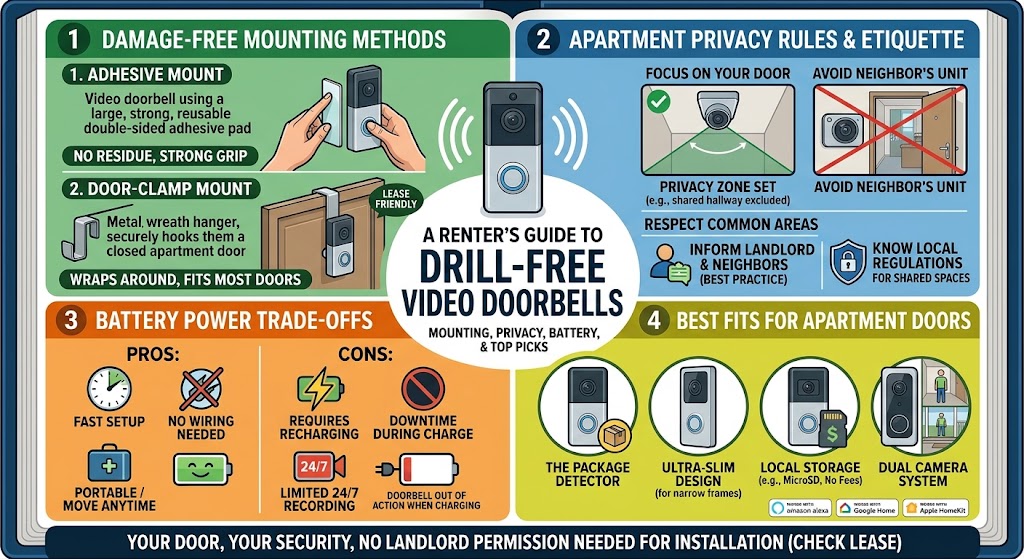
Quick answer
The best drill-free video doorbell for a rental depends on the door itself. A peephole replacement such as Ring Peephole Cam 2K is the cleanest option when the apartment already has a compatible standard peephole; Ring's battery doorbells with an official adhesive No-Drill Mount suit smooth mounting surfaces; and Aqara's Video Doorbell G4 supports an adhesive backplate and is especially attractive for Apple Home and local-storage users. In multi-family housing, renters should also confirm lease or building rules and minimize recording of neighboring doors and communal corridors.
Table of contents
- The short answer: choose the mounting method before the camera
- Best overall for an existing peephole: Ring Peephole Cam 2K
- Why it makes sense in multi-family housing
- The important trade-off
- Best official adhesive system: Ring Battery Doorbell 2K with No-Drill Mount
- Why Battery Doorbell 2K is a practical pairing
- Adhesive still counts as a modification
- Best Apple Home and local-storage option: Aqara Smart Video Doorbell G4
- Why the indoor storage location matters
- Where the G4 is less convenient
- Why some good battery doorbells are not top picks for strict no-drill renters
- The multi-family privacy problem is different from a front porch
- Configure for the doorway, not the whole floor
- Check your lease and building rules before ordering
- Theft resistance matters more in a shared corridor
- Peephole mounting has a structural advantage
- Adhesive mounts depend on the surface
- Wi-Fi can be surprisingly difficult at an apartment door
- Subscription cost can matter more than purchase price
- Battery strategy is part of the installation strategy
- Which drill-free doorbell should you choose?
- Choose Ring Peephole Cam 2K if:
- Choose Ring Battery Doorbell 2K + official No-Drill Mount if:
- Choose Aqara Smart Video Doorbell G4 if:
- Consider a third-party over-door mount only if:
- Renter installation checklist
- Conclusion
Key takeaways
- A peephole replacement is usually the cleanest drill-free solution when the apartment door already has a compatible peephole.
- Official adhesive mounts are preferable to improvised tape because the doorbell, bracket, adhesive, and removal procedure are designed as one system.
- Multi-family renters should treat hallway privacy, building permission, theft risk, Wi-Fi reliability, and battery access as buying criteria alongside video quality.
Editorial transparency
Who worked on this article and how it was handled.
- Written by
- Daniel Reed
- Creation method
- Editorial research
AI assistance: AI assisted with research organization and drafting. Sources, factual claims, and the final article should be reviewed by a human editor before publication.
A video doorbell is unusually useful in an apartment: deliveries happen in shared corridors, visitors may reach the unit before an intercom call arrives, and renters often want a record of activity outside their own door. The problem is that the most obvious installation method—drilling a bracket into a door frame or corridor wall—may violate the lease or building rules.
Going drill-free solves only part of that problem. In multi-family housing, the mounting method has to coexist with fire doors, shared hallways, neighboring entrances, privacy expectations, battery charging, Wi-Fi coverage, and the possibility that someone can simply remove a device mounted outside your unit.
The right choice therefore depends less on which doorbell has the longest feature list and more on how it attaches to your specific apartment door. This guide compares the strongest manufacturer-supported drill-free approaches, explains which products fit each mounting scenario, and highlights the privacy and building-management issues renters should resolve before installation.
The short answer: choose the mounting method before the camera
For most renters, there are three practical drill-free approaches.
| Mounting approach | Best fit | Main advantage | Main drawback |
|---|---|---|---|
| Peephole replacement | Apartment door with a compatible existing peephole | No adhesive on the corridor wall and no new holes | Replaces the physical optical peephole while installed |
| Official adhesive mount | Smooth, clean surface beside the door | Simple installation and easy removal | Surface compatibility and theft exposure matter |
| Manufacturer adhesive backplate | Door or wall approved for adhesive mounting | Can combine drill-free installation with broader ecosystem choices | Removal quality depends on surface and adhesive condition |
The first rule is simple: avoid buying the doorbell before you know how you are allowed to mount it.
A battery-powered doorbell is not automatically a no-drill doorbell. Several popular battery models still ship with brackets that the manufacturer expects to be screwed into a wall or door frame. You can sometimes add a third-party clamp or adhesive enclosure, but that introduces another layer of fit, theft, door-clearance, and warranty considerations.
For a rental, a manufacturer-supported mounting path is easier to reason about and easier to remove when the lease ends.
Best overall for an existing peephole: Ring Peephole Cam 2K
If your apartment already has a compatible standard peephole, the cleanest drill-free strategy is often to use that opening instead of adding anything to the wall.
Ring positions Peephole Cam 2K specifically for apartments and condos. It installs through the existing peephole without drilling, uses a removable rechargeable battery, and can be removed when you move out.
Its current specification includes 2K video and a 140° horizontal by 140° vertical head-to-toe field of view. Core functions such as Live View, Two-Way Talk, and real-time motion alerts do not require a subscription, while recorded video history and additional smart-alert features require a compatible Ring Protect plan.
Why it makes sense in multi-family housing
The biggest advantage is not resolution. It is mounting certainty.
You are not depending on an adhesive strip staying bonded to painted corridor drywall, and you are not drilling into a fire-rated door or shared wall. The camera uses an opening the door already has.
That makes it particularly attractive when:
- the lease prohibits drilling;
- the hallway wall is technically common property;
- the door frame is metal or difficult to modify;
- you expect to move within a year or two;
- you want the installation to leave as little trace as possible.
The important trade-off
Installing Peephole Cam 2K means you lose the ability to look through the original optical peephole while the camera is installed. Ring explicitly notes that the camera replaces that physical view.
That matters more than it sounds. Some renters, landlords, or building policies may require the peephole to remain usable in its original form. Confirm that before buying.
The door’s peephole dimensions and construction also have to be compatible. Never enlarge or alter a rental door opening without written authorization.
Best official adhesive system: Ring Battery Doorbell 2K with No-Drill Mount
If you do not have a suitable peephole, an official adhesive bracket is the next-cleanest option.
Ring’s current No-Drill Mount is designed for compatible battery doorbells and uses double-sided adhesive to hold the mounting plate to a smooth, even surface. The doorbell then attaches to that plate using the provided hardware.
That distinction is useful: you are not sticking the doorbell itself to the wall with generic tape. The adhesive plate, doorbell interface, installation procedure, and removal process are designed as a system.
Ring specifically markets the No-Drill Mount for renters and users who do not want to drill holes. Its installation instructions require a smooth, clean mounting surface, and Ring says not to install it on glass. The mount is also model-specific, so compatibility must be checked against the exact doorbell generation.
Why Battery Doorbell 2K is a practical pairing
The current Battery Doorbell 2K supports the official no-drill accessory and provides 2K head-to-toe video in a battery-powered form. That makes it easy to remove for charging without involving the building’s doorbell wiring.
For a rental, battery operation has three advantages:
- no transformer compatibility problem;
- no electrical modification to restore at move-out;
- no need to ask an electrician to alter shared-building wiring.
The downside is predictable: you have to recharge it. Heavy hallway motion, frequent Live View use, cold weather, and aggressive recording settings can all increase battery demand.
Adhesive still counts as a modification
“No drill” does not mean “no landlord issue.”
Adhesive can lift paint, leave residue, discolor a finish, or fail on textured surfaces. In a managed apartment building, the corridor-facing wall or door frame may also be considered common property even though it is beside your unit.
Before installing, get written confirmation if your lease or building rules are unclear.
Best Apple Home and local-storage option: Aqara Smart Video Doorbell G4
The Aqara Smart Video Doorbell G4 is a different kind of renter option. Instead of requiring a separately purchased official no-drill plate, Aqara’s installation documentation supports an adhesive backplate installation method for suitable clean, flat surfaces.
That makes the G4 especially interesting for renters who want Apple Home integration or more control over where recordings are stored.
The G4 supports:
- six AA batteries for wire-free operation;
- 1080p video;
- a 162° field of view;
- 2.4 GHz Wi-Fi;
- Apple HomeKit Secure Video;
- streaming to compatible Google and Alexa displays;
- an included indoor chime repeater;
- local microSD storage in the indoor repeater, up to 512 GB according to Aqara’s current specifications.
Aqara also supports wired power, but a strict renter setup can stay battery-powered and avoid modifying existing doorbell wiring.
Why the indoor storage location matters
A doorbell is mounted in a public-facing location. If someone removes or damages the outdoor unit, storage located entirely inside that camera can disappear with it.
Aqara puts the microSD slot in the indoor chime repeater, which keeps the storage medium inside the apartment. That is a useful design choice for multi-family housing, where hallway devices are physically accessible to neighbors, visitors, contractors, and delivery workers.
Aqara also advertises cloud event storage and HomeKit Secure Video options, but storage behavior depends on the selected ecosystem and configuration. Continuous 24/7 recording is not a realistic battery-first expectation; Aqara states that 24/7 recording is available when the G4 is wired.
Where the G4 is less convenient
The G4 is physically larger than many battery doorbells and uses six AA cells rather than a removable rechargeable pack. For a busy corridor with frequent triggers, battery-management preferences may matter more than the product’s smart-home compatibility.
Its adhesive installation also requires a suitable surface. As with any adhesive-mounted device, test whether the building allows it before assuming “no screws” automatically means “approved.”
Why some good battery doorbells are not top picks for strict no-drill renters
Battery power and drill-free mounting are separate features.
That is easy to miss when shopping. A product page may call a doorbell “wire-free” because it does not need electrical wiring, while the installation instructions still tell you to drill mounting holes for the bracket.
For example, current official installation guidance for eufy Video Doorbell E340 describes battery operation but still uses a screw-secured mounting bracket. The product can be adapted with third-party door mounts, but that is not the same as having a manufacturer-supported drill-free installation path.
The same buying rule applies to other products:
If strict no-drill installation is non-negotiable, read the mounting manual—not just the power specification.
Third-party mounts can still be useful, especially clamp-style brackets that wrap around the edge of an inward-opening door. But you need to verify door thickness, weather stripping, closing clearance, lock operation, fire-door requirements, and whether the mount can be removed from the hallway side.
The multi-family privacy problem is different from a front porch
A suburban doorbell often looks at the homeowner’s porch, driveway, and front path. An apartment doorbell may look directly at:
- a neighbor’s entrance;
- a shared elevator lobby;
- a communal landing;
- a stairwell;
- a corridor used by dozens of residents each day.
That changes the privacy calculation.
In the UK, the Information Commissioner’s Office states that home CCTV and smart doorbells that capture communal areas or other property can fall under data-protection rules. Its guidance recommends limiting coverage to what is necessary, securing footage, deleting recordings appropriately, and using privacy blockers or masking where possible.
The European Data Protection Board similarly treats the household exemption narrowly when video surveillance extends beyond a purely private setting. Exact obligations vary by country and circumstances.
US rules are more fragmented and can vary by state, lease, housing provider, and whether audio is recorded. The practical renter response is the same: do not assume a shared hallway is legally equivalent to your own front porch.
Configure for the doorway, not the whole floor
Once the camera is installed:
- angle it toward the area immediately in front of your own door;
- use motion zones to exclude elevators or neighboring entrances where possible;
- use privacy zones or masks where the platform supports them;
- avoid continuous recording when event-triggered recording meets the security need;
- review whether audio recording is necessary in your jurisdiction and building;
- keep account access limited to household members who actually need it.
A wider field of view is not always better in a multi-family corridor.
Check your lease and building rules before ordering
There is no universal “renter exemption” that makes a doorbell camera automatically acceptable.
The front door itself may belong to the landlord. The hallway may be controlled by the property manager, condominium association, housing authority, or building owner. Fire-rated doors can have restrictions on hardware and alterations. Some properties also have specific surveillance or appearance rules for corridor-facing devices.
Before buying, answer these questions:
- Does the lease prohibit alterations to the door, frame, or corridor wall?
- Does building management require written permission for cameras facing common areas?
- Is the door fire-rated or subject to restrictions on attached hardware?
- Can adhesive be applied to the finish without being treated as damage?
- Is the existing peephole tenant-modifiable?
- Are there rules about recording neighbors, staff, or common spaces?
If approval is required, get it in writing. A short email from management is more useful at move-out than relying on a verbal conversation from two years earlier.
Theft resistance matters more in a shared corridor
A no-drill mount is designed to avoid permanent property modification. That can also make it easier to remove than a deeply anchored exterior bracket.
No consumer doorbell is theft-proof, but renters can reduce the risk by choosing the mounting strategy carefully.
Peephole mounting has a structural advantage
A peephole camera passes through the door, so its mounting system is not simply an adhesive plate exposed to the hallway. That is one reason the Ring Peephole Cam 2K is compelling for compatible apartment doors.
Adhesive mounts depend on the surface
A smooth, solid surface gives an adhesive system its best chance. Textured paint, dusty masonry, peeling finishes, damp areas, or uneven trim can weaken the bond.
Follow the manufacturer’s surface-preparation and curing instructions exactly. Ring, for example, tells users to clean the surface, hold the mount in place for several minutes, and allow time for adhesion before completing installation.
Do not “improve” an approved no-drill mount with construction adhesive, permanent epoxy, or screws unless the landlord has explicitly approved a permanent installation.
Wi-Fi can be surprisingly difficult at an apartment door
Your doorbell may be only a few meters from the router and still have poor connectivity.
Apartment doors are often surrounded by metal frames, concrete, masonry, utility risers, fire-rated assemblies, and dense neighboring Wi-Fi networks. The result can be good internet inside the living room but unreliable connectivity on the hallway side of the door.
Before permanently attaching anything:
- power on the doorbell;
- hold it at the intended mounting position;
- check live view and notifications;
- close the apartment door fully;
- test again from both Wi-Fi and cellular data.
This is especially important for products that rely on 2.4 GHz Wi-Fi or an indoor chime/repeater.
Aqara’s G4 includes a chime repeater that acts as part of the connection path. Ring’s Peephole Cam 2K uses 2.4 GHz Wi-Fi. Whatever product you choose, test the real doorway location rather than assuming the signal strength inside the room represents performance outside the door.
Subscription cost can matter more than purchase price
A doorbell that costs less upfront can become more expensive over a multi-year lease if the features you actually want require cloud storage.
Before buying, separate these functions:
- live view;
- doorbell notifications;
- motion alerts;
- recorded event history;
- package or person classification;
- facial recognition;
- local storage;
- cloud storage retention.
Ring’s Peephole Cam 2K provides Live View, Two-Way Talk, and real-time motion alerts without a paid plan, while recorded video history and additional smart features are tied to Ring Protect.
Aqara’s G4 has a different model: it supports local microSD storage through the indoor chime repeater and can integrate with HomeKit Secure Video for Apple users. That may be preferable if recurring cloud fees are a deciding factor, although the exact experience depends on the ecosystem and storage configuration you choose.
Do not compare subscription prices alone. Compare the specific feature you would lose if you stopped paying.
Battery strategy is part of the installation strategy
A renter-friendly doorbell should be easy to recharge without disturbing the mounting surface.
That is another reason mounting design matters.
- Ring Peephole Cam 2K uses a removable Quick Release Battery Pack.
- Ring Battery Doorbell 2K is battery-powered and can be removed from its mount for charging.
- Aqara G4 uses six AA batteries when operated wirelessly.
High traffic can reduce battery life. A multi-family hallway can trigger more events than a quiet detached-house porch because residents, delivery workers, cleaners, and maintenance staff pass the camera throughout the day.
To control battery drain:
- narrow motion zones;
- reduce unnecessary motion sensitivity;
- exclude constantly active common areas where possible;
- avoid excessive Live View use;
- keep spare batteries or a charging routine appropriate to the product.
The best battery claim on a product page is less useful than knowing how often your hallway wakes the camera.
Which drill-free doorbell should you choose?
Use the door itself as the decision tree.
Choose Ring Peephole Cam 2K if:
- your apartment has a compatible standard peephole;
- you want the least reliance on adhesive;
- apartment-specific mounting is more important than broad smart-home integration;
- you are comfortable losing the original optical peephole while the device is installed.
Choose Ring Battery Doorbell 2K + official No-Drill Mount if:
- there is no usable peephole;
- you have a smooth, landlord-approved adhesive surface;
- you prefer a rechargeable battery format;
- you want an official mounting accessory rather than a generic third-party bracket.
Choose Aqara Smart Video Doorbell G4 if:
- Apple Home or HomeKit Secure Video matters to you;
- local microSD storage is a priority;
- the included indoor chime/repeater fits your apartment network setup;
- you have a suitable surface for Aqara’s documented adhesive backplate method;
- AA battery maintenance is acceptable.
Consider a third-party over-door mount only if:
- the manufacturer does not provide a suitable drill-free option;
- the mount fits your exact door thickness and swing direction;
- it does not interfere with seals, locks, self-closing hardware, or fire-door operation;
- building management approves the external appearance and hardware.
For fire-rated or self-closing apartment doors, do not guess. Ask the landlord or building manager before attaching hardware that changes how the door closes or seals.
Renter installation checklist
Use this sequence before sticking anything to the door or corridor wall.
- Read the lease and building camera rules.
- Confirm whether the door, frame, and hallway wall are tenant-modifiable.
- Get written permission if the rules are unclear.
- Decide between peephole, official adhesive, or other approved mounting method.
- Verify exact doorbell-to-mount compatibility.
- Test Wi-Fi and live view at the final mounting location with the door closed.
- Check the camera field of view for neighboring entrances and communal traffic.
- Configure motion zones and privacy masking where available.
- Decide whether audio recording is necessary and lawful in your location.
- Photograph the door and mounting surface before installation for move-out records.
- Follow the manufacturer’s cleaning, adhesion, and removal instructions.
- Test notifications from cellular data after installation.
- Add battery replacement or charging to your household maintenance routine.
The goal is a setup that is easy to install and easy to undo.
Conclusion
For multi-family rental housing, the best drill-free video doorbell is the one whose mounting method fits the building before its camera features fit your wish list. If the door has a compatible peephole, Ring Peephole Cam 2K offers the cleanest apartment-specific installation. If you need an adhesive solution, Ring’s Battery Doorbell 2K with its official No-Drill Mount is straightforward, while Aqara G4 is the stronger choice for renters who value Apple Home integration and local-storage flexibility.
Before installing any of them, confirm the lease, test the doorway Wi-Fi, and reduce the camera’s view of shared spaces as much as practical. In an apartment, a good video doorbell should protect your doorway without creating a permanent modification—or turning the entire hallway into your surveillance zone.
Common questions
Questions this guide answers
Can renters install a video doorbell without drilling?
Yes. Depending on the door and product, renters can use an official adhesive no-drill mount, replace an existing peephole with a compatible camera, or use a manufacturer-supported adhesive backplate. Permission requirements still depend on the lease, landlord, condominium, or building management rules.
What is the best no-drill video doorbell for an apartment with a peephole?
Ring Peephole Cam 2K is a strong fit because it is designed for apartments and condos, replaces a standard peephole without drilling, uses a removable rechargeable battery, and removes cleanly when the renter moves. The trade-off is that the physical optical peephole is no longer usable while the camera is installed.
Can I mount a Ring battery doorbell without drilling?
Yes, for compatible models. Ring sells model-specific No-Drill Mounts that use double-sided adhesive on a smooth, even surface. Ring's instructions say the mount is intended for renters and should not be installed on glass.
Does the Aqara Video Doorbell G4 support adhesive installation?
Yes. Aqara's G4 installation documentation supports an adhesive backplate method for suitable clean, flat surfaces, making it a viable drill-free option. The G4 can run on six AA batteries and includes an indoor chime repeater with local microSD storage support.
Is it legal to point a video doorbell at a shared apartment hallway?
Rules vary by country, state, lease, and building. In the UK, the ICO states that a smart doorbell capturing a communal space can fall under data-protection rules; EU guidance similarly treats surveillance extending beyond purely private space more cautiously. Renters should minimize the field of view, use privacy zones where available, avoid unnecessary audio recording, and check building rules before installation.
Evidence & further reading
Sources & references
Primary and authoritative references used to support or contextualize this article. Links open the original source.
- 1Install No-Drill Mount for battery doorbells
Ring · Accessed Aug 25, 2026
Supports renter use, adhesive installation, surface preparation, model-specific compatibility, and the warning not to install the mount on glass.
- 2Peephole Cam 2K – Doorbell Camera
Ring · Accessed Aug 25, 2026
Supports no-drill apartment and condo installation, rechargeable battery power, 2K video, 140-degree head-to-toe view, subscription trade-offs, and loss of the physical peephole while installed.
- 3Battery Doorbell 2K — Doorbell Camera
Ring · Accessed Aug 25, 2026
Supports current Battery Doorbell 2K features and compatibility with Ring's No-Drill Mount accessory.
- 4Smart Video Doorbell G4 Specs
Aqara · Accessed Aug 25, 2026
Supports G4 battery power, 1080p resolution, 162-degree field of view, 2.4 GHz Wi-Fi, chime repeater, and local microSD storage specifications.
- 5Smart Video Doorbell G4 User Manual
Aqara · Accessed Aug 25, 2026
Supports the manufacturer's adhesive backplate installation method as an alternative to screw fixing.
- 6Home CCTV systems
Information Commissioner's Office · Accessed Aug 25, 2026
Supports privacy guidance for home CCTV and smart doorbells that capture communal or neighboring areas, including minimizing coverage, securing footage, and considering privacy masking.
- 7Guidelines 3/2019 on processing of personal data through video devices
European Data Protection Board · Accessed Aug 25, 2026
Supports the distinction between purely household surveillance and video monitoring that extends into public or neighboring spaces in the EU data-protection context.

About the author
Daniel Reed
Daniel writes about connected-home standards, small-space technology, device interoperability, and privacy-conscious urban living.
More from Daniel →Make your home smarter without buying every gadget.
One useful idea, one product worth knowing, and one energy-saving action—delivered weekly.
No spam. Unsubscribe anytime.
Semantic recommendations
Related reading
Selected from topic cluster, entities, tags, search intent, and editorial relationships.
Best Adhesive Mounts for Smart Security Cameras in Rental Units
A renter-focused guide to choosing removable camera mounts that balance wall protection, camera stability, viewing angle, and safe removal.

Smart Water Timer Setup for Balcony Container Vegetable Gardens
Set up a smart hose timer and drip irrigation for balcony vegetables without overwatering pots, wasting water, or creating runoff problems for neighbors below.
Smart Lock Setup for College Apartment Roommates
Set up a smart lock for college roommates with separate access, safer admin permissions, guest codes, move-out rules, and reliable backup entry.
Renter Move-In Guide: Setting Up Smart Home Tech Without Drilling
A renter-friendly move-in plan for building a useful smart home with portable devices, removable mounts, safer privacy settings, and no permanent wall changes.